Guardrails and rules
Set the rules every draft is checked against before anything goes out, and decide whether a failing draft is held, handed off, revised, flagged or blocked.
Guardrails are rules an agent's drafts must pass before anything is sent, such as "the quoted price is within the approved band". Each rule is a condition plus what happens when a draft fails it. Rules apply at every autonomy level, Autonomous included.
- Who can use it: Everyone can read an agent's guardrails. Adding, editing, turning off and deleting rules need permission to edit agents (owners and admins by default). Without it, the switches are read-only, Add rule is disabled and rule menus are hidden. See Roles and permissions.
- Before you start: Nothing.
Read the rules
On the agent's page, click the Guardrails tab. The panel title sums up what the rules that are on will do, such as "6 rules · 3 hold, 1 hands off, 1 warns, 1 hard limit". Open in builder opens the first flow with a Guardrails step.
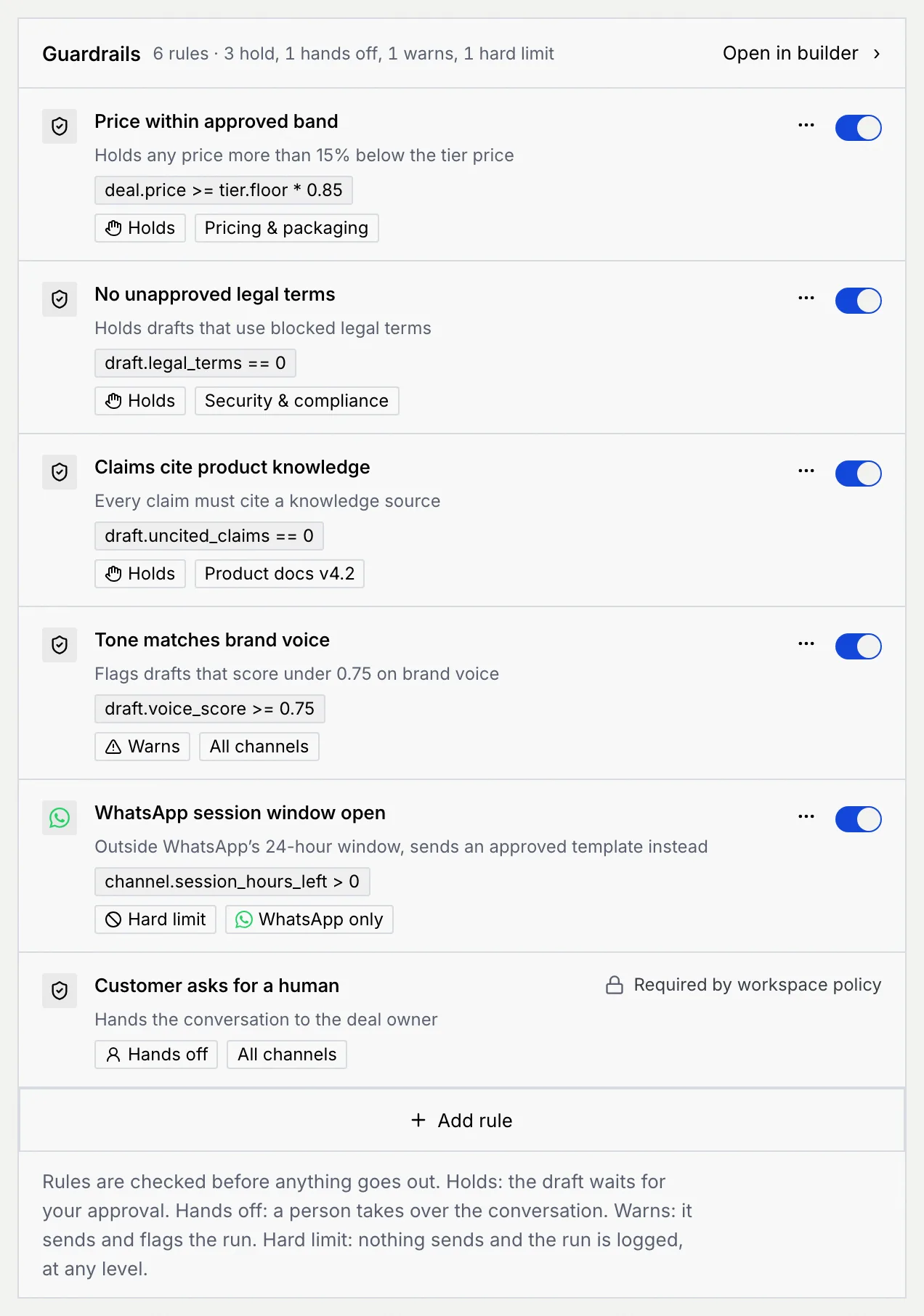
Each rule shows its name, what it does in plain words, its condition (such as deal.price >= tier.floor * 0.85), what happens when a draft fails it, and where it applies (All channels, one channel such as WhatsApp only, or a knowledge source such as Pricing & packaging). A rule that's turned off shows Off.
| Outcome | What happens when a draft fails |
|---|---|
| Holds | The draft waits for your approval. |
| Revises | It rewrites the draft and checks again, up to twice, then holds it. |
| Hands off | A person takes over the conversation. |
| Warns | It sends and flags the run. |
| Hard limit | Nothing sends and the run is logged, at any level. |
The last row, Customer asks for a human, hands the conversation to the deal owner on every channel. It's Required by workspace policy, so it can't be turned off or changed.
Turn a rule on or off
Use the switch on a rule's row. A message confirms it, with Undo: when a rule is off, drafts that break it are no longer stopped.
Add a rule
Choose how to start
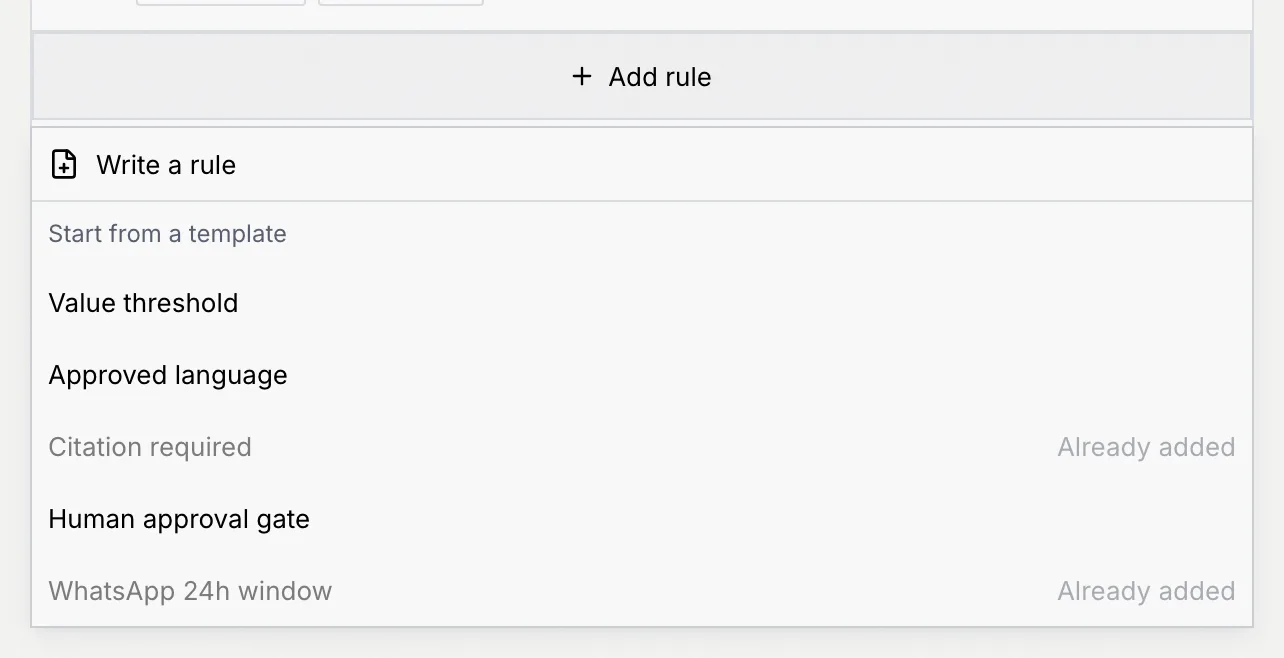
Click Add rule under the list, then:
- Write a rule to start from a blank rule, or
- a template under Start from a template: Value threshold, Approved language, Citation required, Human approval gate or WhatsApp 24h window. A template the agent already has shows Already added.
Name it
In Name, say what the rule checks, such as "Price within approved band" (3 to 80 characters, unique for this agent).
Write when it passes
In Passes when, write the condition a good draft meets, for example deal.price >= tier.floor * 0.85. Under the field, Mokanata reads it back in plain words ("Passes when the quoted price is at least the tier price × 0.85.") or shows what to fix.
Click Fields you can use to see the fields a rule can read, such as deal.price (the quoted price), deal.discount, draft.confidence or channel.session_hours_left. Click one to insert it where the cursor is.
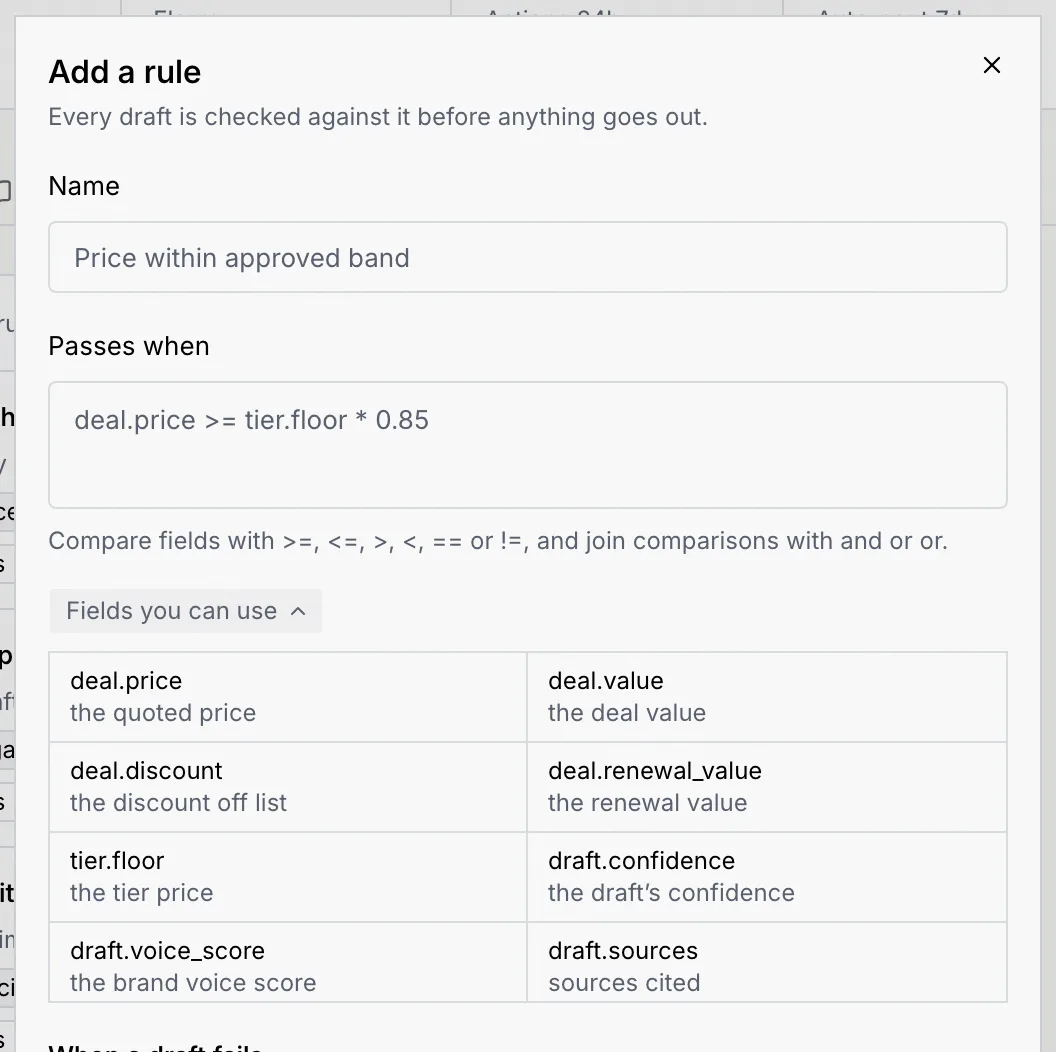
If the condition ends in a number, a Threshold field shows it on its own: change it there and the condition updates.
Decide what happens when a draft fails
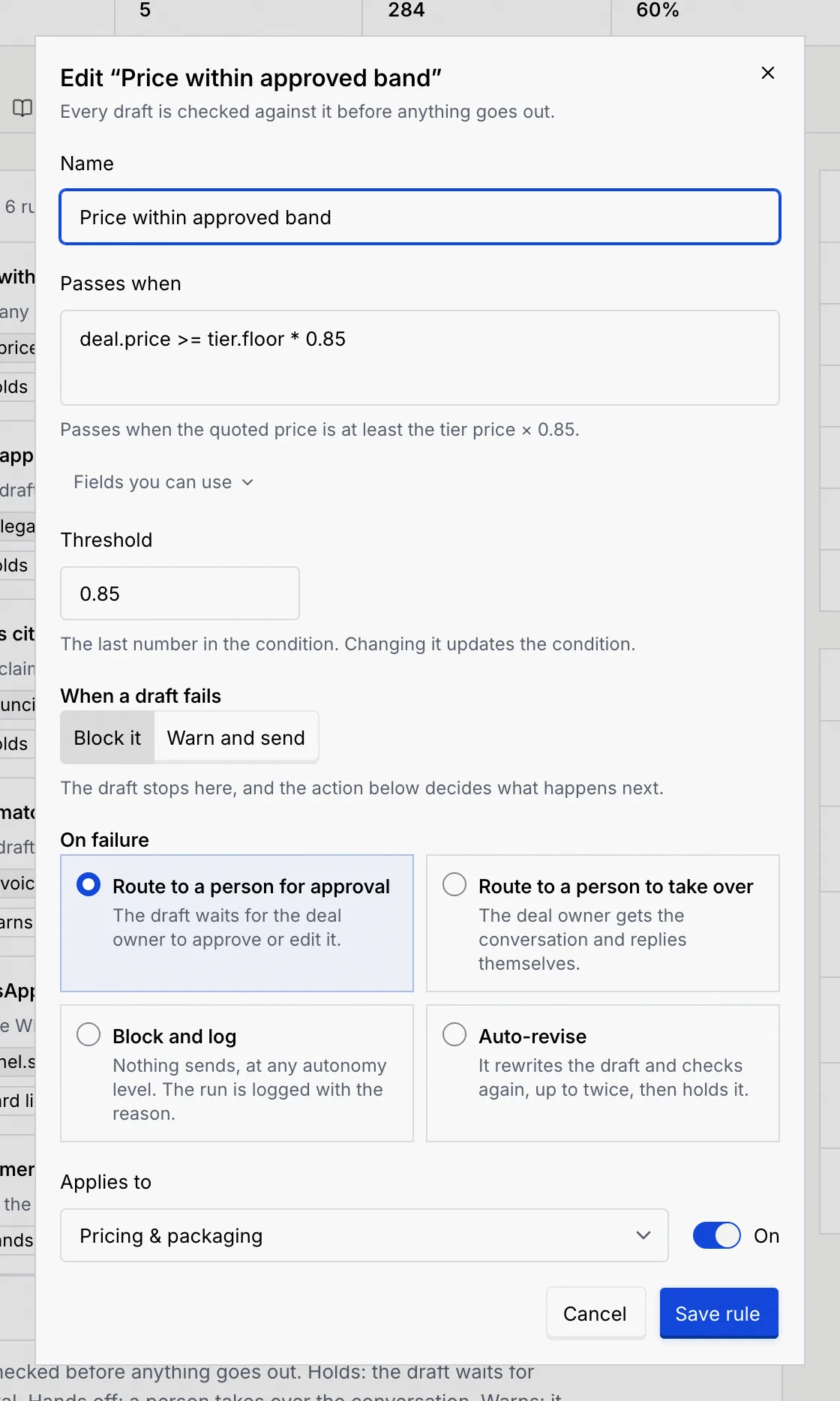
Under When a draft fails:
- Warn and send: the reply still sends, and the run is flagged for you to review.
- Block it: the draft stops, and On failure decides what happens next:
| On failure | What happens | Shown as |
|---|---|---|
| Route to a person for approval | The draft waits for the deal owner to approve or edit it. | Holds |
| Route to a person to take over | The deal owner gets the conversation and replies themselves. | Hands off |
| Block and log | Nothing sends, at any autonomy level. The run is logged with the reason. | Hard limit |
| Auto-revise | It rewrites the draft and checks again, up to twice, then holds it. | Revises |
Choose where it applies and save
In Applies to, choose All channels or one of the agent's channels. A rule that already applies to a knowledge source, such as Pricing & packaging, keeps that choice in the list. Leave On switched on to start checking right away. Click Add rule. The dialog for an existing rule looks the same, with Save rule in place of Add rule.
Edit or delete a rule
- To edit, click ⋯ on the rule, then Edit rule. Change anything and click Save rule.
- To delete, click ⋯, then Delete rule, and confirm with Delete rule. Drafts stop being checked against it right away. Flows that copied the rule into their own Guardrails step keep their copy until you edit them.
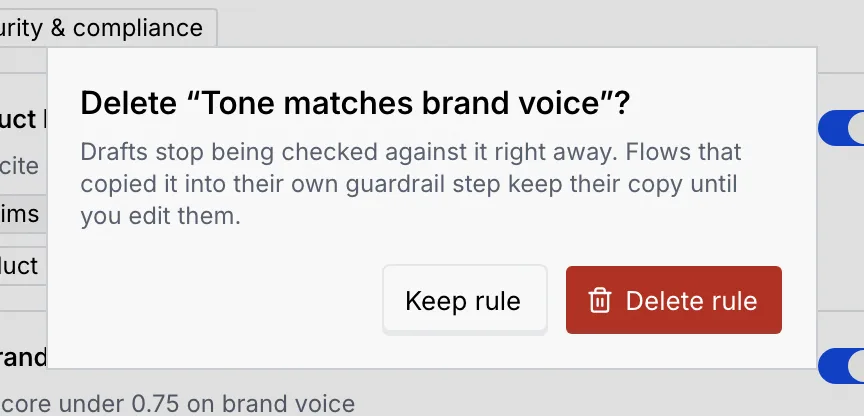
Each change shows a message with Undo.
Write conditions
A condition compares fields with >=, <=, >, <, == or !=, and joins comparisons with and or or. Use parentheses to group them and not before a comparison.
| Example | Passes when |
|---|---|
deal.price >= tier.floor * 0.85 | The quoted price is at least 85% of the tier price. |
deal.discount <= 0.15 | The discount is 15% or less. |
draft.uncited_claims == 0 | Every claim cites a source. |
channel.session_hours_left > 0 | The WhatsApp 24-hour window is still open. |
not reply.is_public | The reply isn't public. |
Write shares as decimals (15% is 0.15) and amounts as plain numbers (100000). Compare yes/no fields with true or false. If the condition can't be read, the error says what to fix:
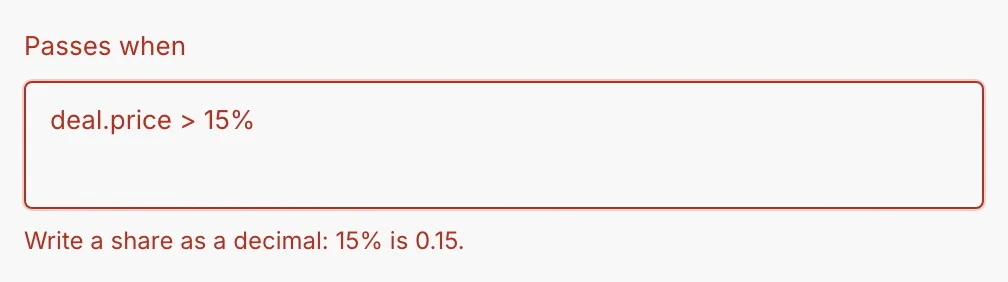
Other common messages are "Use == to compare two values." and "Close the parenthesis you opened." When a field name is misspelled, the error says it isn't a field rules can read and suggests the closest one.
Rules inside flows
A flow's Guardrails step checks drafts against these rules. To see or change that step, click Open in builder. See Conditions and paths for conditions that route a flow rather than check a draft.