# Guardrails and rules (/docs/agents/agent-guardrails)
Guardrails are rules an agent's drafts must pass before anything is sent, such as "the quoted price is within the approved band". Each rule is a condition plus what happens when a draft fails it. Rules apply at every autonomy level, Autonomous included.
- **Who can use it:** Everyone can read an agent's guardrails. Adding, editing, turning off and deleting rules need permission to edit agents (owners and admins by default). Without it, the switches are read-only, **Add rule** is disabled and rule menus are hidden. See [Roles and permissions](/docs/settings/roles).
- **Before you start:** Nothing.
## Read the rules [#read-the-rules]
On the agent's page, click the **Guardrails** tab. The panel title sums up what the rules that are on will do, such as "6 rules · 3 hold, 1 hands off, 1 warns, 1 hard limit". **Open in builder** opens the first flow with a Guardrails step.
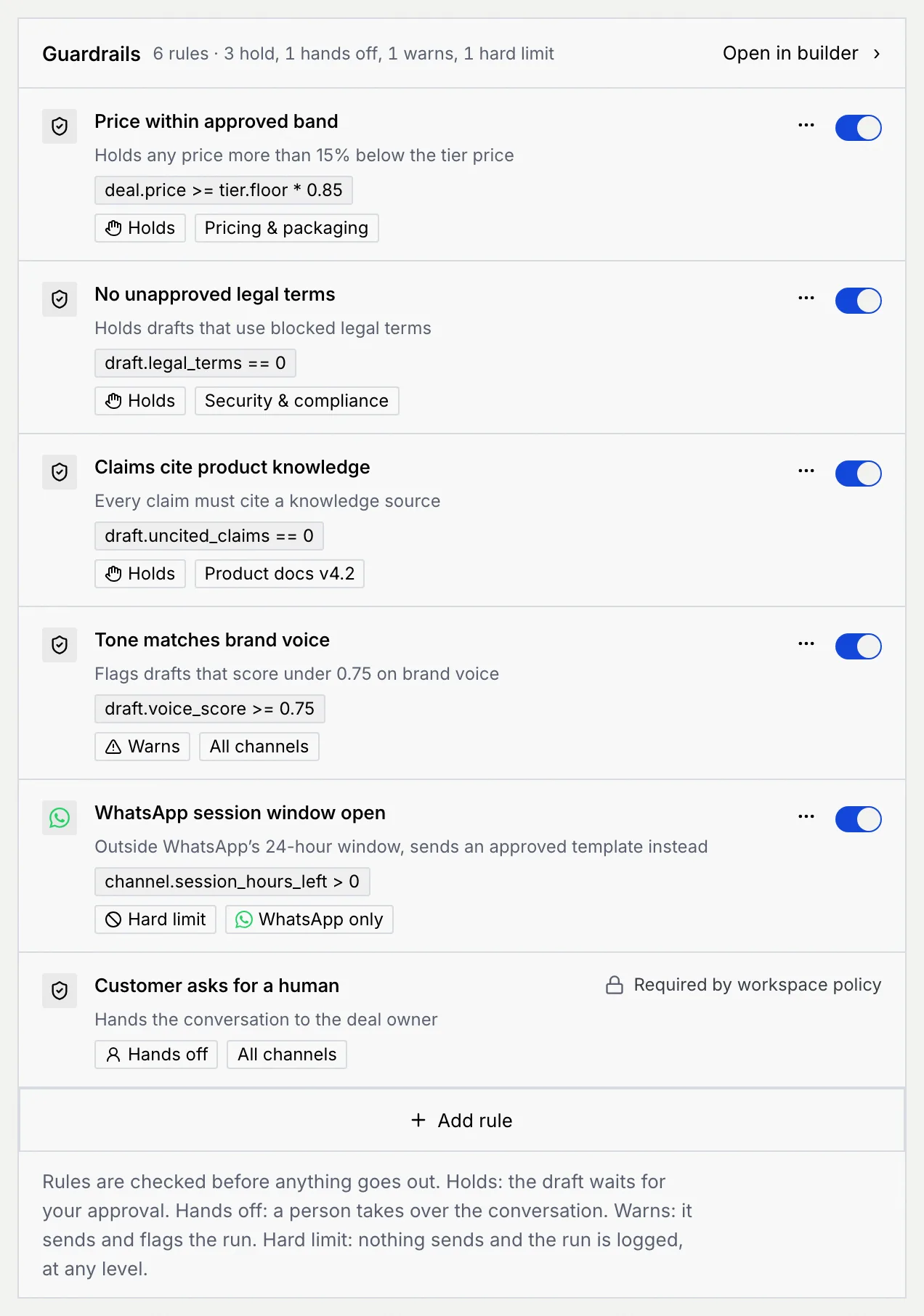
Each rule shows its name, what it does in plain words, its condition (such as `deal.price >= tier.floor * 0.85`), what happens when a draft fails it, and where it applies (**All channels**, one channel such as **WhatsApp only**, or a knowledge source such as **Pricing & packaging**). A rule that's turned off shows **Off**.
| Outcome | What happens when a draft fails |
| --- | --- |
| **Holds** | The draft waits for your approval. |
| **Revises** | It rewrites the draft and checks again, up to twice, then holds it. |
| **Hands off** | A person takes over the conversation. |
| **Warns** | It sends and flags the run. |
| **Hard limit** | Nothing sends and the run is logged, at any level. |
The last row, **Customer asks for a human**, hands the conversation to the deal owner on every channel. It's **Required by workspace policy**, so it can't be turned off or changed.
## Turn a rule on or off [#turn-a-rule-on-or-off]
Use the switch on a rule's row. A message confirms it, with **Undo**: when a rule is off, drafts that break it are no longer stopped.
## Add a rule [#add-a-rule]
### Choose how to start [#choose-how-to-start]
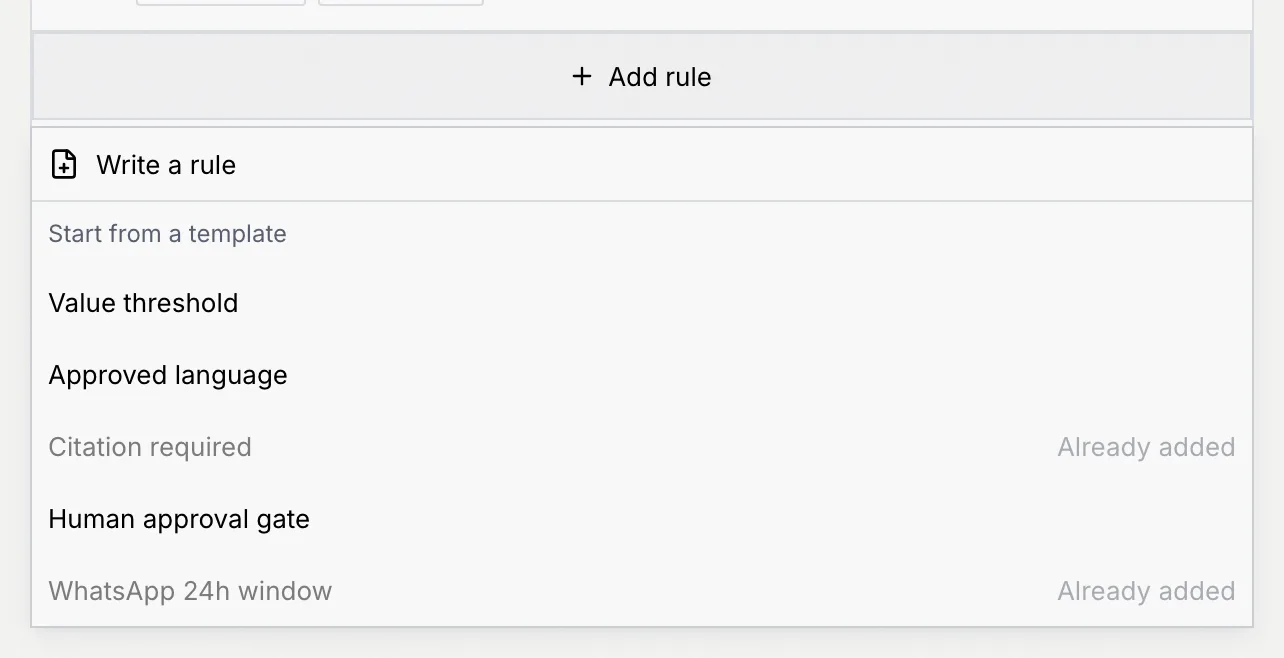
Click **Add rule** under the list, then:
- **Write a rule** to start from a blank rule, or
- a template under **Start from a template**: **Value threshold**, **Approved language**, **Citation required**, **Human approval gate** or **WhatsApp 24h window**. A template the agent already has shows **Already added**.
### Name it [#name-it]
In **Name**, say what the rule checks, such as "Price within approved band" (3 to 80 characters, unique for this agent).
### Write when it passes [#write-when-it-passes]
In **Passes when**, write the condition a good draft meets, for example `deal.price >= tier.floor * 0.85`. Under the field, Mokanata reads it back in plain words ("Passes when the quoted price is at least the tier price × 0.85.") or shows what to fix.
Click **Fields you can use** to see the fields a rule can read, such as `deal.price` (the quoted price), `deal.discount`, `draft.confidence` or `channel.session_hours_left`. Click one to insert it where the cursor is.
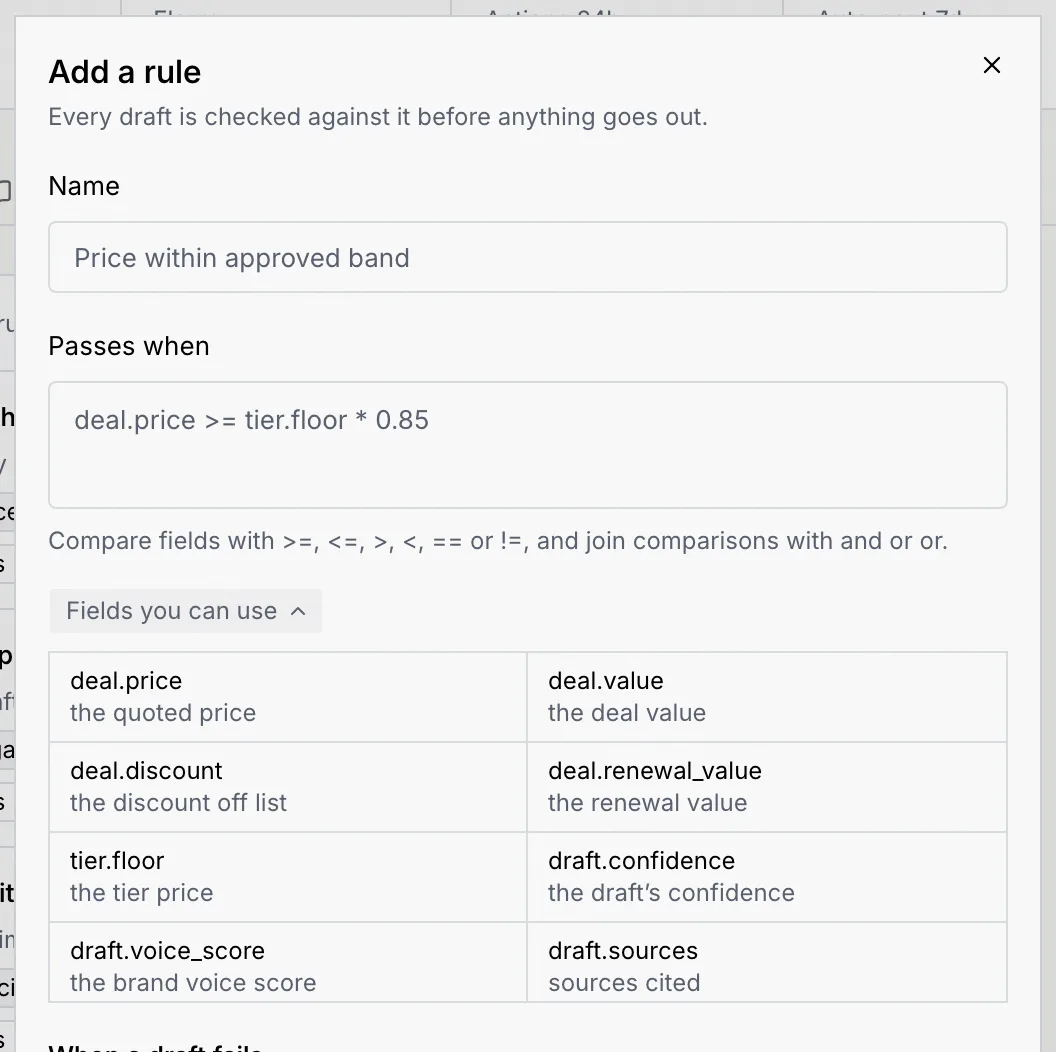
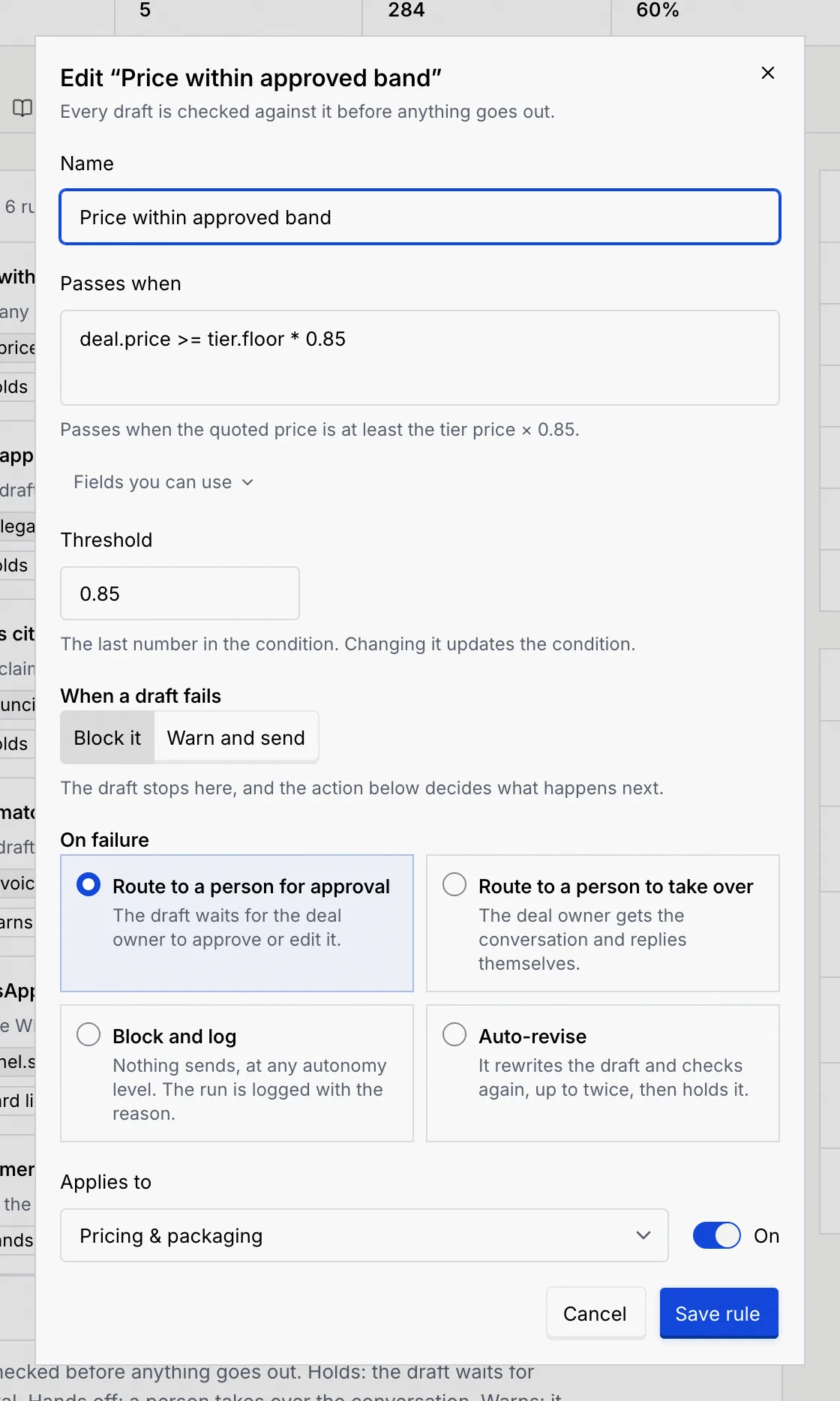
If the condition ends in a number, a **Threshold** field shows it on its own: change it there and the condition updates.
### Decide what happens when a draft fails [#decide-what-happens-when-a-draft-fails]
Under **When a draft fails**:
- **Warn and send:** the reply still sends, and the run is flagged for you to review.
- **Block it:** the draft stops, and **On failure** decides what happens next:
| On failure | What happens | Shown as |
| --- | --- | --- |
| **Route to a person for approval** | The draft waits for the deal owner to approve or edit it. | **Holds** |
| **Route to a person to take over** | The deal owner gets the conversation and replies themselves. | **Hands off** |
| **Block and log** | Nothing sends, at any autonomy level. The run is logged with the reason. | **Hard limit** |
| **Auto-revise** | It rewrites the draft and checks again, up to twice, then holds it. | **Revises** |
### Choose where it applies and save [#choose-where-it-applies-and-save]
In **Applies to**, choose **All channels** or one of the agent's channels. A rule that already applies to a knowledge source, such as **Pricing & packaging**, keeps that choice in the list. Leave **On** switched on to start checking right away. Click **Add rule**. The dialog for an existing rule looks the same, with **Save rule** in place of **Add rule**.
## Edit or delete a rule [#edit-or-delete-a-rule]
- To edit, click **⋯** on the rule, then **Edit rule**. Change anything and click **Save rule**.
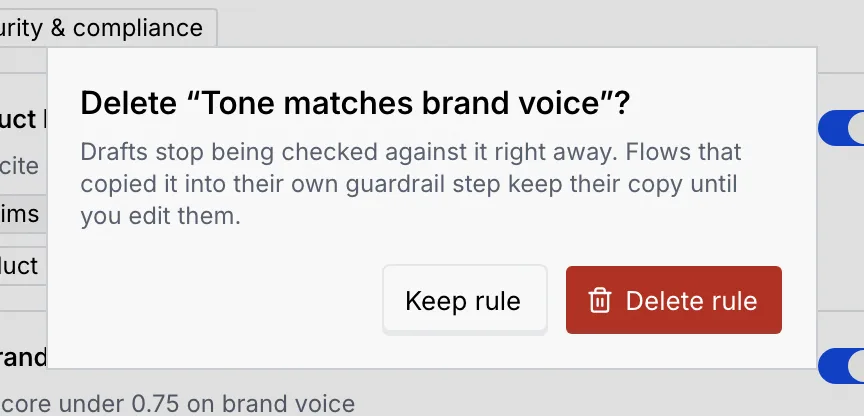
- To delete, click **⋯**, then **Delete rule**, and confirm with **Delete rule**. Drafts stop being checked against it right away. Flows that copied the rule into their own Guardrails step keep their copy until you edit them.
Each change shows a message with **Undo**.
## Write conditions [#write-conditions]
A condition compares fields with `>=`, `<=`, `>`, `<`, `==` or `!=`, and joins comparisons with `and` or `or`. Use parentheses to group them and `not` before a comparison.
| Example | Passes when |
| --- | --- |
| `deal.price >= tier.floor * 0.85` | The quoted price is at least 85% of the tier price. |
| `deal.discount <= 0.15` | The discount is 15% or less. |
| `draft.uncited_claims == 0` | Every claim cites a source. |
| `channel.session_hours_left > 0` | The WhatsApp 24-hour window is still open. |
| `not reply.is_public` | The reply isn't public. |
Write shares as decimals (15% is `0.15`) and amounts as plain numbers (`100000`). Compare yes/no fields with `true` or `false`. If the condition can't be read, the error says what to fix:
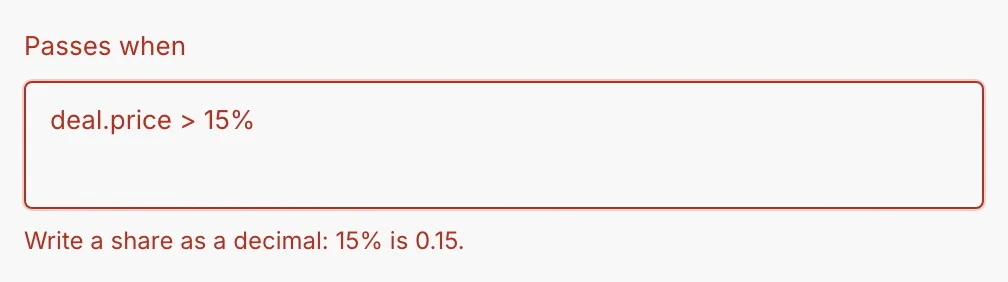
Other common messages are "Use == to compare two values." and "Close the parenthesis you opened." When a field name is misspelled, the error says it isn't a field rules can read and suggests the closest one.
A flow's **Guardrails** step checks drafts against these rules. To see or change that step, click **Open in builder**. See [Conditions and paths](/docs/agents/flow-conditions) for conditions that route a flow rather than check a draft.
## Next steps [#next-steps]