Team and AI agent reports
Compare AI agents and teammates on resolution, handoffs, draft approvals, workload, CSAT and the revenue each side closes.
The Team and agents tab of Reports puts your AI agents and your people side by side: how much each handles, how often agents finish the job or hand off and why, how customers rate both, and who closes the revenue. Use it to decide where an agent needs better knowledge or rules, and where your team needs more hands.
- Who can use it: Everyone in the workspace can open this report. Downloading a chart or its data needs Export reports (owners and admins by default); see Tables and exports.
- Before you start: At least one AI agent working on your conversations. To pick dates and read the headline numbers, see Reports.
Open the Team and agents report
Go to the Team and agents tab
In the sidebar, click Reports, then the Team and agents tab. Set the dates with the date button at the top right.
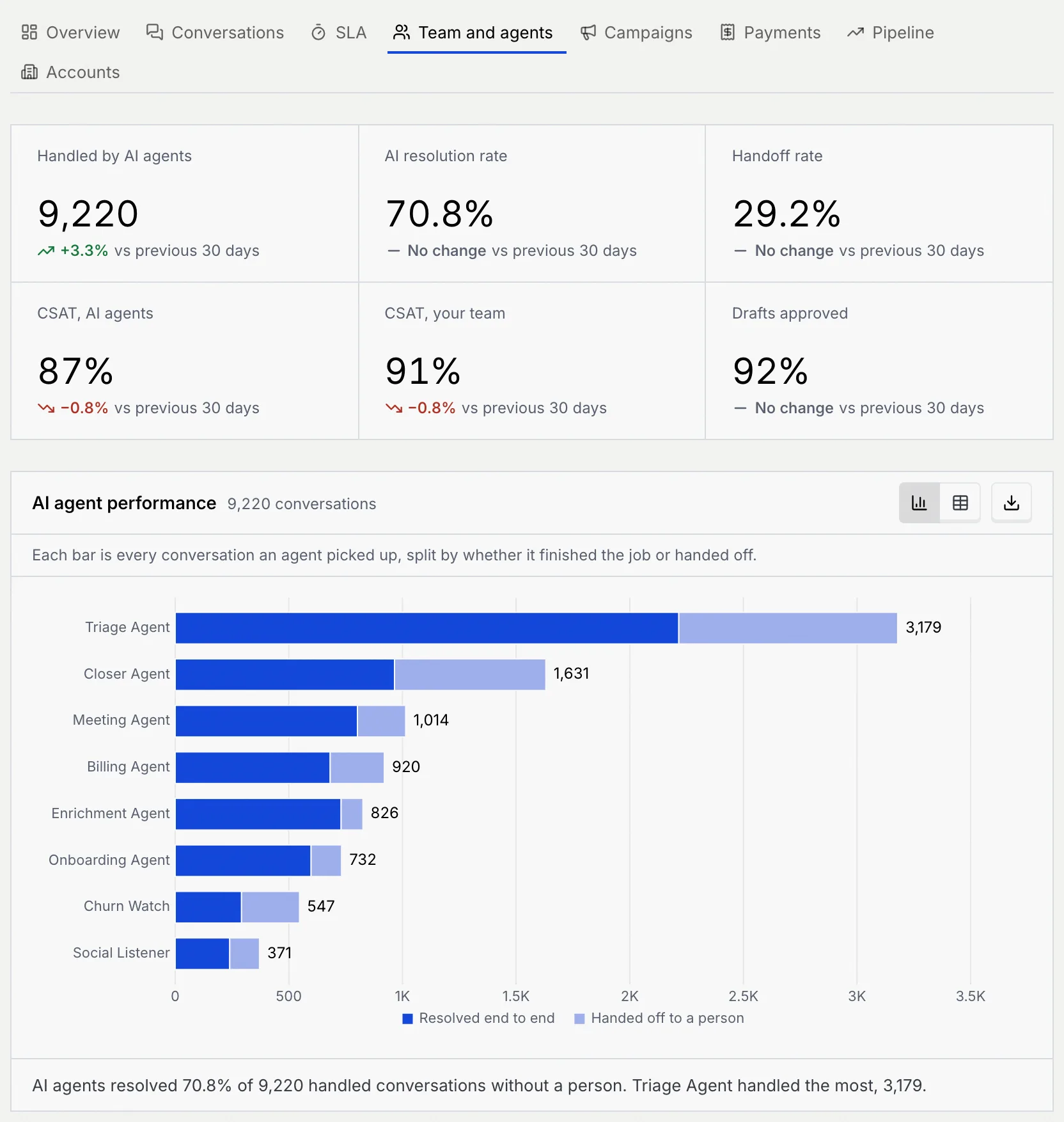
| Key number | What it counts |
|---|---|
| Handled by AI agents | Conversations an AI agent picked up in the range |
| AI resolution rate | Of those, the share an agent resolved without handing off |
| Handoff rate | The share an agent handed to a person. Lower is better. |
| CSAT, AI agents | The share of post-conversation survey answers rating 4 or 5 out of 5, for conversations an AI agent handled |
| CSAT, your team | The same for conversations your teammates handled |
| Drafts approved | The share of agent drafts that went out, as written or after edits |
Read the AI agent charts
| Chart | What it shows | How to read it |
|---|---|---|
| AI agent performance | A bar per AI agent, busiest first: every conversation it picked up, split into Resolved end to end and Handed off to a person | A long light part means the agent hands off a lot. The table adds each agent's resolution rate, CSAT, average handle time and Revenue influenced. |
| AI resolution rate over time | All AI agents together, per period: resolved conversations divided by handled ones, against a 70% target | Points under the dashed line fell short; the summary counts how many periods did. The table adds the three busiest agents' own rates. |
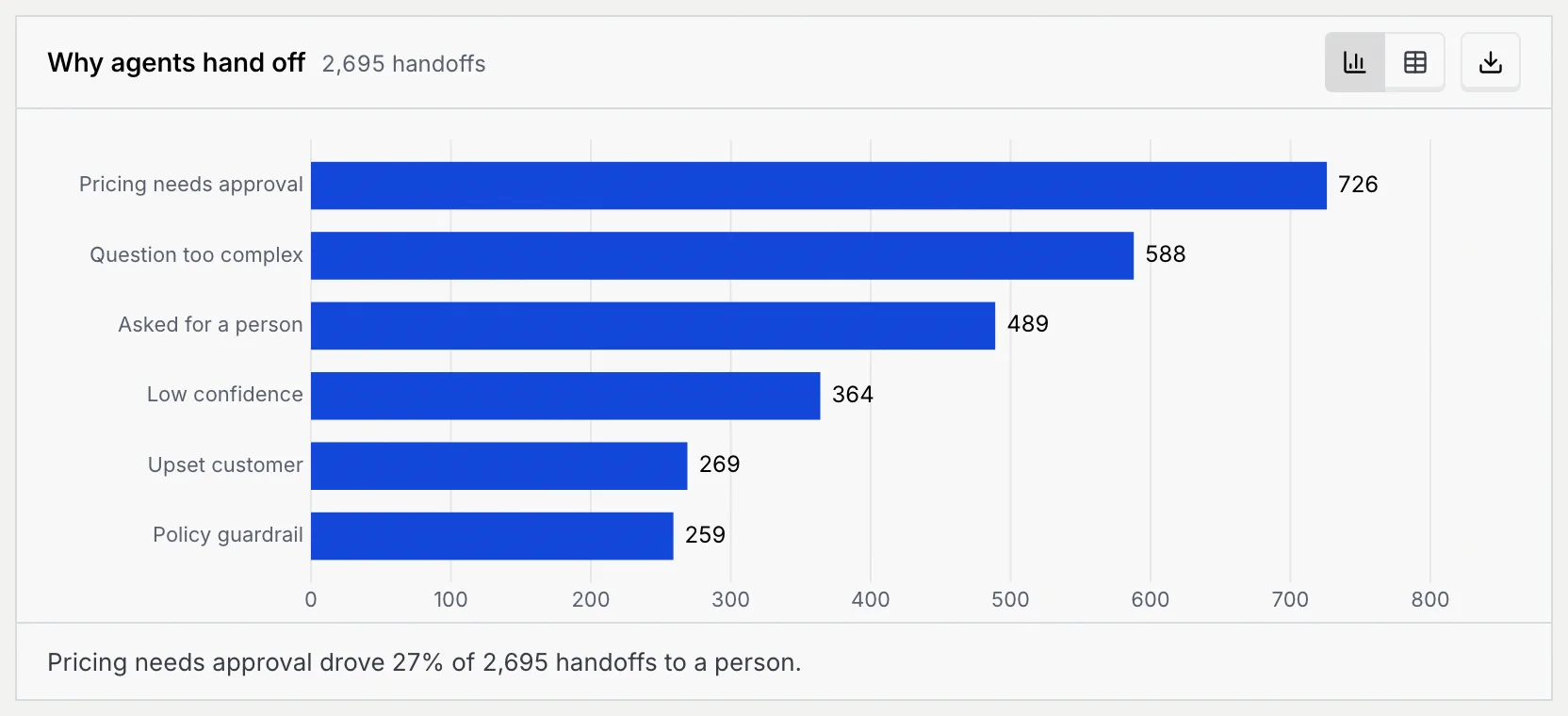
| Why agents hand off | Handoffs to a person by reason: Pricing needs approval, Question too complex, Asked for a person, Low confidence, Upset customer and Policy guardrail | The longest bar is the first thing to fix, for example by adding knowledge sources or adjusting guardrails. The table adds each reason's share. |
| Draft approvals | A bar per AI agent: replies it drafted for a person to review, split into Approved as is, Edited before sending and Rejected | A large red part means the agent's drafts often miss; the summary names the agent with the highest rejection rate. The table adds drafts reviewed and the share approved. |
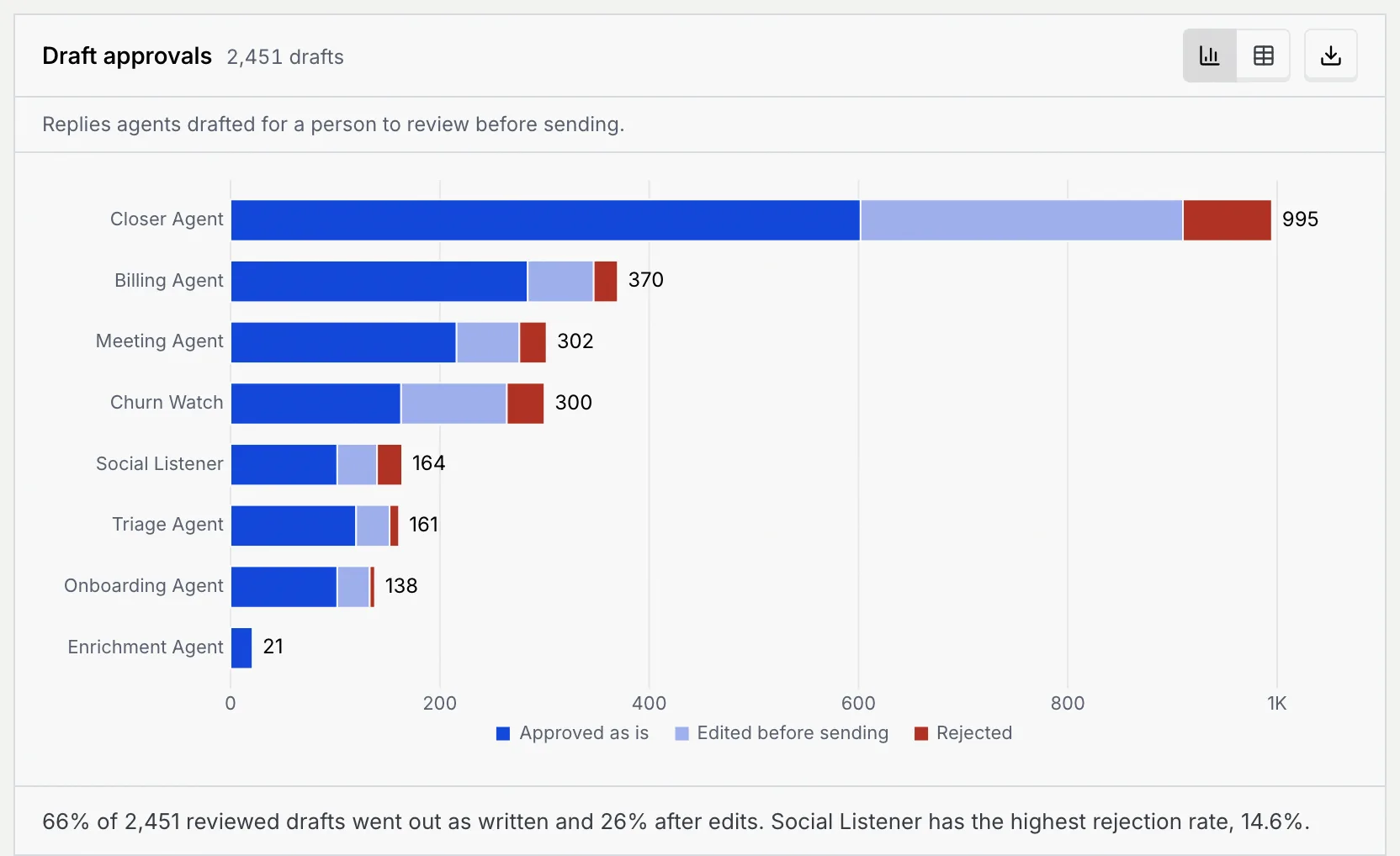
Drafts come from agents that ask for approval before sending; you review them in the approval queue.
Read the team charts
| Chart | What it shows | How to read it |
|---|---|---|
| Teammate performance | A bar per teammate, busiest first: conversations assigned to them, split into Resolved and Still open | The summary names who replies fastest. The table adds each teammate's median first response, CSAT, average handle time and Revenue closed. |
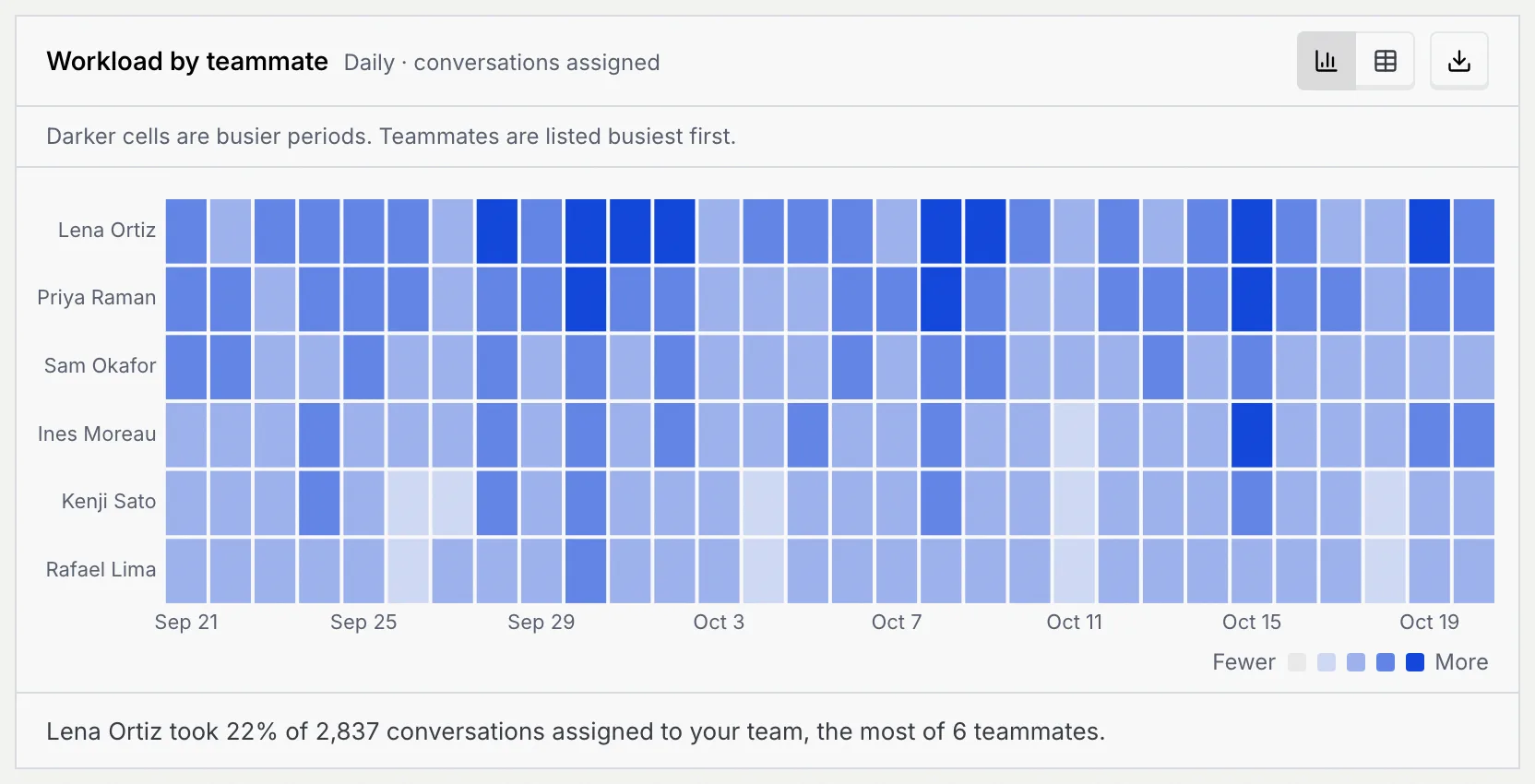
| Workload by teammate | A grid of teammates by period: conversations assigned in each period | Darker cells are busier periods; teammates are listed busiest first. Uneven rows show who carries the load. |
| CSAT: AI agents vs your team | Two lines per period: the share of survey answers rating 4 or 5 out of 5, for AI agents and Your team | The summary gives each side's overall CSAT and the gap between them. |
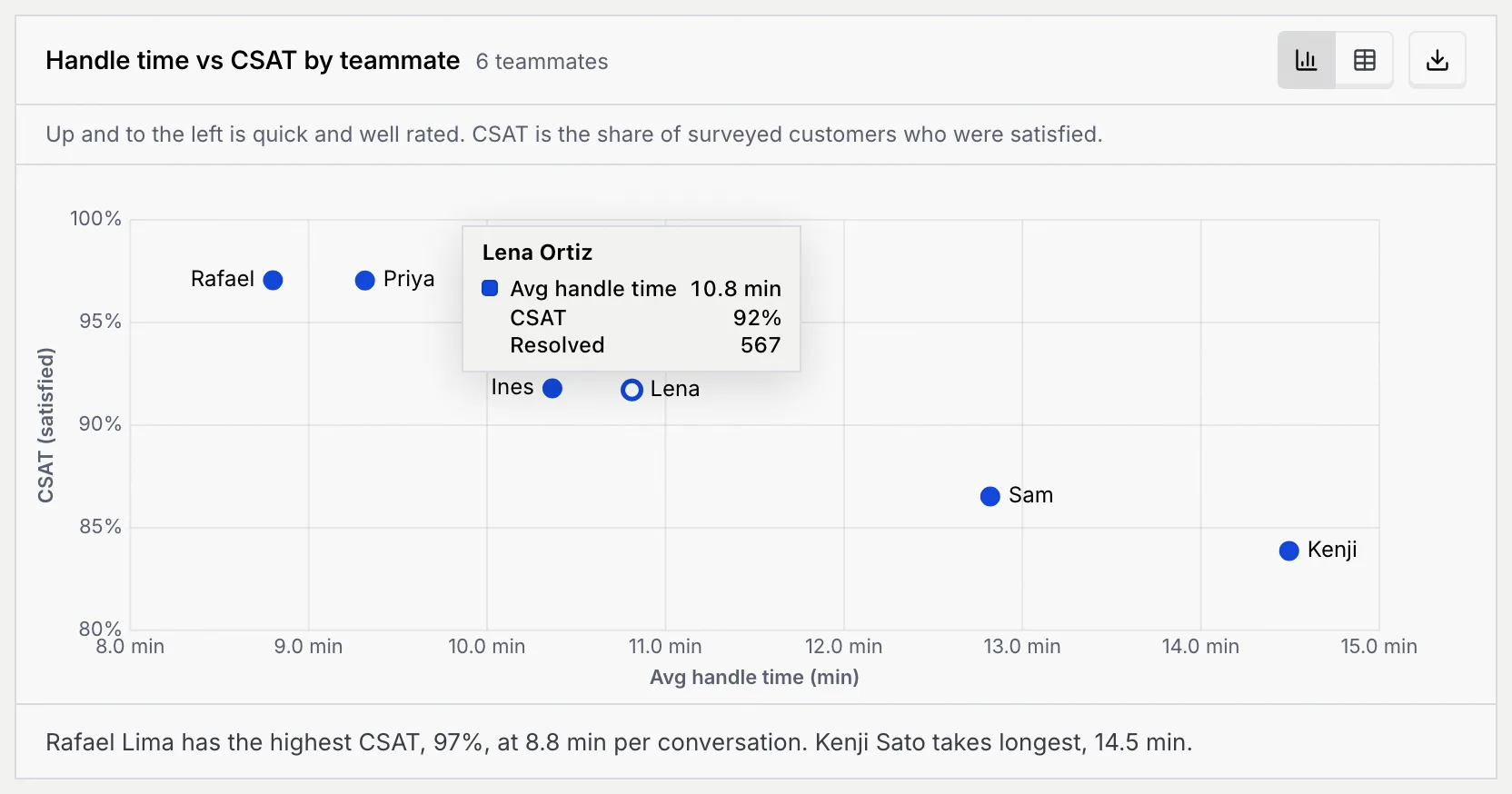
| Handle time vs CSAT by teammate | A dot per teammate: average handle time across, CSAT up | Up and to the left is quick and well rated; down and to the right is slow and less well rated. |
| Revenue closed: AI agents vs your team | Revenue per period, stacked by who closed the sale: AI agents and Your team | The summary gives each side's total and the AI agents' share. |
Point at a dot on Handle time vs CSAT by teammate to see that teammate's average handle time, CSAT and resolved conversations.
Troubleshooting
They divide by different things. AI resolution rate is resolved conversations out of every conversation an AI agent picked up. The Overview's Automation rate is the share of all resolved conversations that an AI agent handled from start to finish.
Drafts approved counts drafts that went out as written or after edits; Draft approvals splits the two apart.