Catalog and link defaults
Add the products you sell in payment links, and set the currency, expiry and tax new links start with.
The Catalog tab holds the products you can add to a payment request. The Link defaults tab sets what every new link starts with: its currency, how long it stays open and the tax on rupiah orders.
- Who can use it: Everyone can see the catalog and the defaults. Adding products and choosing which are offered needs Manage the product catalog; changing the defaults needs Manage gateways. Both are for owners and admins by default. Anyone else sees a View only notice on the tab, with its controls disabled. See Roles and permissions.
- Before you start: Nothing.
Add a product to the catalog
Open the Catalog tab
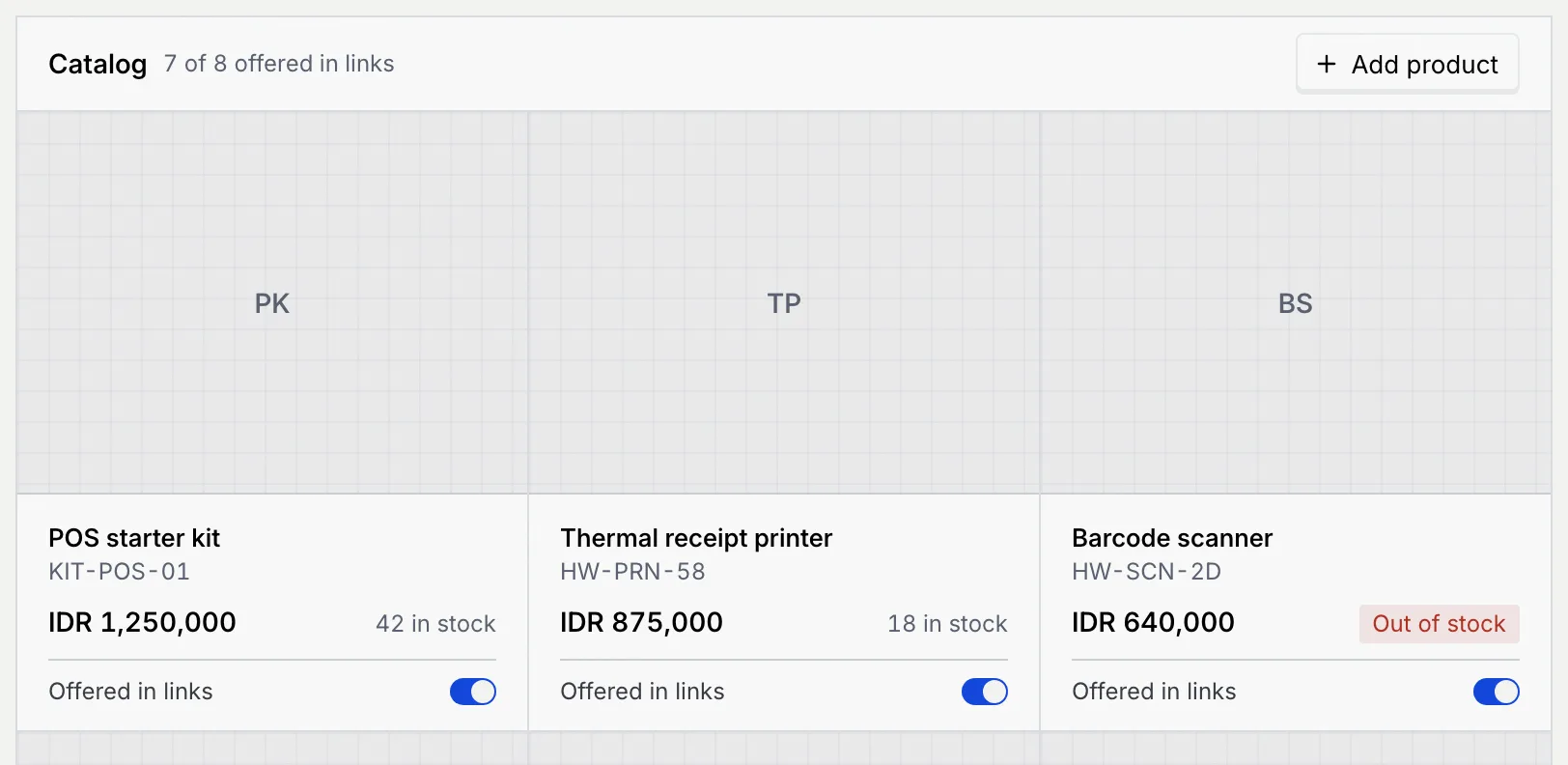
On Payments, click Catalog. Each product shows its name, SKU, price, stock (N in stock, Unlimited or Out of stock) and whether it's Offered in links. The count at the top says how many products are offered.
Fill in the product
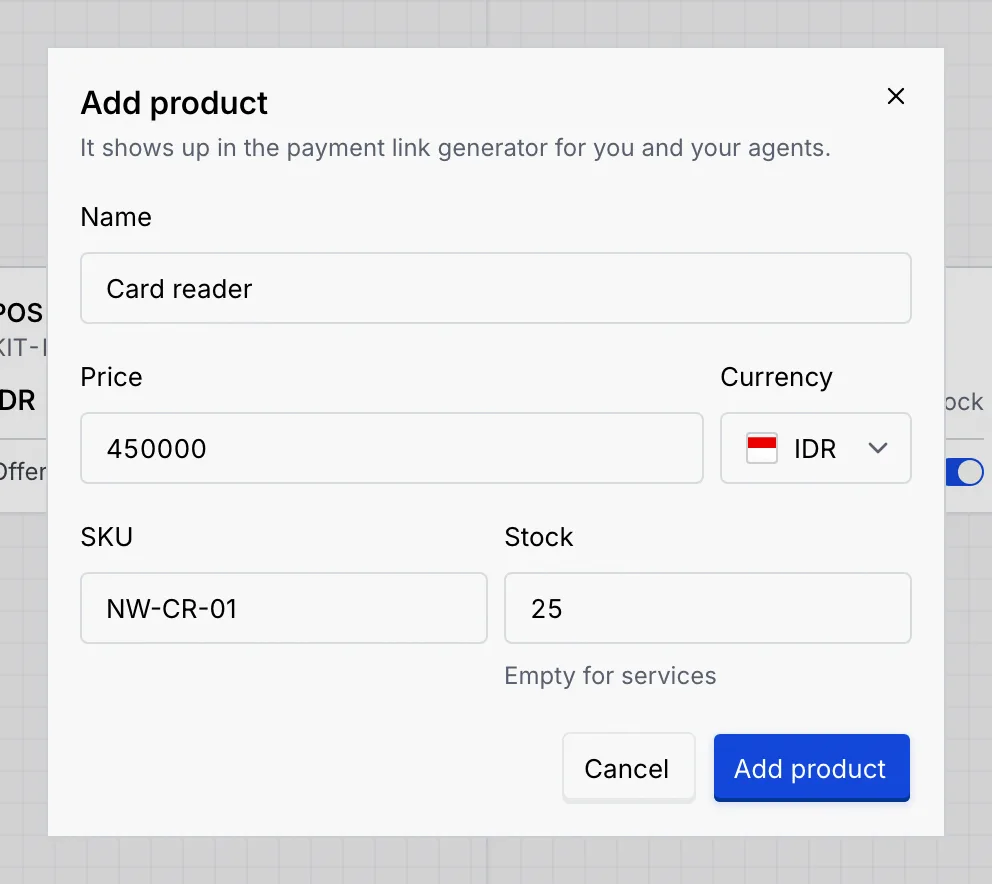
Click Add product and fill in:
- Name of the product, as customers see it.
- Price and its Currency (IDR, USD, SGD or MYR). Rupiah prices are whole numbers; other currencies take up to 2 decimals.
- SKU (optional), so you can find it by code.
- Stock: how many you have, or leave it empty for services and anything unlimited. Payment requests can't add more than the stock.
Add it
Click Add product. It shows up in the catalog and in the payment request builder.
Choose which products are offered
Turn Offered in links off to keep a product in the catalog but leave it out of new payment requests (for example something you've stopped selling for now). Turn it back on any time. A product only shows in a payment request whose currency matches its price.
Set the link defaults
Open Link defaults
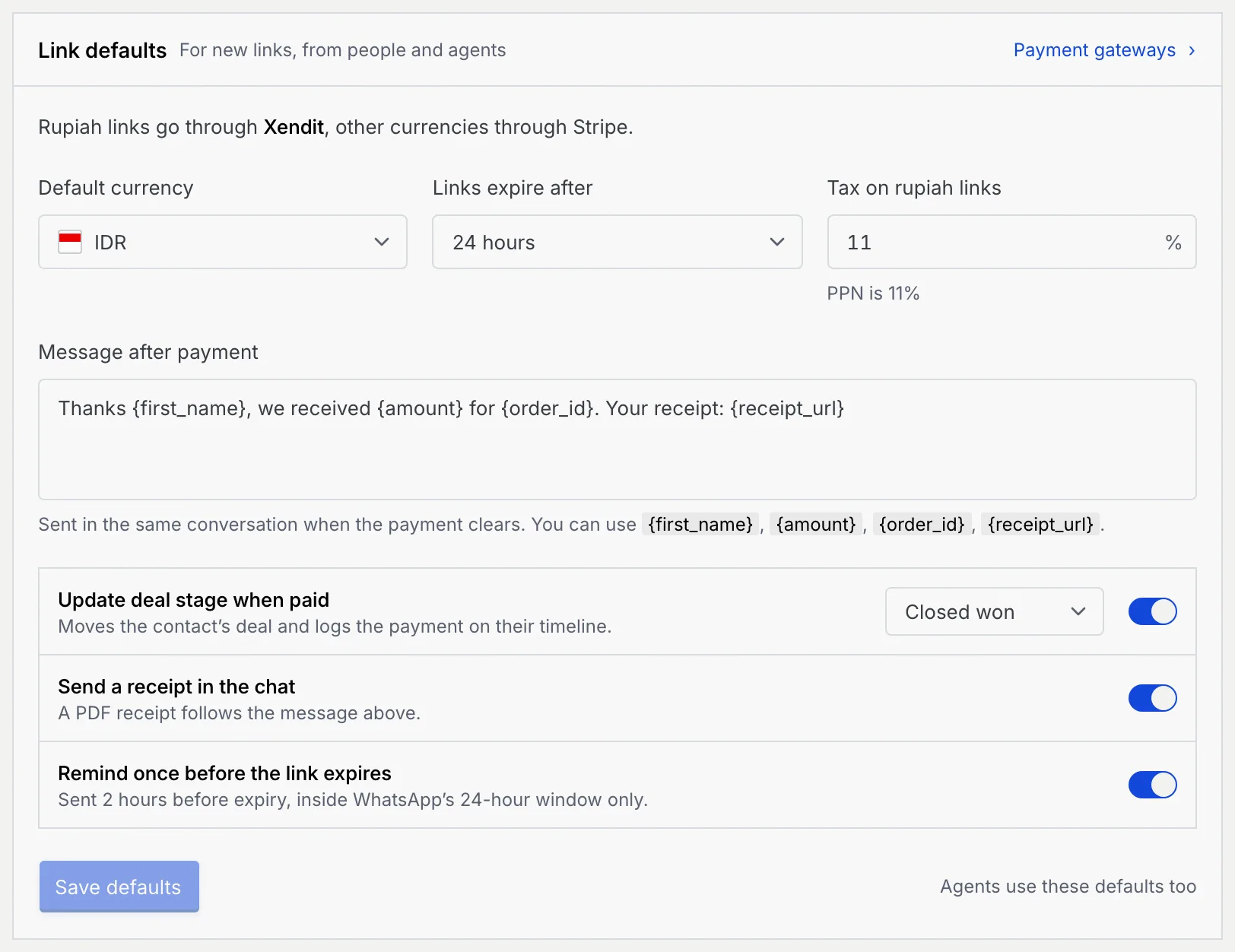
On Payments, click Link defaults. The panel says which gateway online payment links would go through; payment gateways are coming soon, so today you take payments as a QRIS. Payment gateways opens Payment gateways and QRIS.
Change what you need
| Setting | What it does |
|---|---|
| Default currency | The currency new payment requests start in. |
| Links expire after | How long a new link stays payable: 1 hour, 24 hours, 3 days, 7 days or 30 days. Resending an expired link gives it this long again. |
| Tax on rupiah links | The tax rate added to rupiah orders, between 0 and 50% with up to 2 decimals. PPN is 11%. Links in other currencies aren't taxed. |
| Message after payment | The thank-you meant for the conversation once a link is paid. Use {first_name}, {amount}, {order_id} and {receipt_url} for the customer's name, the amount, the order and a link to the receipt. Up to 500 characters. |
| Update deal stage when paid | The stage (Negotiation or Closed won) a paid link is meant to move the contact's deal to. |
| Send a receipt in the chat | Meant to send a PDF receipt after the message above. |
| Remind once before the link expires | Meant to send one reminder 2 hours before the link expires. |
Saved, not acted on yet
Mokanata saves Message after payment, Update deal stage when paid, Send a receipt in the chat and Remind once before the link expires, but doesn't act on them yet: marking a link paid sends no message, receipt or reminder and doesn't move the deal.
Save
The panel says Unsaved changes until you save. Click Save defaults, or Discard changes to put everything back. New links use the new defaults; links already sent don't change. If you leave the page with unsaved changes, Mokanata asks first.
What other roles see
Members and viewers can see the catalog but not add products or switch them on and off:

On Link defaults, a role without Manage gateways sees the defaults new links start with, and a notice that changing them comes with managing gateways.
Troubleshooting
Check that Offered in links is on, that the payment request's currency matches the product's price, and that it isn't out of stock.
Enter a rate between 0 and 50. or Use at most 2 decimals.: fix the tax rate. Write a short thank-you, so customers know the payment went through.: the message can't be empty. Keep it under 500 characters.: shorten it.
Name the product.: type a name. Enter a price above zero.: type a price. Whole number, or leave empty.: the stock must be a whole number.
Next steps
Manage payment links
Open a payment link to read its items and timeline, then copy its details, resend it, mark it paid, record a refund or cancel it.
Payment gateways and QRIS
Turn your static QRIS into a QRIS with each order's total filled in. Payment gateways for online payment links are coming soon.