# Campaign and payment reports (/docs/reports/revenue-reports)
The **Campaigns** and **Payments** tabs of Reports follow the money. Campaigns shows how your broadcasts are delivered, read and answered, why messages fail and what each campaign earns. Payments shows what you collected, how payment links convert, how long customers take to pay and where payments fail.
- **Who can use it:** Everyone in the workspace can open these reports. Downloading a chart or its data needs **Export reports** (owners and admins by default); see [Tables and exports](/docs/reports/report-exports#who-can-export).
- **Before you start:** The Campaigns tab fills in once you [send a campaign](/docs/campaigns/create-campaign); the Payments tab once customers pay what you [send them](/docs/payments/create-payment-link) (payments through a [payment gateway](/docs/payments/payment-gateways) are coming soon). To pick dates, see [Reports](/docs/reports/reports#pick-a-date-range).
## Open the Campaigns report [#open-the-campaigns-report]
### Go to the Campaigns tab [#go-to-the-campaigns-tab]
In the sidebar, click **Reports**, then the **Campaigns** tab. Set the dates with the date button at the top right. The numbers cover every campaign that sent in the range; for one campaign's own results, open it from [Campaigns](/docs/campaigns/campaign-results).
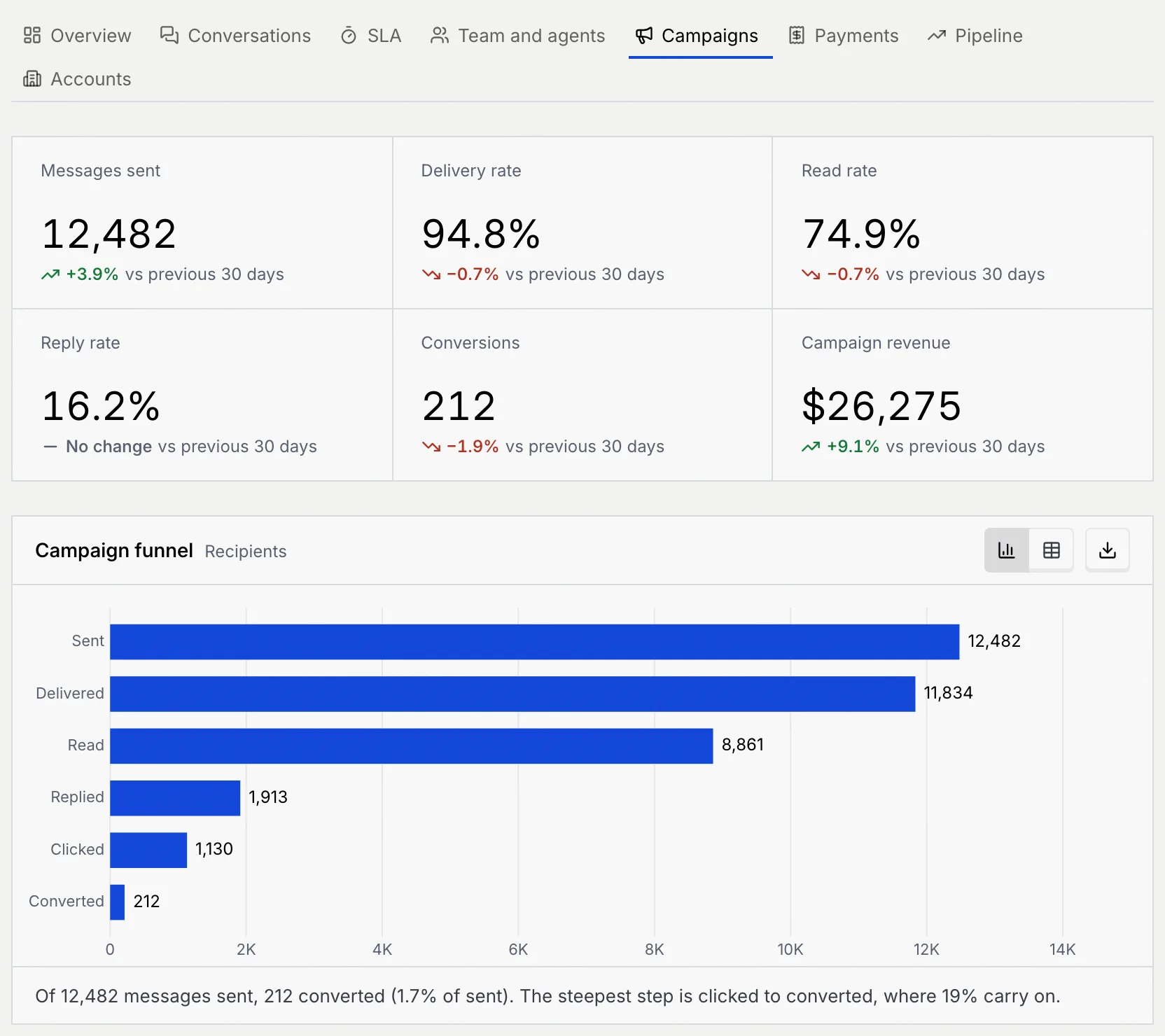
| Key number | What it counts |
|---|---|
| **Messages sent** | Campaign messages sent in the range |
| **Delivery rate** | Delivered messages out of those sent |
| **Read rate** | Read messages out of those delivered |
| **Reply rate** | Messages that got a reply, out of those delivered |
| **Conversions** | Recipients who converted after a campaign: the sales its revenue comes from |
| **Campaign revenue** | Revenue from those conversions, in your workspace currency. It matches the **Campaigns** bar in the Overview's **Revenue by source**. |
## Read the Campaigns report [#read-the-campaigns-report]
| Chart | What it shows | How to read it |
|---|---|---|
| **Campaign funnel** | Recipients at each step: **Sent**, **Delivered**, **Read**, **Replied**, **Clicked**, **Converted** | The summary names the steepest step, where the fewest carry on. The table adds each step's share of the step before and of everyone sent. |
| **Messages sent over time** | Messages sent per period, split into **Delivered** and **Failed** | Tall bars are the days your campaigns went out; red tops are failures. The table adds the delivery rate per period. |
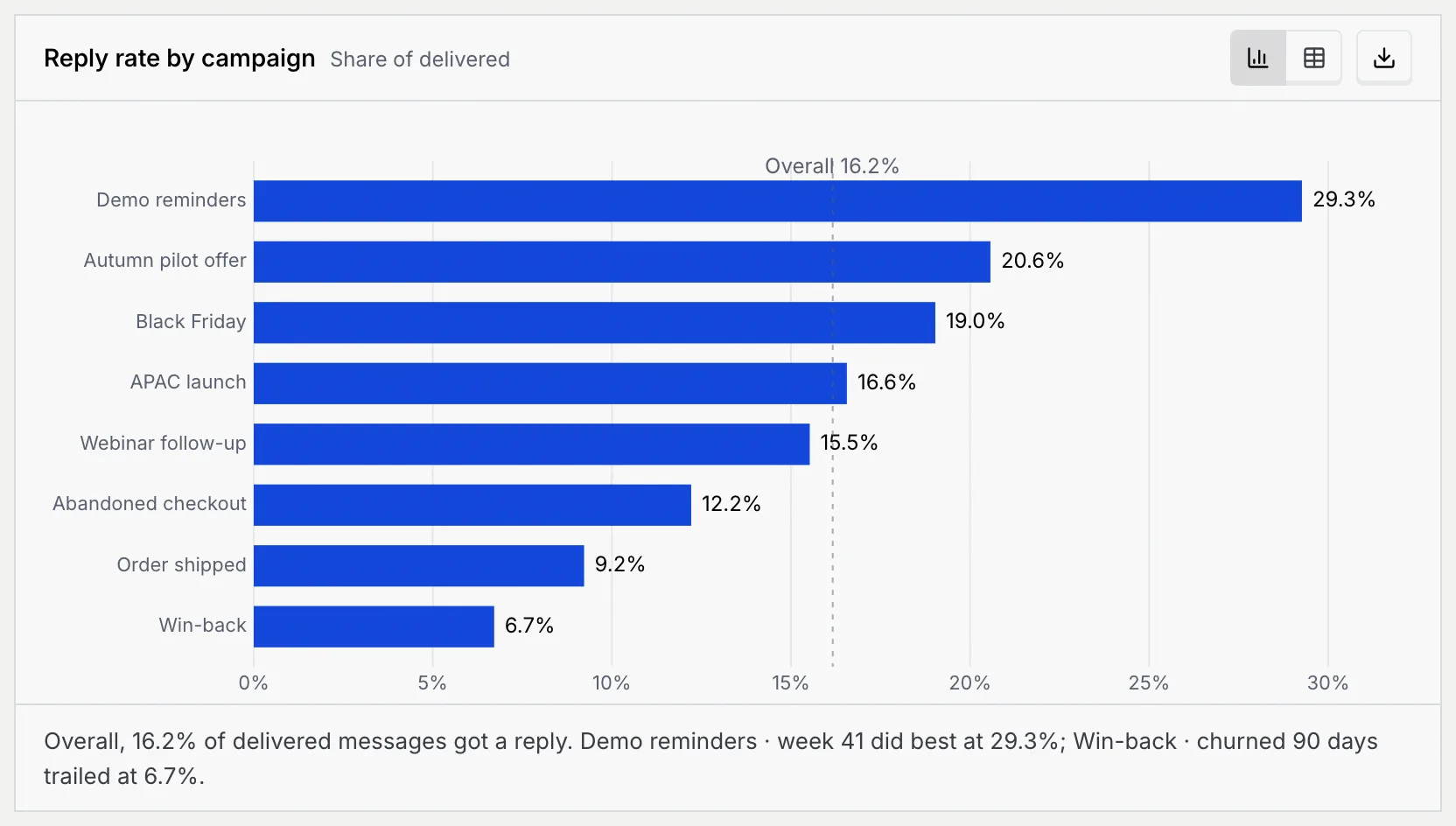
| **Reply rate by campaign** | The share of each campaign's delivered messages that got a reply, best first | The dashed line is your overall reply rate. The table adds sent, delivered, read rate and replies per campaign. |
| **Revenue by campaign** | Revenue from each campaign's conversions, highest first | A campaign at zero sent messages but sold nothing, such as a shipping notice. The table adds conversions and **Revenue per delivered** message. |
| **Delivery, read and reply rates over time** | Three lines per period: **Delivered of sent**, **Read of delivered** and **Replied of delivered** | A dip in the top line means more failures that day; the summary gives the range of reply rates. |
| **Replies after send** | Replies grouped by how long after the send they came, from 0–1 h to 3+ days | Most replies arrive in the first hours. The table adds **Replied by then**, the running share. |
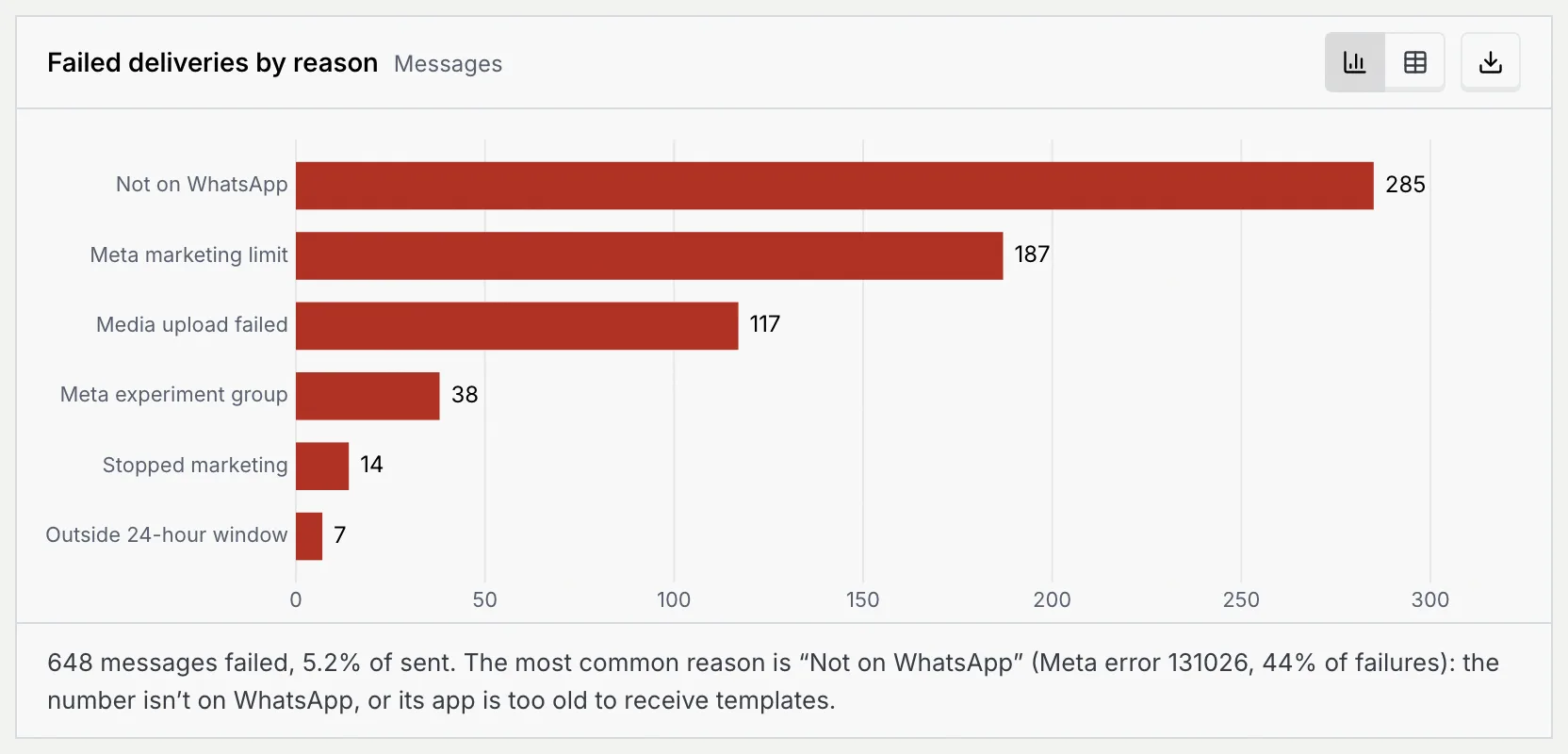
| **Failed deliveries by reason** | Failed messages by the reason WhatsApp gave: **Not on WhatsApp**, **Meta marketing limit**, **Media upload failed**, **Meta experiment group**, **Stopped marketing** and **Outside 24-hour window** | The table adds each reason's Meta error code and what it means, as listed below. |
| **Opt-outs and blocks** | People who opted out per period, split into **Opted out only** and **Opted out and blocked** | Mokanata doesn’t record opt-outs yet, so outside the sample workspace this stays at zero. |
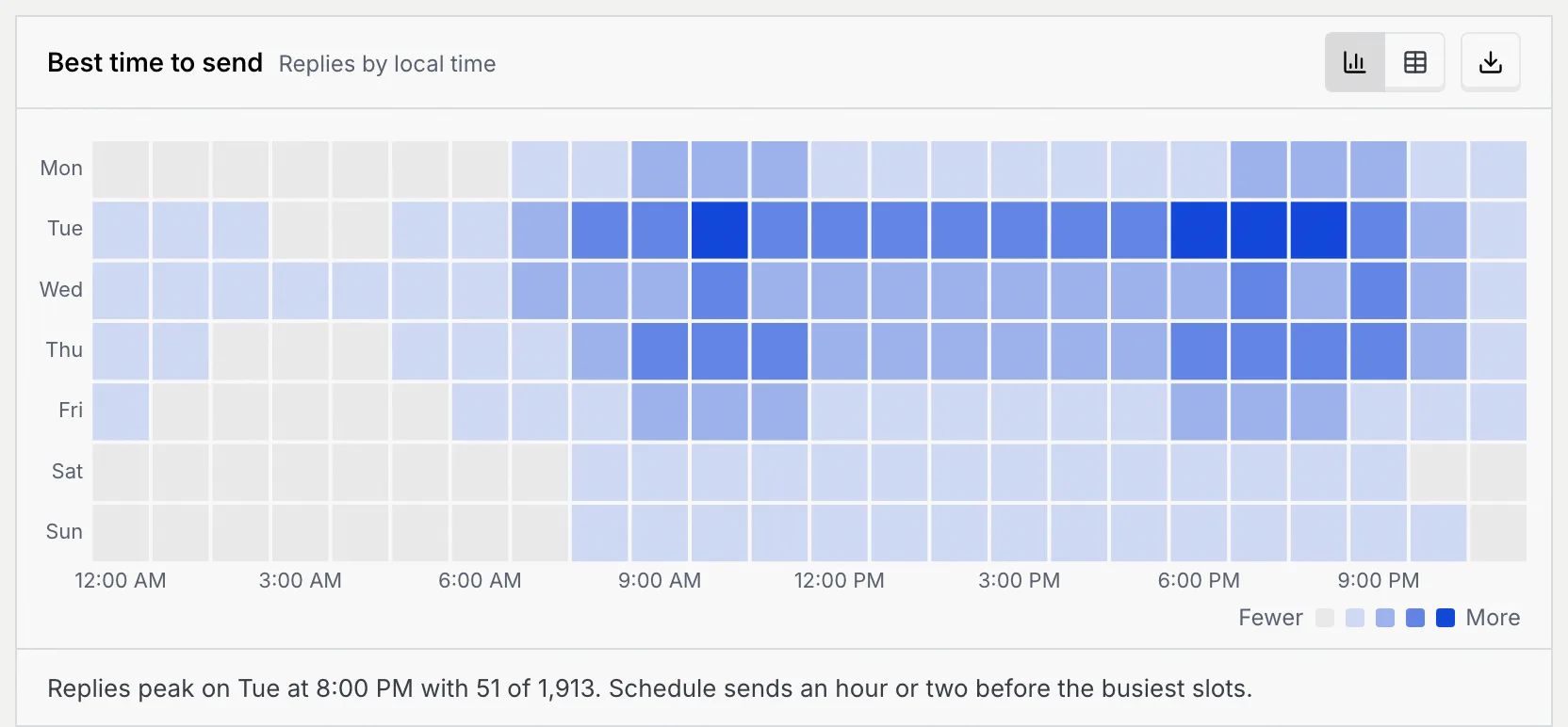
| **Best time to send** | Campaign replies by weekday and hour, in local time | The darkest cells are when recipients answer most; the summary suggests sending an hour or two before them. |
### Why messages fail [#why-messages-fail]
| Reason | Meta error code | What it means |
|---|---|---|
| **Not on WhatsApp** | 131026 | The number isn’t on WhatsApp, or its app is too old to receive templates. |
| **Meta marketing limit** | 131049 | The person got other marketing messages recently; Meta held this one back. |
| **Meta experiment group** | 130472 | The number is in a Meta experiment that withholds some marketing messages. |
| **Stopped marketing** | 131050 | The person turned off marketing messages from your business. |
| **Outside 24-hour window** | 131047 | A follow-up went out more than 24 hours after their last reply. |
| **Media upload failed** | 131053 | WhatsApp couldn’t fetch the header image. |
## Open the Payments report [#open-the-payments-report]
### Go to the Payments tab [#go-to-the-payments-tab]
In Reports, click the **Payments** tab. It covers payments through every connected gateway; payment gateways are coming soon, so the gateway breakdowns below show the sample workspace. To work with individual links, go to [Payments](/docs/payments/payments).
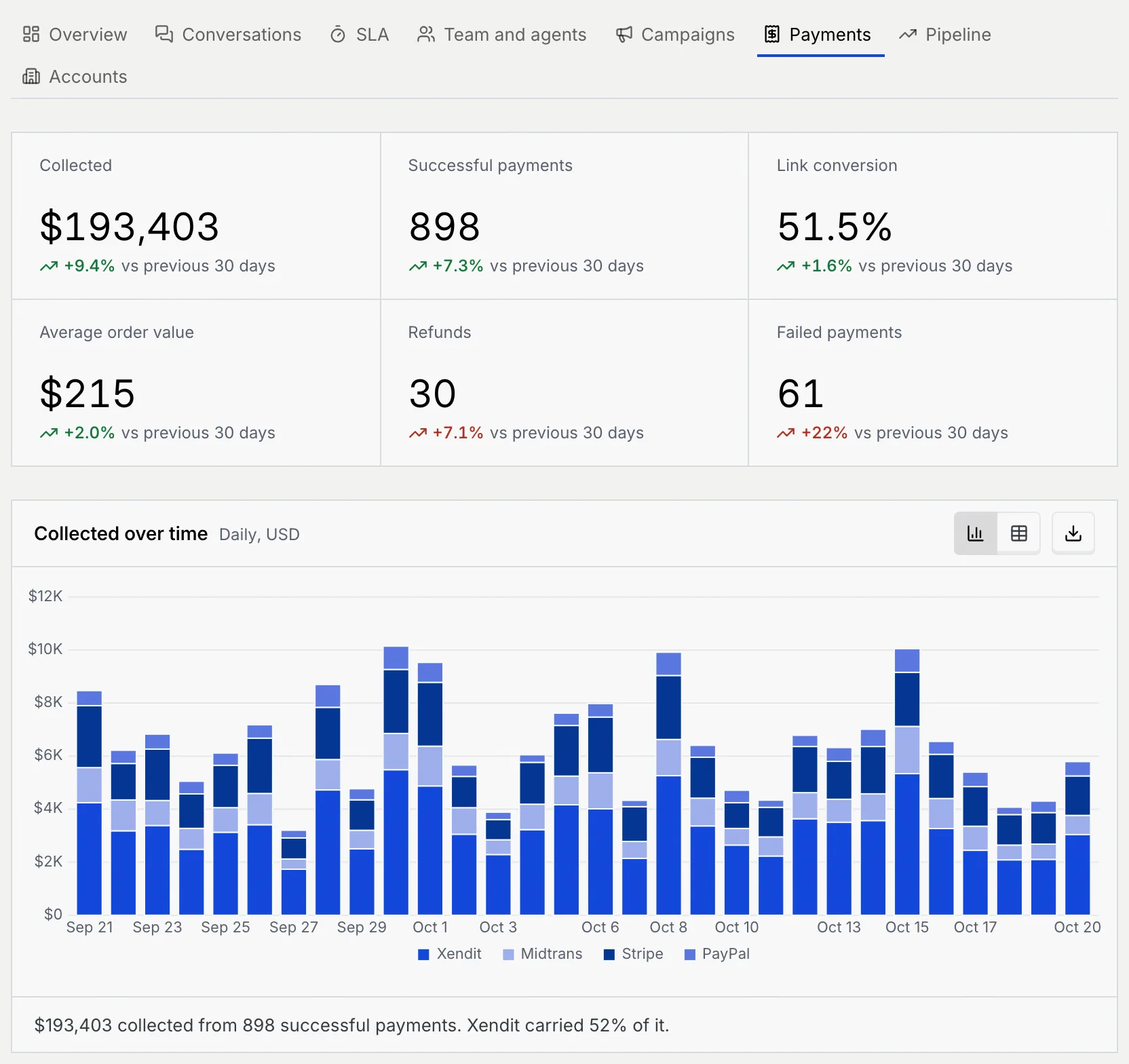
| Key number | What it counts |
|---|---|
| **Collected** | Money collected from successful payments, in your workspace currency |
| **Successful payments** | Payments that went through |
| **Link conversion** | Paid links out of all payment links sent |
| **Average order value** | Collected divided by successful payments |
| **Refunds** | Payments refunded in the range. Lower is better. |
| **Failed payments** | Payment attempts that failed. Lower is better. |
## Read the Payments report [#read-the-payments-report]
| Chart | What it shows | How to read it |
|---|---|---|
| **Collected over time** | Money collected per period, stacked by gateway (QRIS today; payment gateways are coming soon, and the sample workspace shows sample ones) | The summary says which gateway carried the most. The table adds a **Total** per period. |
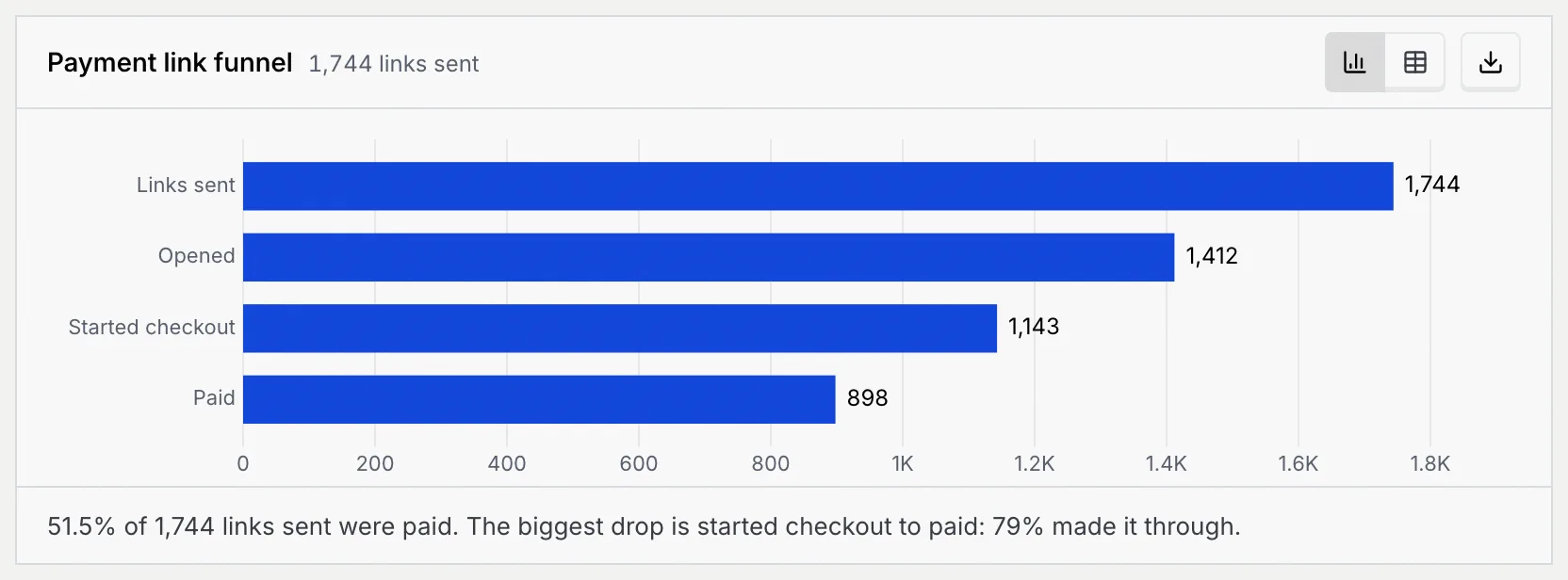
| **Payment link funnel** | Payment links at each step: **Links sent**, **Opened**, **Started checkout**, **Paid** | The summary names the step with the biggest drop. The table adds each step's share of the step before and of links sent. |
| **Time to pay** | Successful payments by the time from sending the link to payment, from **Under 5 min** to **3+ days** | The summary gives the share paid within 30 minutes of the link being sent, and the share that took more than 3 days. |
| **Payment links created by AI agents vs your team** | Payment links created per period, split into **Created by AI agents** and **Created by your team** | The table adds the share of each side's links that were paid. |
| **Failed and refunded** | Three lines per period: **Failed payments**, **Refunds** and **Expired links** (links that expired unpaid) | The summary adds up failures, refunds and the amount refunded. |
| **Payments by method** | Successful payments by method: QRIS today; card, virtual account, e-wallet, PayPal and bank transfer come with payment gateways (coming soon) | Shows how your customers prefer to pay. The table adds each method's share. |
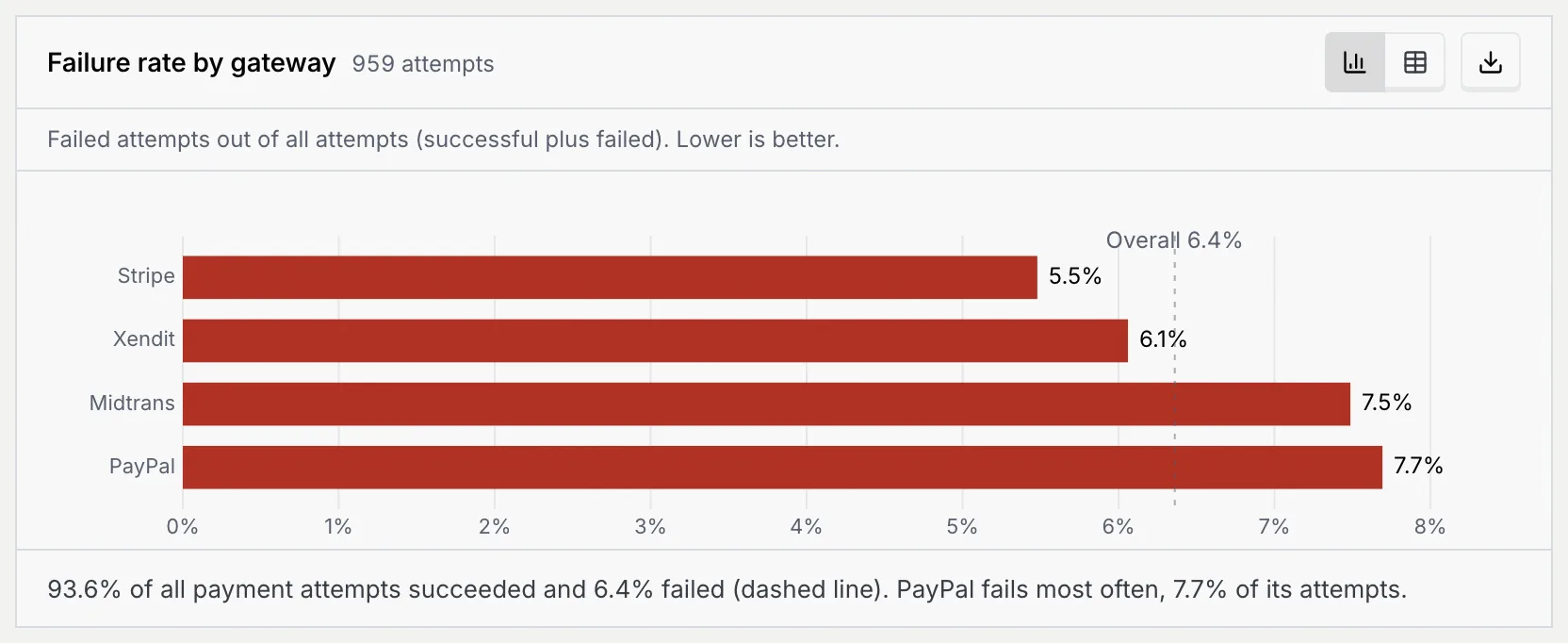
| **Failure rate by gateway** | Failed attempts out of all attempts (successful plus failed) for each gateway (payment gateways are coming soon) | Lower is better; the dashed line is your overall failure rate. The table adds successful and failed attempts and the success rate. |
| **Revenue by product** | Revenue from each product on your payment links, highest first | The summary gives the top three products' share. The table adds each product's share of revenue. |
## Troubleshooting [#troubleshooting]
**Revenue by campaign** counts only sales that followed the campaign. Notices such as shipping updates or reminders usually earn nothing, so they sit at zero.
Both count money from paid orders in the same range, so they match. The Payments tab breaks it down by gateway, method and product.
Those numbers can't receive WhatsApp messages. Check the phone numbers in your audience, or reach those contacts on another channel.
## Next steps [#next-steps]