# Conversation and SLA reports (/docs/reports/conversation-reports)
The **Conversations** and **SLA** tabs of Reports show how much your customers write, how fast and how well you answer, and where conversations end up. Use them to staff the busy hours, spot a channel that's falling behind and check you're keeping your reply and resolution promises.
- **Who can use it:** Everyone in the workspace can open these reports. Downloading a chart or its data needs **Export reports** (owners and admins by default); see [Tables and exports](/docs/reports/report-exports#who-can-export).
- **Before you start:** At least one [connected channel](/docs/channels/connect-a-channel). To pick dates and read the headline numbers, see [Reports](/docs/reports/reports#pick-a-date-range).
## Open the Conversations report [#open-the-conversations-report]
### Go to the Conversations tab [#go-to-the-conversations-tab]
In the sidebar, click **Reports**, then the **Conversations** tab. Set the dates with the date button at the top right. The tab opens with six key numbers and **Conversations by channel**.
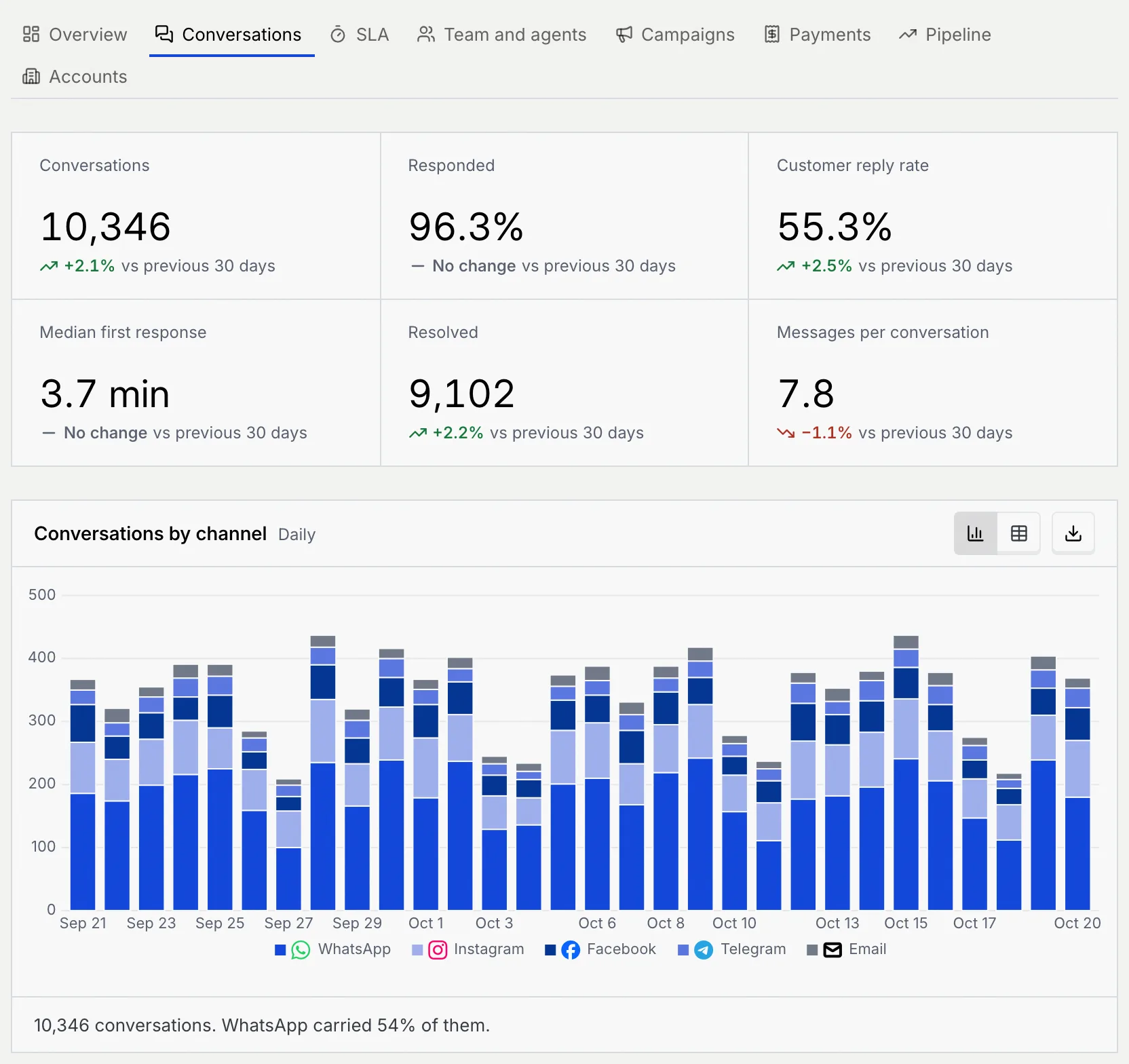
| Key number | What it counts |
|---|---|
| **Conversations** | Conversations started in the range |
| **Responded** | Of active conversations (the customer sent at least one message), the share you replied to |
| **Customer reply rate** | Of conversations where you sent the first message, the share where the customer replied |
| **Median first response** | The median time to your first reply. Lower is better. |
| **Resolved** | Conversations resolved in the range |
| **Messages per conversation** | The average number of messages in a new conversation, both sides counted |
## Read the Conversations report [#read-the-conversations-report]
### Volume and replies [#volume-and-replies]
| Chart | What it shows | How to read it |
|---|---|---|
| **Conversations by channel** | New conversations per period, stacked by channel (the sample workspace shows sample channels; WhatsApp, Messenger and Instagram go live once Mokanata's Meta app is approved, and more are coming soon) | The height of each bar is the day's (or week's) total; the summary says which channel carried the most. The table adds a **Total** column. |
| **Active vs responded conversations** | Two lines: **Active** (the customer sent at least one message in the period) and **Responded** (you replied) | The gap between the lines is conversations nobody answered. The table adds **Unanswered** and **Responded rate**. |
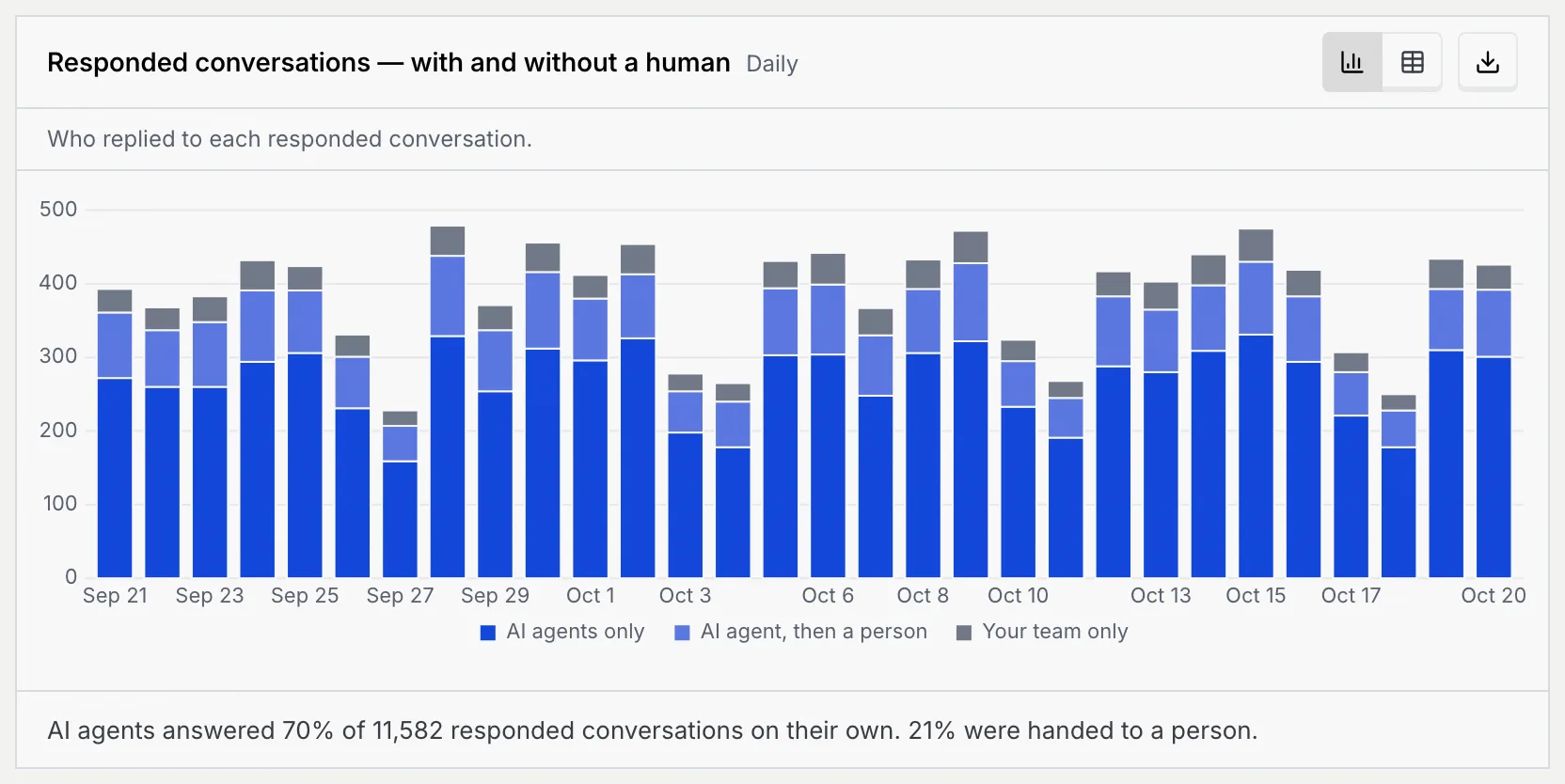
| **Responded conversations — with and without a human** | Who replied to each responded conversation: **AI agents only**, **AI agent, then a person**, or **Your team only** | A growing **AI agents only** share means agents handle more without help. The middle band is conversations an agent handed to a person. |
### How conversations close [#how-conversations-close]
| Chart | What it shows | How to read it |
|---|---|---|
| **Resolved by agents and people** | Resolved conversations per period, stacked: **Resolved by agents** and **Resolved by your team** | The table adds **Agent share**, the agents' part of each period. |
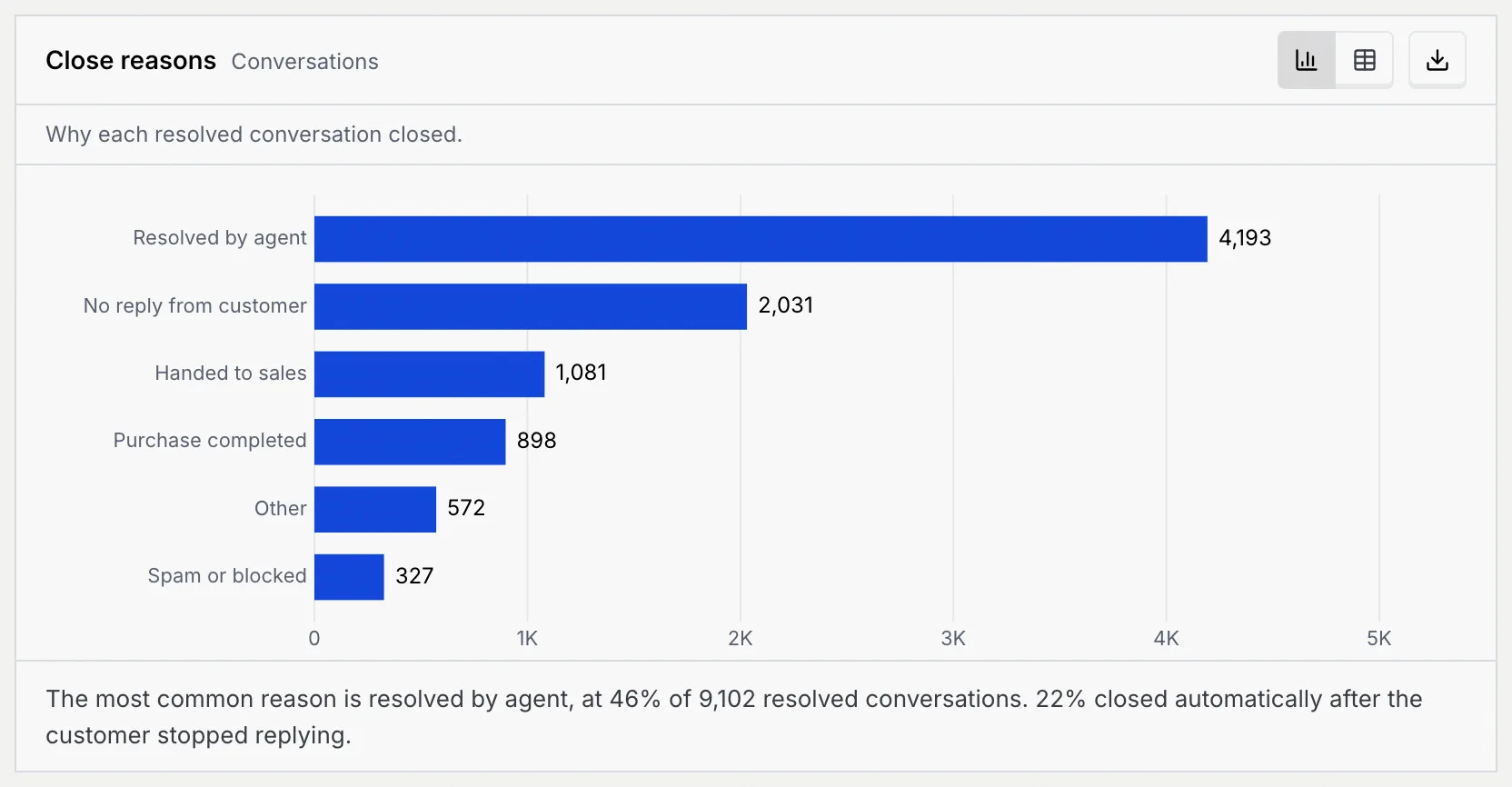
| **Close reasons** | Why each resolved conversation closed: **Resolved by agent**, **Purchase completed**, **Handed to sales**, **No reply from customer**, **Spam or blocked** and **Other** | **No reply from customer** counts conversations that closed automatically after the customer stopped replying. The table adds each reason's **Share of resolved**. |
### Speed and replies by channel [#speed-and-replies-by-channel]
| Chart | What it shows | How to read it |
|---|---|---|
| **First response by channel** | The median time to your first reply on each channel, fastest first | The dashed **Median** line is your overall median: bars that pass it are slower than average. The table adds each channel's conversations. |
| **Reply rate by channel** | Of conversations where you sent the first message, the share where the customer replied, highest first | The dashed line is your overall rate. The table adds **We messaged first** and **Customer replied**. |
### Busy hours [#busy-hours]
| Chart | What it shows | How to read it |
|---|---|---|
| **Conversations closed** | Resolved conversations in the range, by the weekday and hour they closed | Each cell is one hour of one weekday; darker cells hold more (see the **Fewer** to **More** scale). |
| **New conversations by hour** | When customers start conversations, by weekday and hour, across every channel | The darkest cells are when you need the most people or agents on hand. The summary names the busiest hour. |
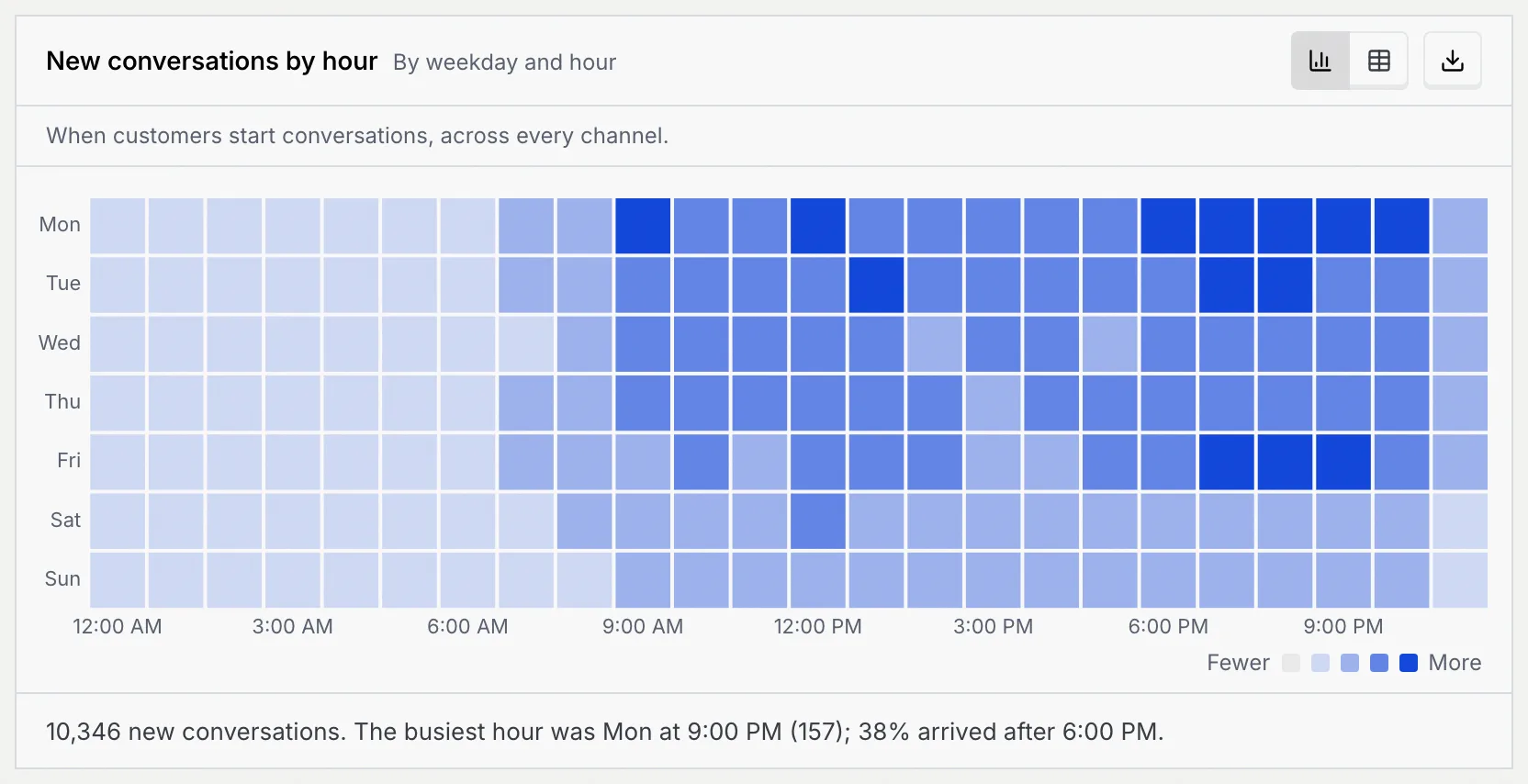
Point at a cell to see its count. The table and downloaded data list every weekday and hour, 168 rows in all.
### Length and outcomes [#length-and-outcomes]
| Chart | What it shows | How to read it |
|---|---|---|
| **Messages per conversation** | New conversations grouped by how many messages they took, both sides counted: 1–2, 3–5, 6–10, 11–20 and 21+ | Most conversations should fall in the short groups. The table adds each group's share. |
| **Conversation outcomes by channel** | Where each channel's conversations stand at the end of the range: **Resolved**, **Still open** or **Unanswered**, busiest channel first | The summary names the channel that leaves the most conversations unanswered. The table adds the **Unanswered rate**. |
## Open the SLA report [#open-the-sla-report]
### Go to the SLA tab [#go-to-the-sla-tab]
In Reports, click the **SLA** tab. It measures every new conversation against fixed service clocks and shows how often you met them.
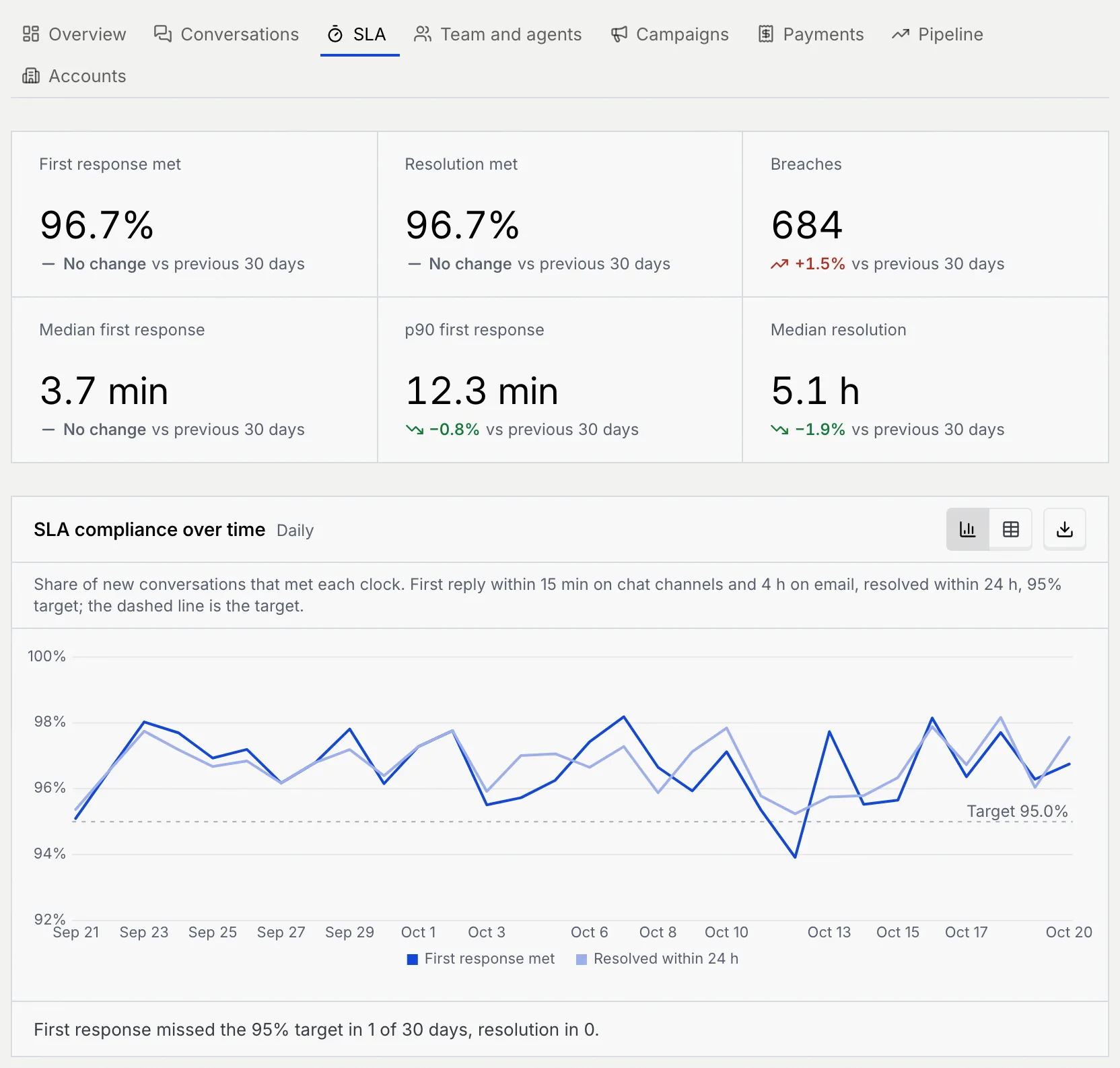
The SLA report uses these clocks:
| Clock | Met when |
|---|---|
| First reply on chat channels (every channel except email) | Someone replies within 15 minutes |
| First reply on email | Someone replies within 4 hours |
| Resolution | The conversation is resolved within 24 hours |
| Compliance target | 95% of conversations meet each clock |
| Pickup after an AI agent's handoff | A teammate picks it up within 15 minutes |
| Key number | What it counts |
|---|---|
| **First response met** | The share of new conversations whose first reply met its clock |
| **Resolution met** | The share resolved within 24 hours |
| **Breaches** | Conversations that missed the first reply clock or the resolution clock. Lower is better. |
| **Median first response** | The median time to the first reply. Lower is better. |
| **p90 first response** | The time 9 in 10 first replies beat: a view of your slowest replies. Lower is better. |
| **Median resolution** | The median time to resolve a conversation. Lower is better. |
## Read the SLA report [#read-the-sla-report]
| Chart | What it shows | How to read it |
|---|---|---|
| **SLA compliance over time** | Per period, the share of new conversations that met each clock: **First response met** and **Resolved within 24 h** | Points under the dashed 95% target missed it; the summary counts how many periods did. The table adds conversations and breaches per period. |
| **Breaches by channel** | Conversations that missed a clock on each channel, split into **First response** and **Resolution**, most first | Big channels have the most breaches; the table's **Breach rate** shows which channel breaches most often for its size. |
| **First response time distribution** | First replies grouped by time to reply (under 1 min up to over 4 h), split into **AI agents** and **Your team** | Replies past 15 min miss the chat clock; past 4 h they miss the email clock. |
| **Resolution time by priority** | The median hours to resolve **Urgent**, **High**, **Normal** and **Low** conversations | The dashed line is the 24-hour clock. The table adds the p90 hours, the conversations and the share resolved within 24 hours for each priority. |
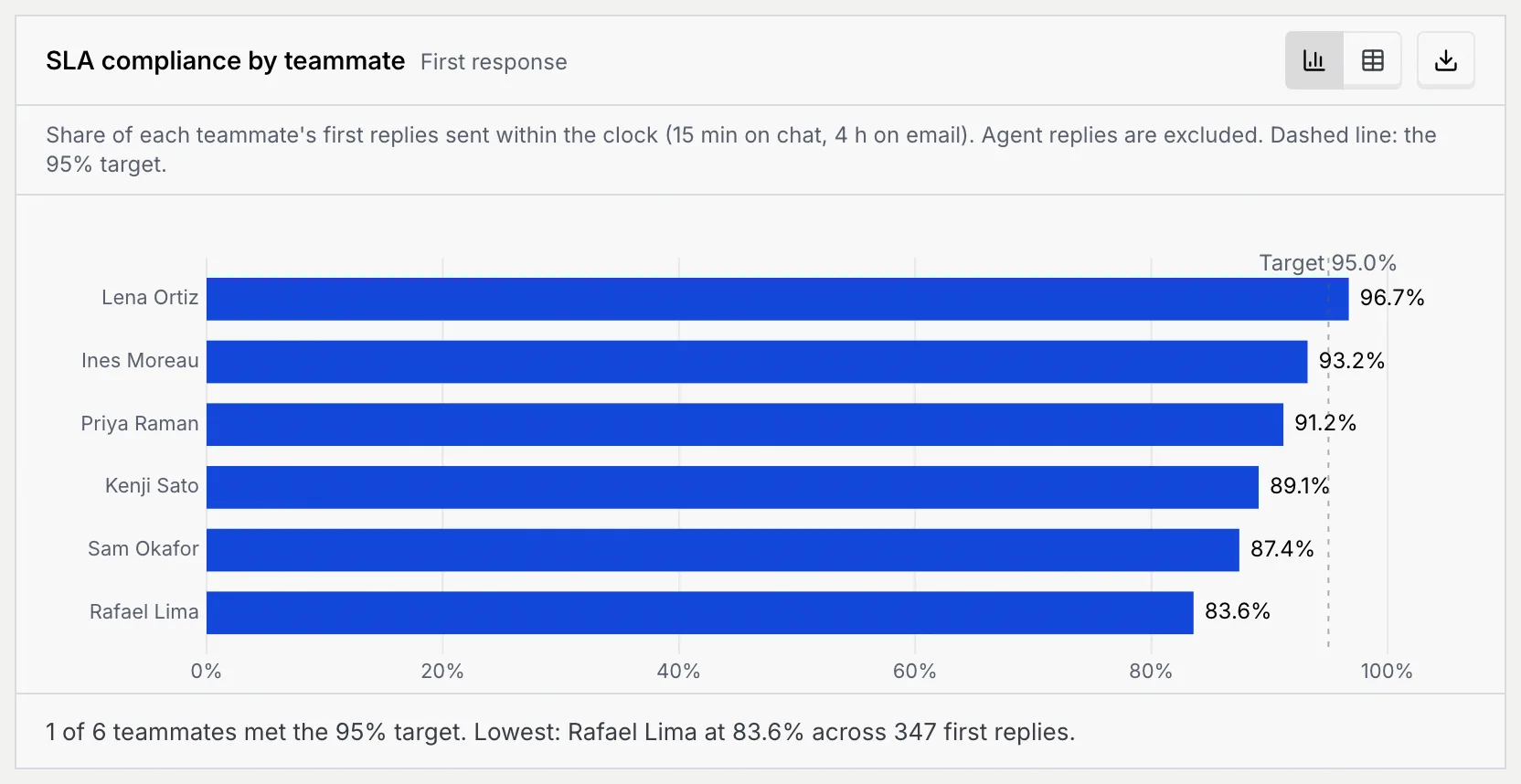
| **SLA compliance by teammate** | The share of each teammate's first replies sent within the clock, against the dashed 95% target | Agent replies are left out, so this is your people only. The table adds first replies and breaches per teammate. |
| **Open backlog by age** | Conversations open right now, by how long ago they opened (under 1 h up to over 3 days), split into **Within SLA** and **Breached** | This chart ignores the date range. Anything open more than 24 hours has missed the resolution clock. |
| **Escalations past SLA** | Conversations an AI agent handed to your team per period, split into **Picked up within 15 min** and **Picked up late** | The table adds the **Late share** of each period. |
| **Breaches by hour of day** | First response breaches by the weekday and hour the conversation arrived, in workspace time | Dark cells are the hours with the most late first replies: a sign to add cover then. |
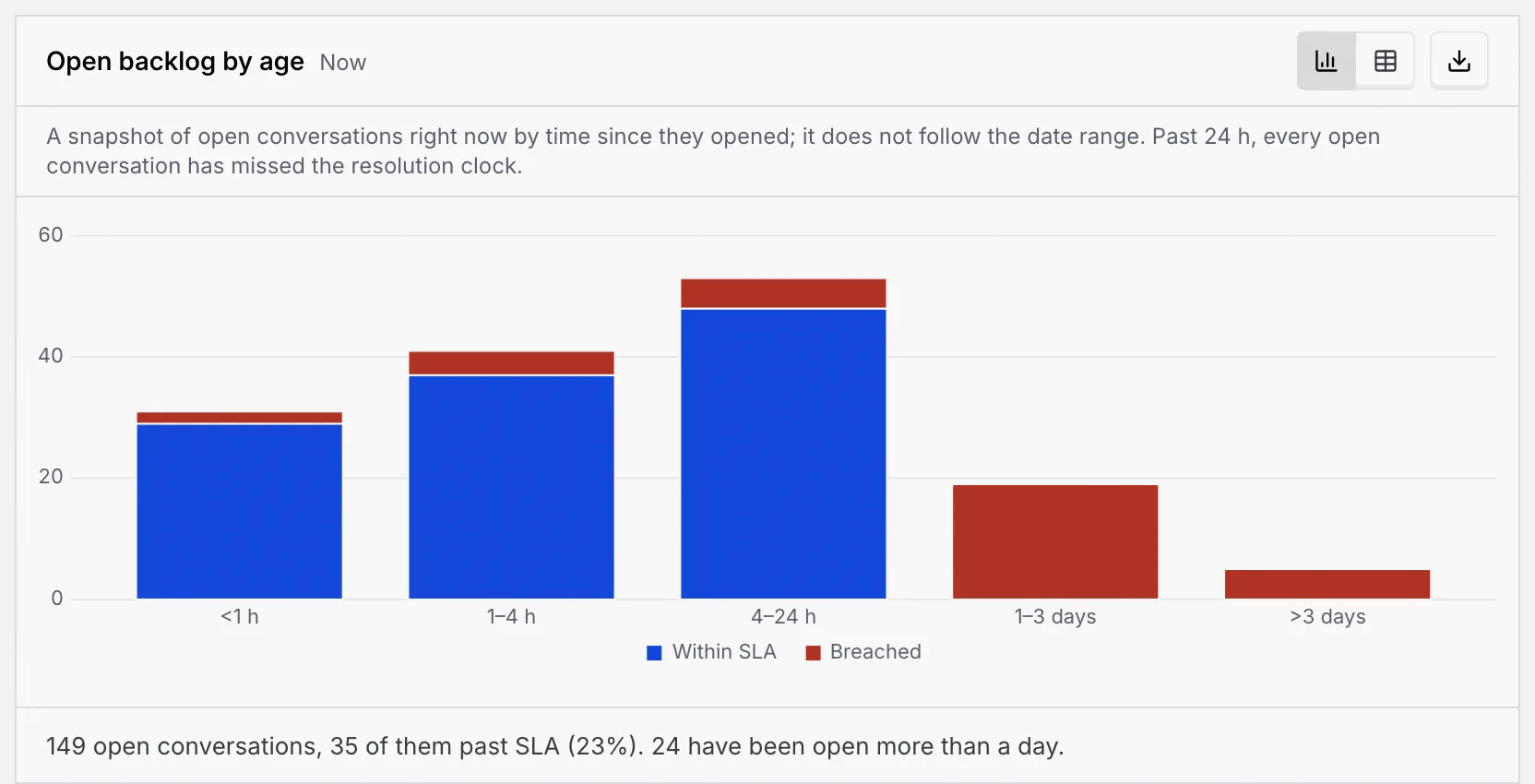
**Open backlog by age** is a snapshot of the conversations open right now, so it doesn't follow the dates you pick. To work through it, open the [inbox](/docs/inbox/inbox) and resolve or snooze what's waiting.
## Troubleshooting [#troubleshooting]
**Breaches** counts conversations that missed either clock: the first reply or the 24-hour resolution. **Breaches by hour of day** counts first response breaches only.
It shows the conversations open right now, whatever range you pick.
**Breaches by channel** draws the number of breaches, which is highest on your busiest channel. Switch to **Table** and sort by **Breach rate** to compare channels by size.
## Next steps [#next-steps]