# Snooze, resolve and reopen (/docs/inbox/snooze-and-resolve)
When a conversation needs nothing more, resolve it so it leaves your working views. When it needs nothing right now, snooze it. Both set aside anything that was waiting for your approval on the thread, and both can be undone.
- **Who can use it:** Roles with **Resolve and reopen** (Owner, Admin and Member by default). The items aren't in a Viewer's menus, and the **Reopen** and **Unsnooze** buttons are greyed out with the reason. See [Roles and permissions](/docs/settings/roles).
- **Before you start:** Open the thread in the [inbox](/docs/inbox/inbox).
## Resolve a thread [#resolve-a-thread]
### Open the thread's menu [#open-the-threads-menu]
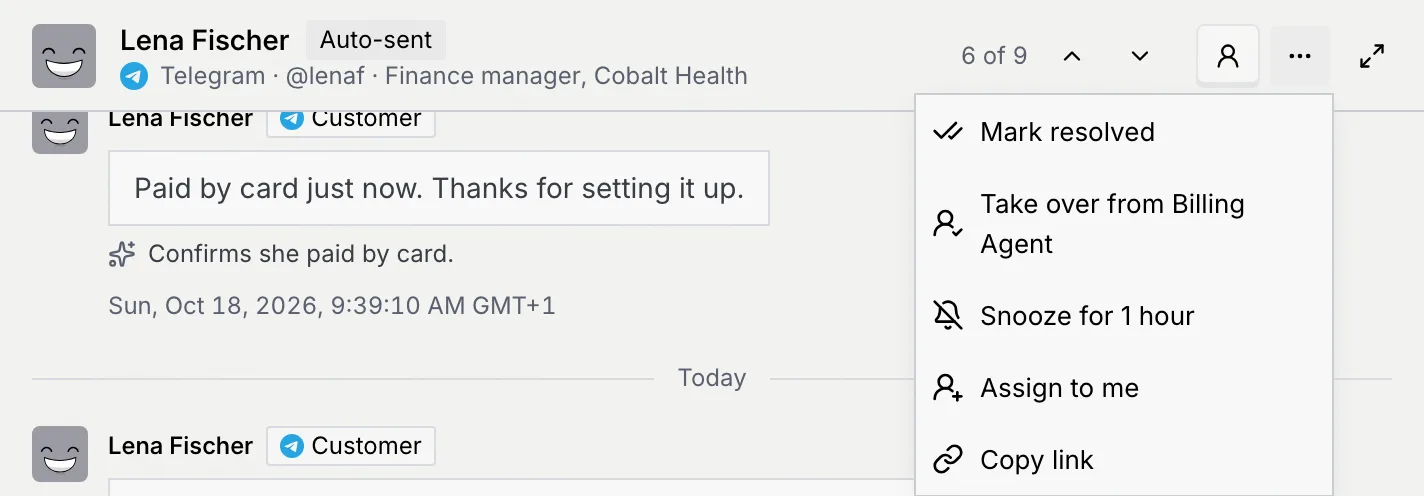
In the thread's header, click **More** (**…**).
### Mark it resolved [#mark-it-resolved]
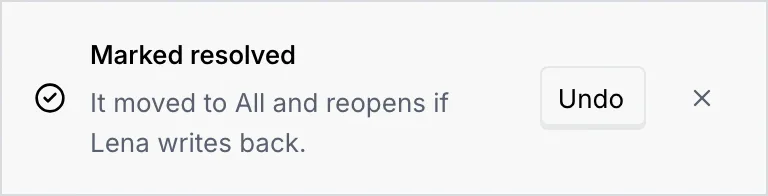
Choose **Mark resolved**. A notice says **Marked resolved**: "It moved to All and reopens if Lena writes back." **Undo** on the notice reopens it.
### Find it later [#find-it-later]
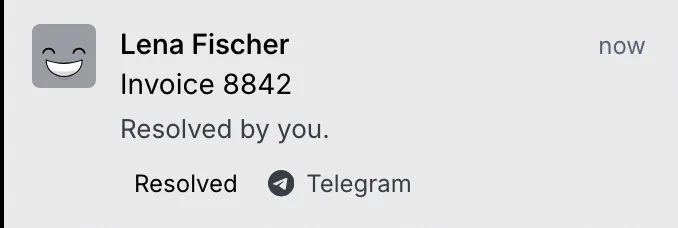
The bottom of the thread says **You resolved this thread**, and the thread is marked **Resolved**. It leaves **Needs you** and **Agent working** and stays on **All**.

If a draft, escalation or suggested update was waiting on the thread, resolving sets it aside: it leaves **Needs you** and the Command center's queue. The notice then says "It moved to All. Reopen it to bring back what was waiting for your approval."
## Reopen a thread [#reopen-a-thread]
Open the resolved thread (on **All**) and click **Reopen** at the bottom, or choose **More** → **Reopen thread**. A notice says **Thread reopened**. The thread goes back to the state it was in before, and anything that was waiting for your approval comes back with it.
As its status says, a resolved thread also reopens on its own if the contact writes back.
## Snooze a thread for an hour [#snooze-a-thread-for-an-hour]
### Snooze it [#snooze-it]
In the thread's header, click **More** (**…**) → **Snooze for 1 hour**. The thread leaves every view of the inbox, and the next thread in the list opens.
### Check the notice [#check-the-notice]
A notice says **Snoozed for 1 hour**: the contact "comes back to your inbox in an hour, or sooner with a new message." Click **Undo** on it to bring the thread back right away.
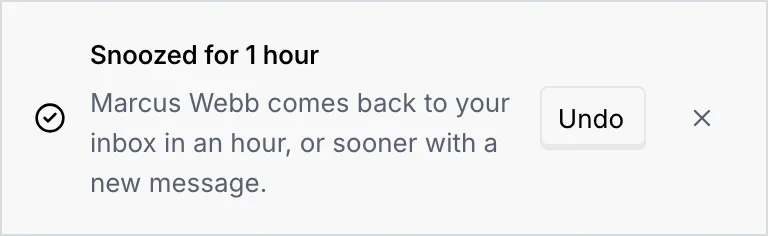
Like resolving, snoozing sets aside anything that was waiting for your approval on the thread. **Snooze for 1 hour** isn't offered on a resolved thread.
## Unsnooze a thread [#unsnooze-a-thread]
While a thread is snoozed it doesn't show in any view, so open it from its link: copy the link first (**More** → **Copy link**) if you expect to need it before the hour is up.
### Open the snoozed thread [#open-the-snoozed-thread]
Open the thread's link. The bottom of the thread says **Snoozed for 1 hour**: "It's hidden from your inbox and comes back sooner if Marcus writes again."

### Bring it back [#bring-it-back]
Click **Unsnooze**. A notice says **Back in your inbox**, and anything set aside comes back to **Needs you**.
## Snooze or resolve: which one [#snooze-or-resolve-which-one]
| | Snooze | Resolve |
|---|---|---|
| Where the thread goes | Out of every view | Out of **Needs you** and **Agent working**, still on **All** |
| How you bring it back | **Unsnooze**, or **Undo** on the notice | **Reopen** or **Reopen thread**, or **Undo** on the notice |
| Approvals waiting on it | Set aside until it comes back | Set aside until it's reopened |
| Label | None | **Resolved** |
Snoozing a queue item in the Command center works on that one item, not the whole thread. See [Triage the approval queue](/docs/inbox/approval-queue#snooze-an-item).
## Troubleshooting [#troubleshooting]
Snoozed threads don't appear in any view, including **All** and search. Open the thread's link (for example one you saved with **Copy link**, or from your browser history), then click **Unsnooze**.
Your role doesn't have **Resolve and reopen**. Ask an owner or admin to change it in **Settings** → **Members & roles**.
Nothing changed. Click **Retry** on the notice.
## Next steps [#next-steps]