# Forms overview (/docs/forms/forms)
Forms collect sign-ups and orders through a link anyone can open, without signing in (payment questions are coming soon). Answers land in Mokanata as they come in, or the conversation carries on in WhatsApp. The **Forms** tab of **Forms & Links** lists every form with what it has collected.
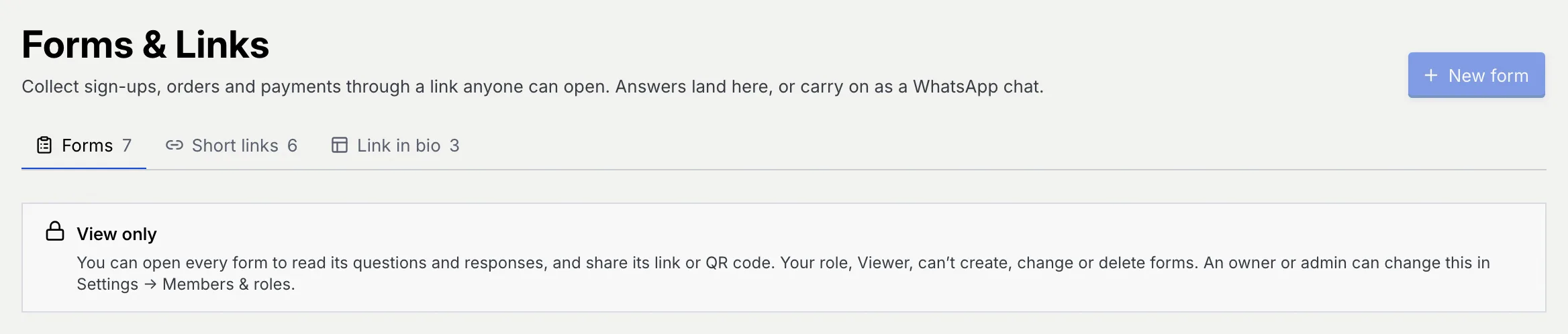
- **Who can use it:** Everyone in the workspace can open every form, read its questions and responses, and share its link or QR code. Owners, admins and members can also create, edit, publish and close forms. Only owners and admins can delete forms. A role that can't change forms sees a **View only** notice under the header and a disabled **New form** button; menu items it can't use are left out. Roles are set in [Roles and permissions](/docs/settings/roles).
- **Before you start:** Nothing.
## Open Forms & Links [#open-forms--links]
### Go to Forms & Links [#go-to-forms--links]
In the sidebar, under **Growth**, click **Forms & Links**, or press G then F from anywhere. The page opens on the **Forms** tab.
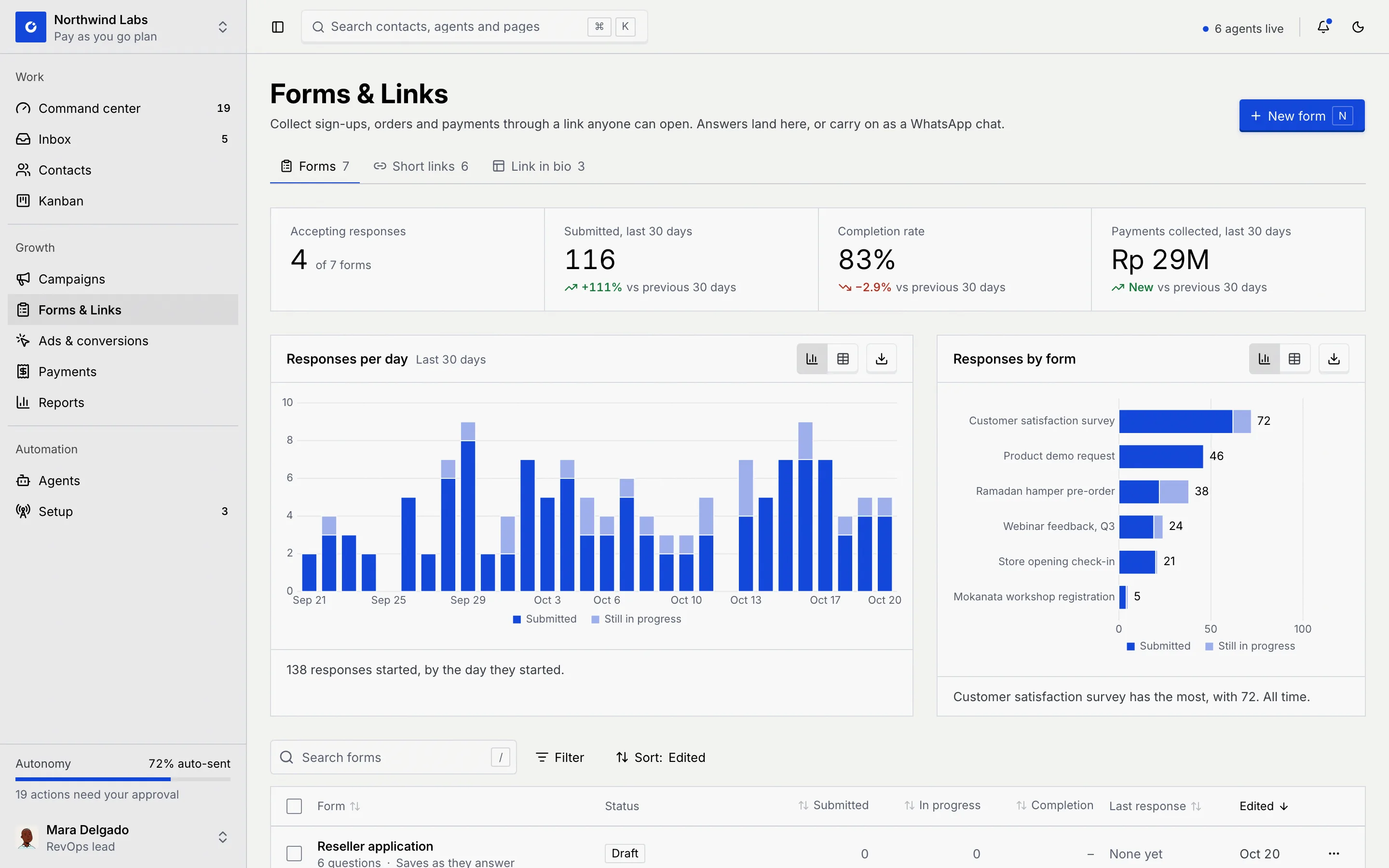
The tabs under the header switch between the three parts of the area, each with a count:
| Tab | What it holds |
|---|---|
| **Forms** | Your forms and their responses. |
| **Short links** | Short, readable links to any page or form. See [Short links](/docs/forms/short-links). |
| **Link in bio** | Pages behind your social bios. See [Link in bio pages](/docs/forms/bio-pages). Roles that can't see link in bio pages don't get this tab. |
### Read the numbers [#read-the-numbers]
The four numbers at the top cover every form:
| Number | What it counts |
|---|---|
| **Accepting responses** | Forms that are live, out of all your forms. |
| **Submitted, last 30 days** | Responses submitted in the last 30 days, with the change against the 30 days before. |
| **Completion rate** | Of the people who started a form in the last 30 days, the share who submitted it. It reads **No one started a form yet** until someone does. |
| **Payments collected, last 30 days** | Money taken through payment questions, in the currency with the most payments. Payment questions are coming soon, so it reads **No payments yet**. |
Below them, **Responses per day** shows responses started on each of the last 30 days, split into **Submitted** and **Still in progress**. **Responses by form** ranks the forms with the most responses, all time. Each chart can switch to a table and be downloaded with the buttons in its corner (see [Tables and exports](/docs/reports/report-exports)).
## Find a form [#find-a-form]
### Search, filter and sort [#search-filter-and-sort]
- Type in **Search forms** (or press /) to match form titles.
- Click **Filter**, then **Status**, to show forms that are **Accepting responses**, **Draft** or **Closed**.
- Click **Sort** to order by **Edited** (the default, newest first), **Form**, **Submitted**, **In progress**, **Completion** or **Last response**. Clicking a column header sorts by it too.
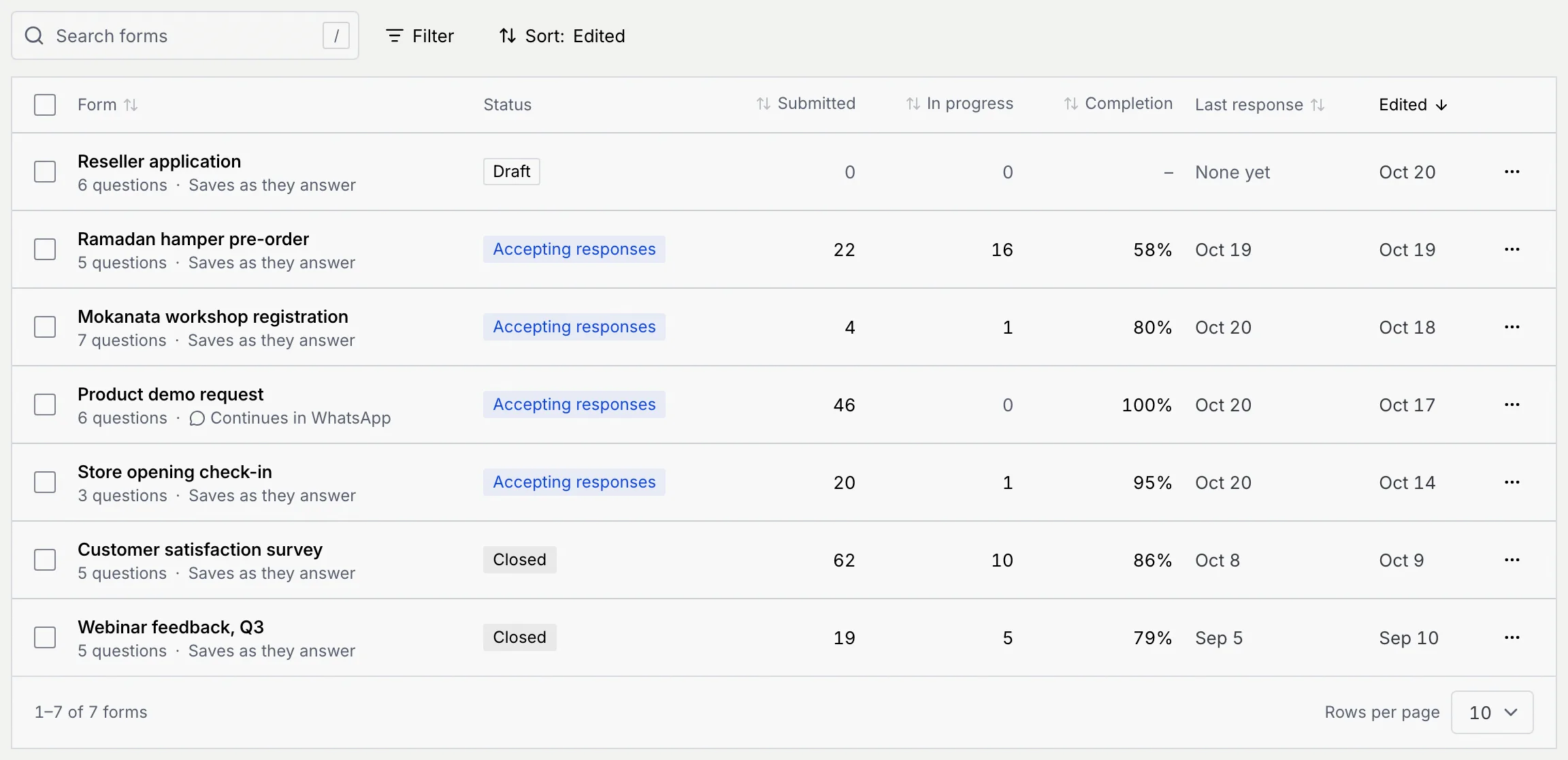
When nothing matches, the list says **No forms match** with a **Clear filters** button. A workspace without forms shows **No forms yet** with a **New form** button instead.
### Read a row [#read-a-row]
| Column | What it shows |
|---|---|
| **Form** | The title, then how many questions it asks, its custom link (`/f/…`) if it has one, and how it saves answers: **Saves as they answer**, or **Continues in WhatsApp**. |
| **Status** | **Draft**, **Accepting responses** or **Closed**. See [Form statuses](#form-statuses). |
| **Submitted** | Responses submitted. |
| **In progress** | People who started and haven't submitted yet. |
| **Completion** | Submitted responses as a share of everyone who started. A dash means no one has started. |
| **Last response** | When the latest answer came in, or **None yet**. |
| **Edited** | When the form was last saved. |
Click a row to open the form in the builder. Show 10, 25 or 50 forms a page with the control under the list.
## Act on one form [#act-on-one-form]
### Open the row menu [#open-the-row-menu]
Click **⋯** at the end of a row.
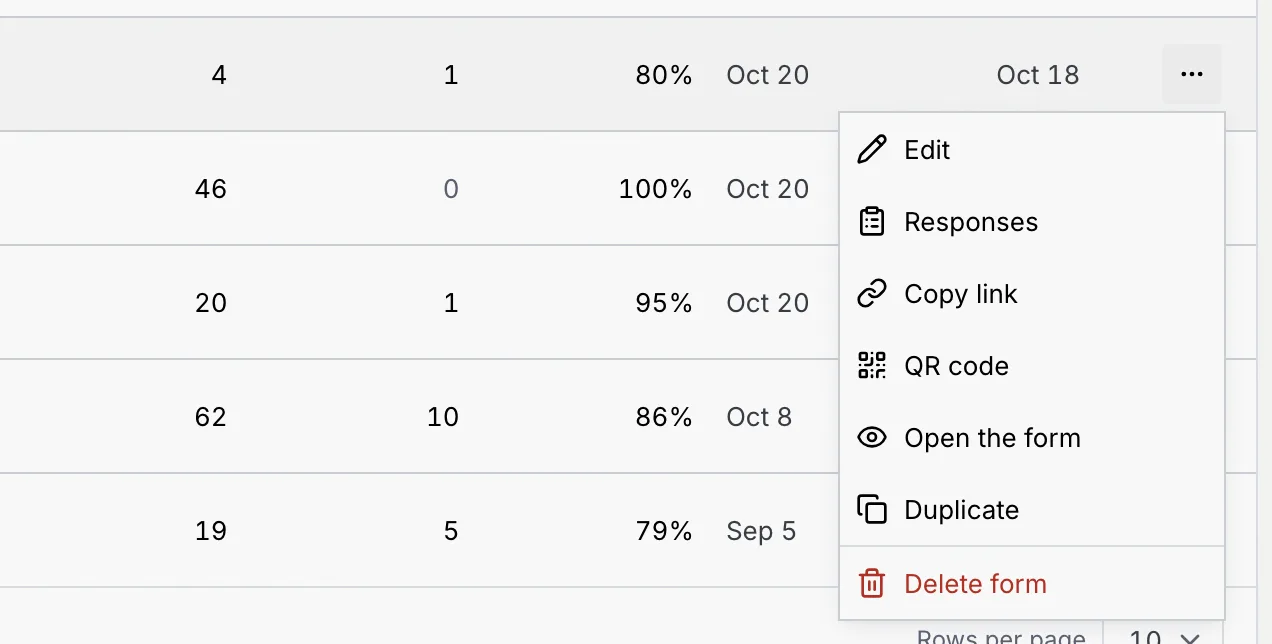
| Item | What it does |
|---|---|
| **Edit** | Opens the form in the builder. See [Build a form](/docs/forms/build-a-form). |
| **Responses** | Opens the form's **Responses** tab. See [View and export responses](/docs/forms/form-responses). |
| **Copy link** | Copies the form's public link. Not shown for drafts, which have no link yet. |
| **QR code** | Opens the form's QR code to download or print. See [Download or print the QR code](/docs/forms/share-a-form#download-or-print-the-qr-code). |
| **Open the form** | Opens the public form in a new tab, as respondents see it. |
| **Duplicate** | Makes a copy as a new draft and opens it. A toast says **Copy created as a draft**. |
| **Delete form** | Deletes the form and its responses, after you confirm. |
## Delete a form [#delete-a-form]
### Choose Delete form [#choose-delete-form]
In the row menu (or the builder's **⋯** menu), click **Delete form**.
### Read what goes with it [#read-what-goes-with-it]
The dialog says what deleting removes: the form's link stops working, its responses are deleted with it, and any short link that opens the form stops forwarding, along with QR codes printed for it.
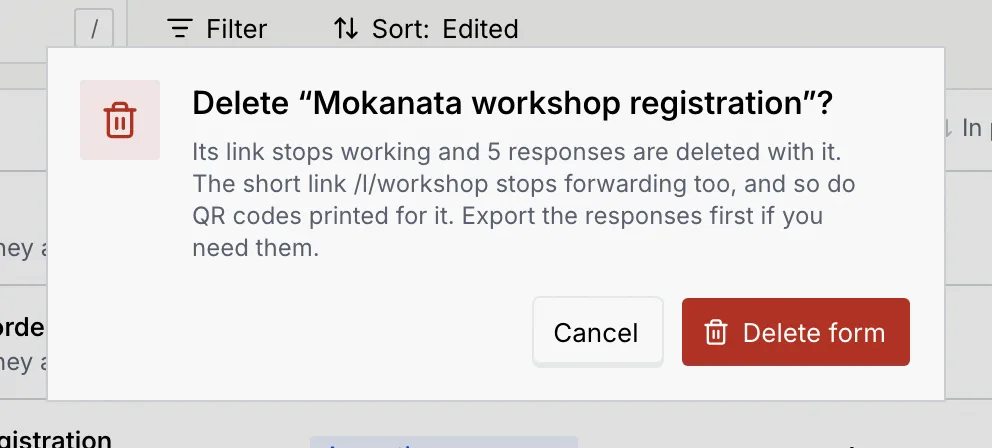
### Confirm [#confirm]
Click **Delete form**. A toast says **Form deleted**.
The responses go with the form. Export them first if you need them: open the form's **Responses** tab and click **Export CSV**.
## Change several forms at once [#change-several-forms-at-once]
### Select forms [#select-forms]
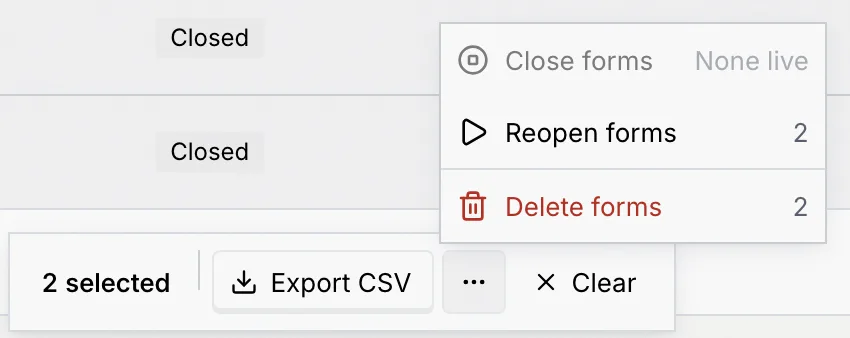
Tick the box at the start of each row, or the box in the header to select every form on the page. A bar appears at the bottom with how many are selected.
### Pick an action [#pick-an-action]
- **Export CSV** downloads `mokanata-forms.csv` with each form's status, questions, submitted and in-progress counts, completion, last response, last edit and link.
- Click **⋯** for the rest:
- **Close forms** stops the live ones taking responses. Their links show a closed message; responses already in are kept.
- **Reopen forms** puts closed forms back to accepting responses.
- **Delete forms** deletes them with their responses, after you confirm.
Items that don't apply to the selection are greyed out with the reason, such as **None live** or **None closed**. Click **Clear** to drop the selection.
## Form statuses [#form-statuses]
| Status | What respondents see | How it gets there |
|---|---|---|
| **Draft** | Nothing: the link says the form isn't available. | A new form, or a copy, until you publish it. |
| **Accepting responses** | The form, ready to fill in. | **Publish** in the builder, or **Accept responses** / **Reopen forms** on a closed form. |
| **Closed** | The form's title and a note that it stopped taking responses. | **Stop accepting responses** in the builder, or **Close forms** in the list. |
See [What respondents see](/docs/forms/respondent-view) for each state of the public page.
## If your role can't change forms [#if-your-role-cant-change-forms]
When your role can't create, edit, publish or delete forms, a **View only** notice sits under the header and **New form** is disabled; hover or focus it to read why. You can still open every form to read its questions and settings, see its responses (if your role allows), and copy its link or QR code.
| Permission | Owner | Admin | Member | Viewer |
|---|---|---|---|---|
| View forms, their links and response counts | Yes | Yes | Yes | Yes |
| Create forms (and duplicate them) | Yes | Yes | Yes | No |
| Edit forms | Yes | Yes | Yes | No |
| Open and close forms | Yes | Yes | Yes | No |
| Delete forms | Yes | Yes | No | No |
| View responses | Yes | Yes | Yes | Yes |
| Export responses | Yes | Yes | No | No |
| Delete responses | Yes | Yes | No | No |
An owner or admin can change these for any custom role in [Roles and permissions](/docs/settings/roles).
## Keyboard shortcuts [#keyboard-shortcuts]
| Keys | What it does |
|---|---|
| G then F | Go to Forms & Links from anywhere. |
| N | New form (on the Forms tab). |
| / | Jump to the search box. |
You can change these in [Keyboard shortcuts](/docs/settings/keyboard-shortcuts).
## Troubleshooting [#troubleshooting]
Your role can't create forms. Hover or focus the button to read the reason, and ask an owner or admin to change your role in Settings → Members & roles.
Only owners and admins can delete forms by default. Menu items your role can't use are left out rather than greyed out.
The form was deleted, here or in another tab, or the address is wrong. Click **Back to forms** to return to the list.
The form is a draft. Drafts have no public link yet: publish the form first ([Publish and share a form](/docs/forms/share-a-form)).
## Next steps [#next-steps]