# Build a form (/docs/forms/build-a-form)
The form builder is where you write a form's questions. Every form starts with the three questions Mokanata needs to turn a response into a contact, and you add the rest from a palette of question kinds, from short answers to file uploads. The payment question is coming soon.
- **Who can use it:** Owners, admins and members can create and edit forms. Viewers, and any role without **Edit forms**, can open a form to read its questions and settings and preview it: the builder shows a **View only** notice and every field is locked. A role without **Create forms** that opens **New form** sees **Can't create forms** with a **Back to forms** button. See [Roles and permissions](/docs/settings/roles).
- **Before you start:** Nothing.
## Start a form [#start-a-form]
### Click New form [#click-new-form]
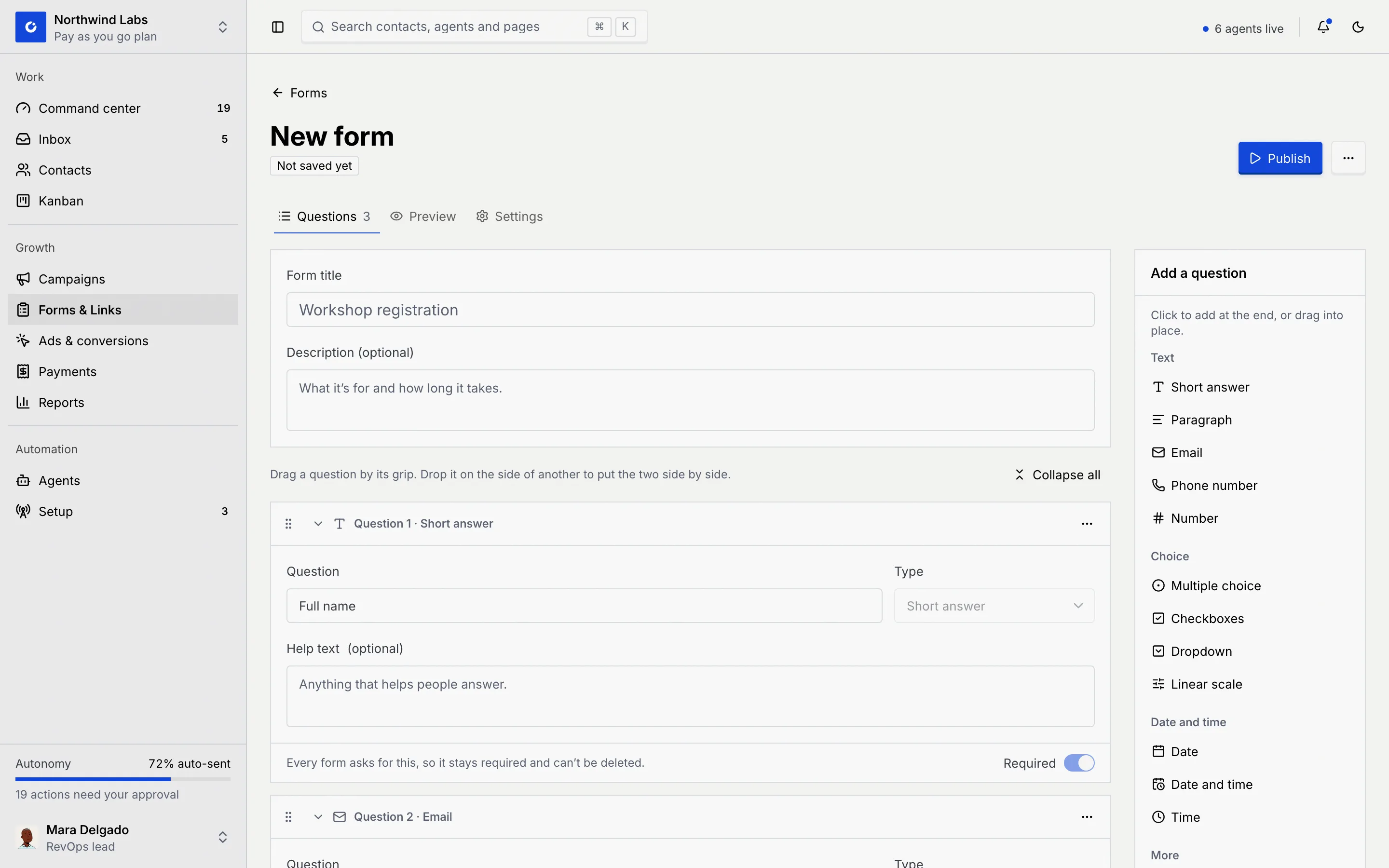
On the **Forms** tab of **Forms & Links**, click **New form** (or press N). The builder opens on its **Questions** tab, with the status **Not saved yet**.
### Name the form [#name-the-form]
Type a **Form title**, the heading respondents see, and an optional **Description**: what the form is for and how long it takes.
### Check the contact questions [#check-the-contact-questions]
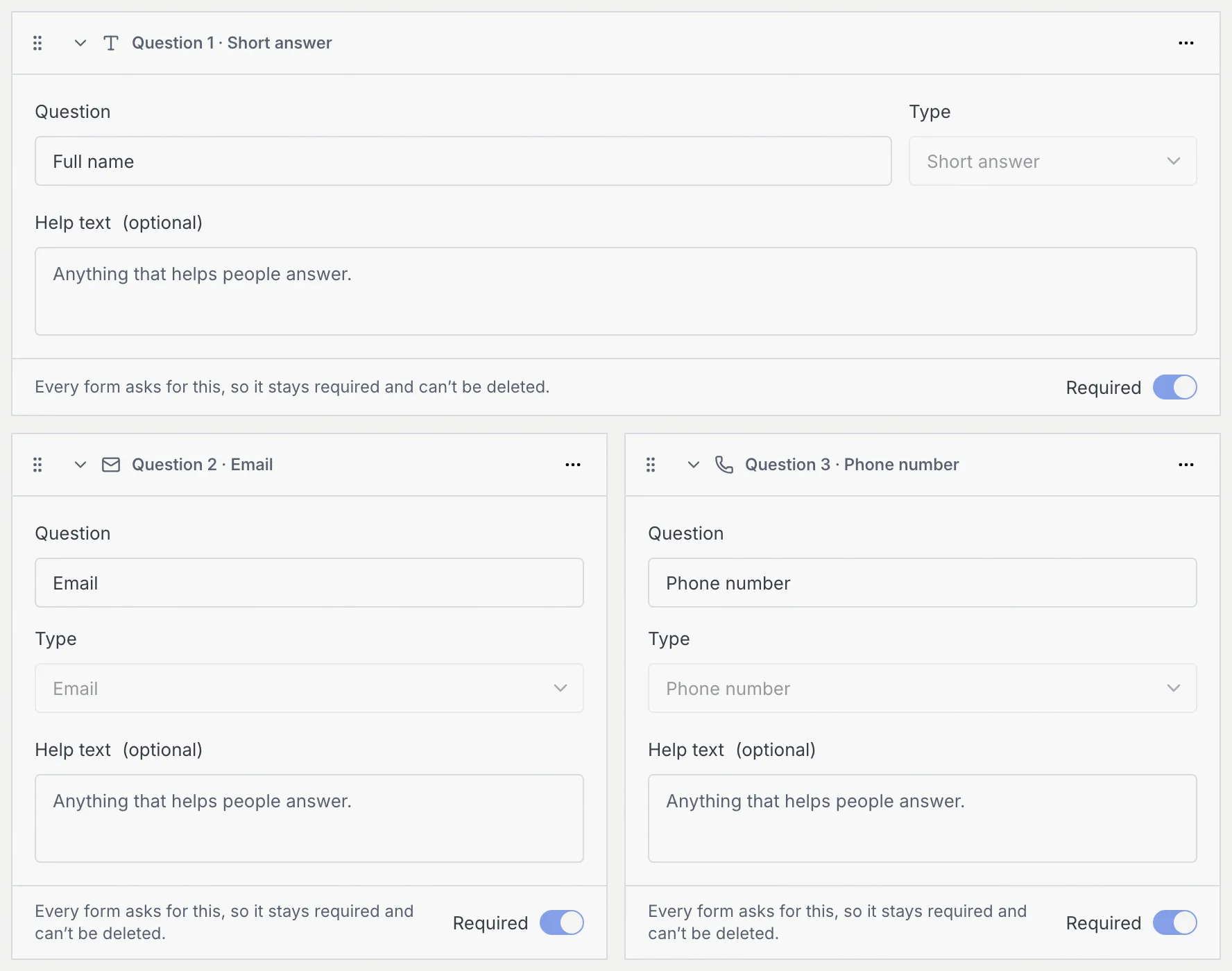
Every form asks for **Full name**, **Email** and **Phone number**, so each response can become a contact. They're always required and can't be deleted, and their type is fixed, but you can reword them (for example "Work email" or "WhatsApp number") and add help text. Their cards say **Every form asks for this, so it stays required and can't be deleted.**
## Add questions [#add-questions]
### Pick a kind from the palette [#pick-a-kind-from-the-palette]
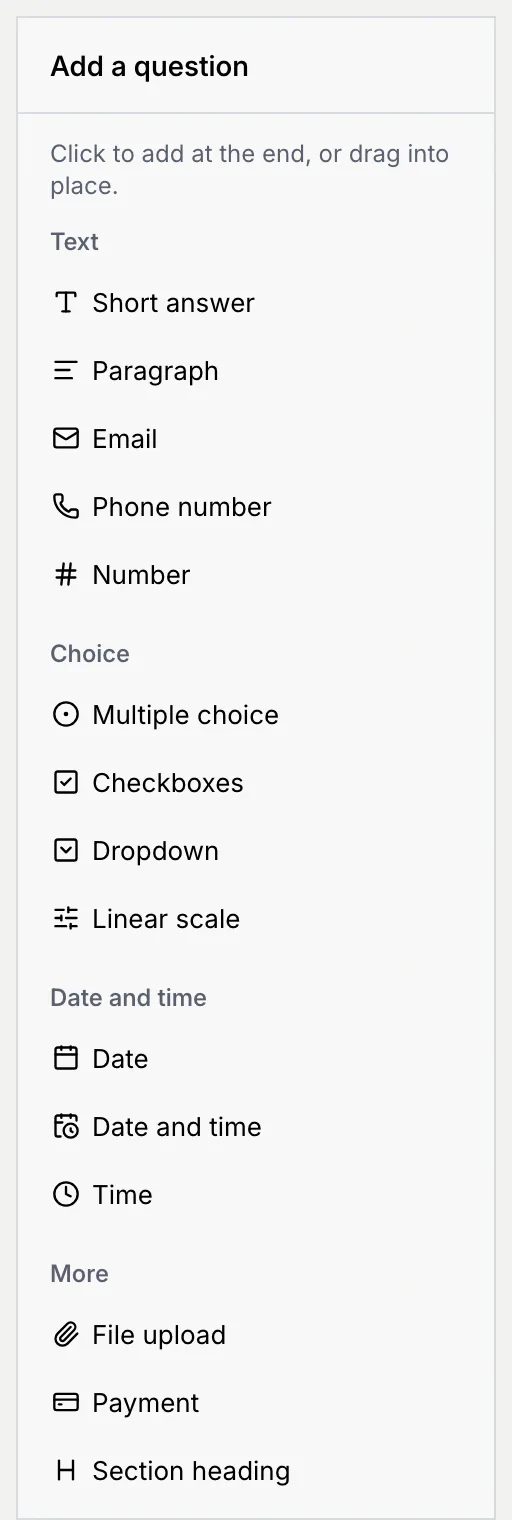
The **Add a question** palette lists every kind, grouped into **Text**, **Choice**, **Date and time** and **More**. Click one to add it at the end, or drag it into place between other questions.
### Write the question [#write-the-question]
Each question has a card headed **Question N · Kind**. Fill in:
- **Question**: what you ask, as respondents see it.
- **Type**: change the kind here at any time.
- **Help text (optional)**: a line under the question that helps people answer.
- The kind's own settings, if it has any (see below).
- **Required**: switch it on and the form can't be submitted without an answer.
## Question kinds [#question-kinds]
| Group | Kind | What respondents get | Settings | Message when an answer is wrong |
|---|---|---|---|---|
| Text | **Short answer** | A one-line box | None | **Answer this question.** (when required) |
| Text | **Paragraph** | A larger box for longer answers | None | **Answer this question.** |
| Text | **Email** | An email box | None | **Enter an email address, like {'name@company.com'}.** |
| Text | **Phone number** | A phone box with a country picker, starting on your workspace's country | None | **Enter a phone number with its country code, like +62 812 3456 7890.** |
| Text | **Number** | A number box | None | **Enter a number, like 12 or 4.5.** |
| Choice | **Multiple choice** | Round buttons, one answer | **Options** | **Choose an answer.** |
| Choice | **Checkboxes** | Tick boxes, any number of answers | **Options** | **Choose at least one.** |
| Choice | **Dropdown** | A list to pick one answer from | **Options** | **Choose an answer.** |
| Choice | **Linear scale** | A row of numbered buttons | **Range** (1 to 5 or 1 to 10) and a label for each end | **Choose an answer.** |
| Date and time | **Date** | A date picker | None | **Answer this question.** |
| Date and time | **Date and time** | A date and time picker | None | **Answer this question.** |
| Date and time | **Time** | A time picker | None | **Answer this question.** |
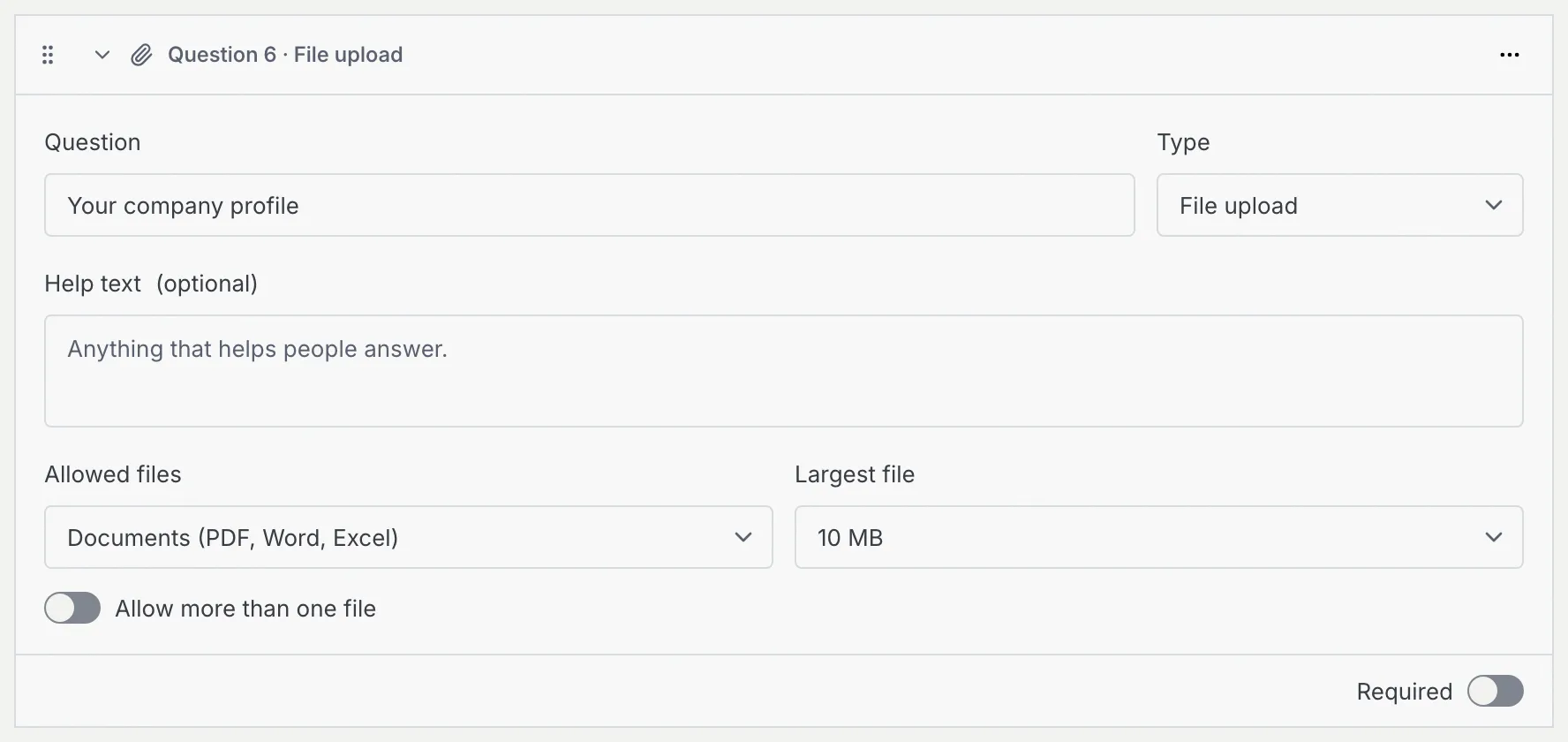
| More | **File upload** | A **Choose a file** button | **Allowed files**, **Largest file**, **Allow more than one file** | **Attach a file.** (when required), or "*name* is over *N* MB. Choose a smaller file." |
| More | **Payment** (coming soon) | The amount and a **Pay** button | **Amount**, **Currency**, **What it's for**, **Payment gateway** | **Pay to continue.** |
| More | **Section heading** | A heading and description that start a new part of the form | **Heading**, **Description** | None: it isn't a question |
See [What respondents see](/docs/forms/respondent-view) for how each one looks on the public form.
### Choice questions [#choice-questions]
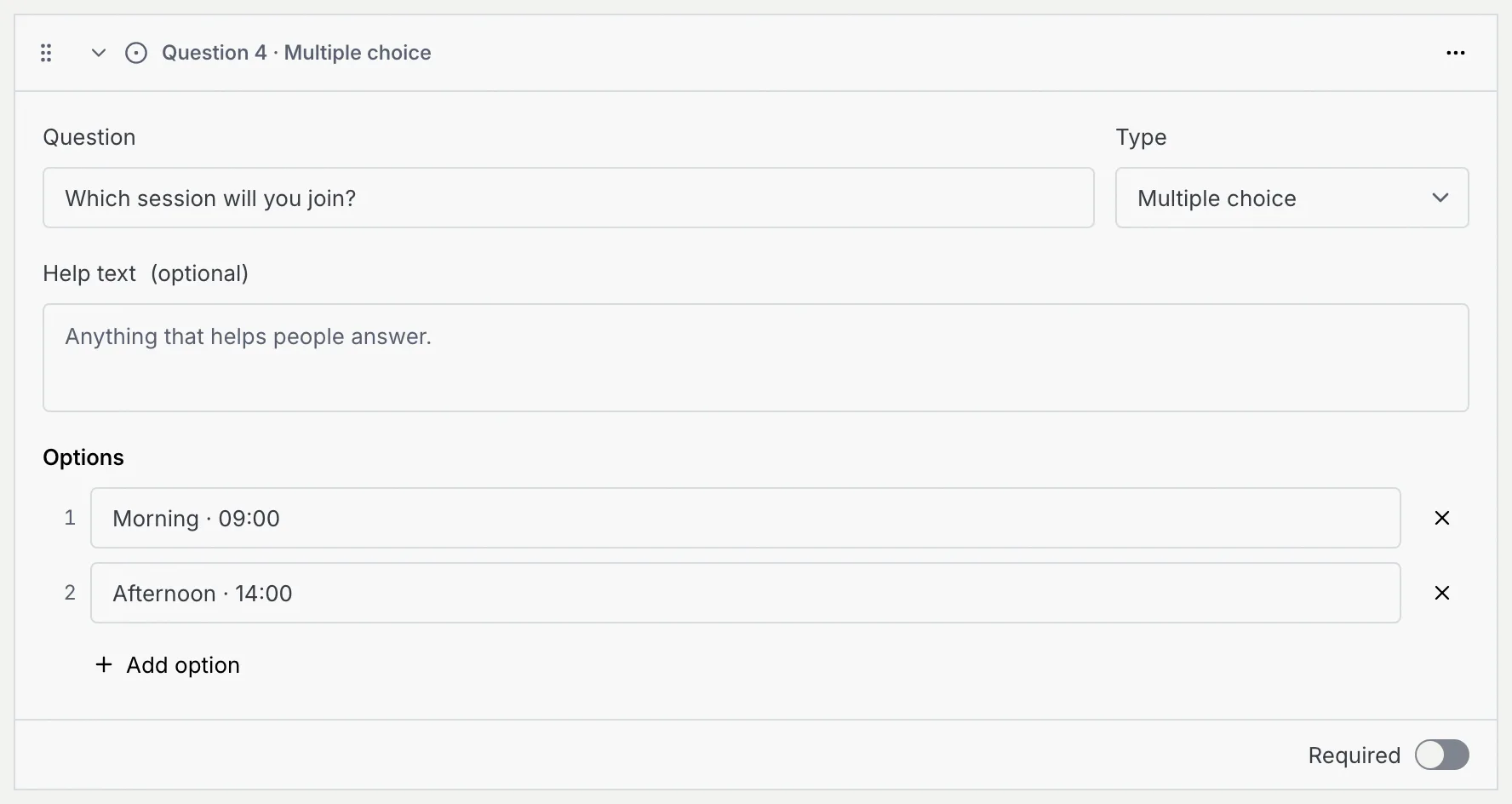
For **Multiple choice**, **Checkboxes** and **Dropdown**, type each answer under **Options**. Press Enter in an option to add the next one, or click **Add option**. Click **×** beside an option to remove it (a question keeps at least one).
### Linear scale [#linear-scale]
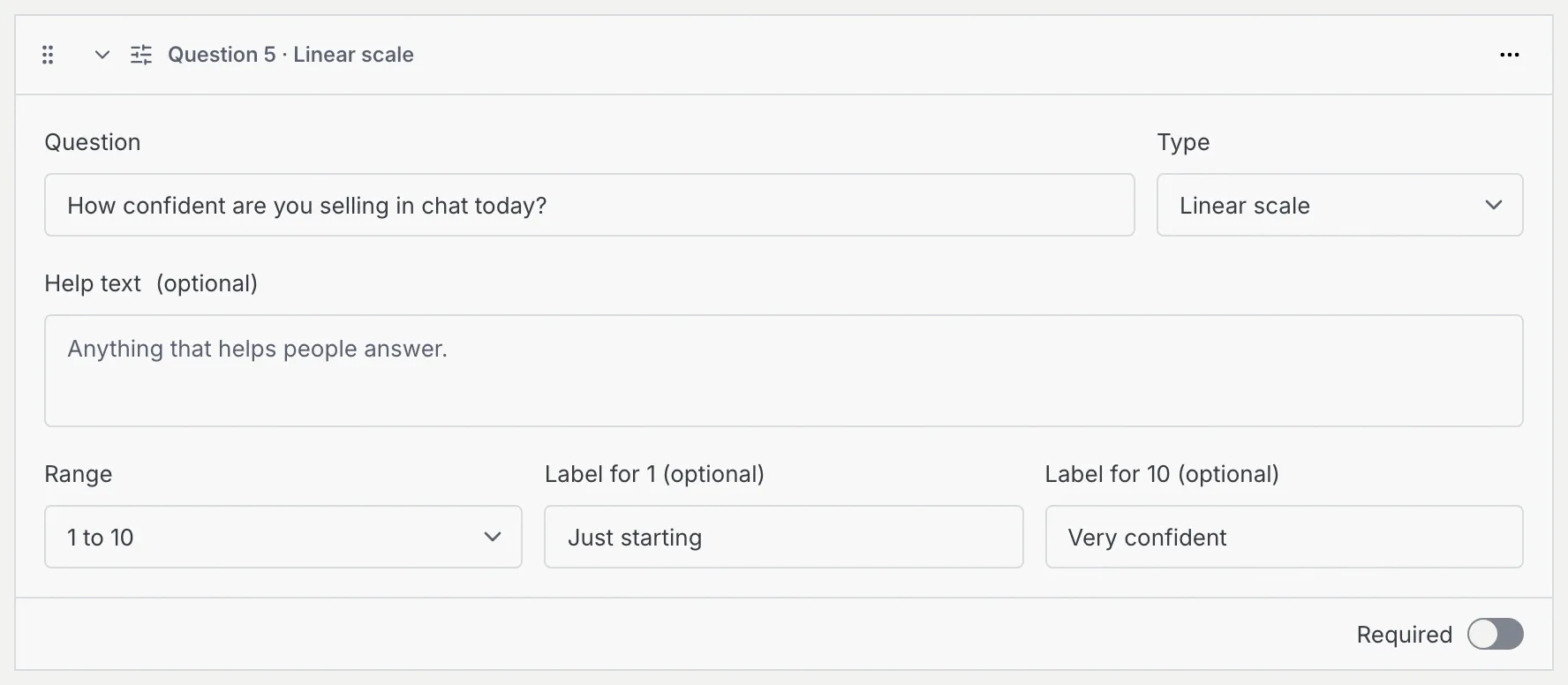
Pick a **Range** of **1 to 5** or **1 to 10**, and optionally label each end, such as "Not likely" and "Very likely". Respondents see the labels under the first and last number.
### File upload [#file-upload]
Choose **Allowed files**: **Any file**, **Images**, **PDF** or **Documents (PDF, Word, Excel)**, and the **Largest file**: 5, 10 or 25 MB. Switch on **Allow more than one file** to let people attach several.
### Payment [#payment]
Payment questions aren't available yet: they need a payment gateway, and [payment gateways](/docs/payments/payment-gateways) are coming soon. The palette says so and doesn't add one. A payment question already on a form is skipped on the public form: its settings say **Payments aren't available yet, so the public form skips this question.** Respondents see "Payments aren't available on this form yet.", it takes no answer, and it doesn't stop them submitting.
Once available, a payment question will charge respondents before they can submit, with an **Amount**, a **Currency**, **What it's for** and the **Payment gateway**. A form will take one payment, and it will always be required.
### Section headings [#section-headings]
A **Section heading** splits a long form into parts. Give it a **Heading** (such as "About you") and an optional **Description**. It always takes the full width, and has no **Required** switch because it isn't a question.
## Arrange questions [#arrange-questions]
### Use the question menu [#use-the-question-menu]
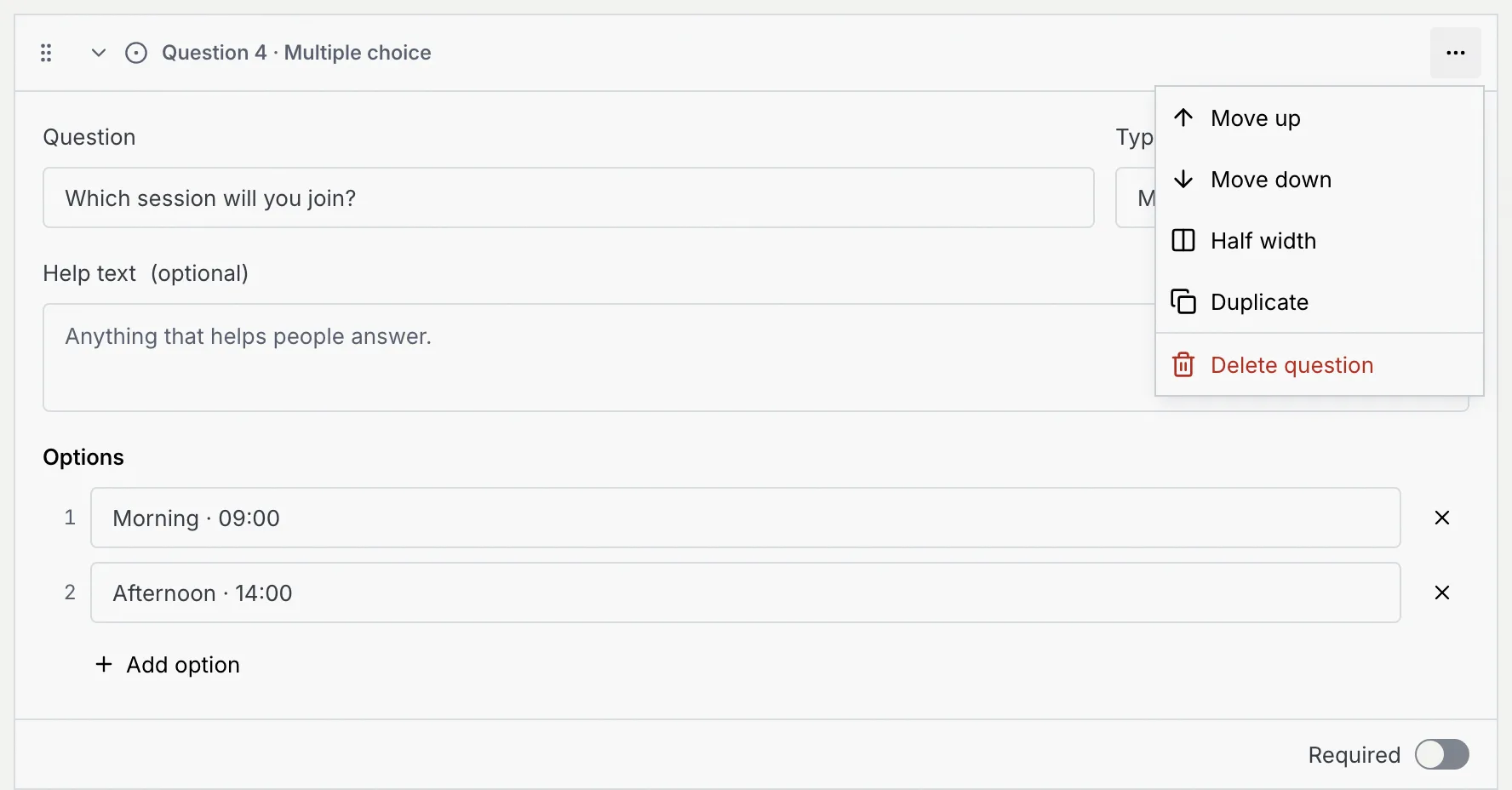
Click **⋯** on a question's card:
| Item | What it does |
|---|---|
| **Move up**, **Move down** | Moves the question one place. |
| **Half width** / **Full width** | Puts the question beside its neighbour, two to a row, or back on a row of its own. Section headings always take the full row. |
| **Duplicate** | Adds a copy below it. Not offered for payment and contact questions. |
| **Delete question** | Removes it after you confirm. Answers already given to it stop showing in responses once you save. For a section heading the item is **Delete section**, and the questions under it stay. |
### Or drag [#or-drag]
Drag a question by its grip (the dotted handle on the left of its card). Drop it above or below another question to move it, or on the side of another to put the two side by side. While you drag, a **Drop here to put it last** box appears at the end.
### Collapse the cards [#collapse-the-cards]
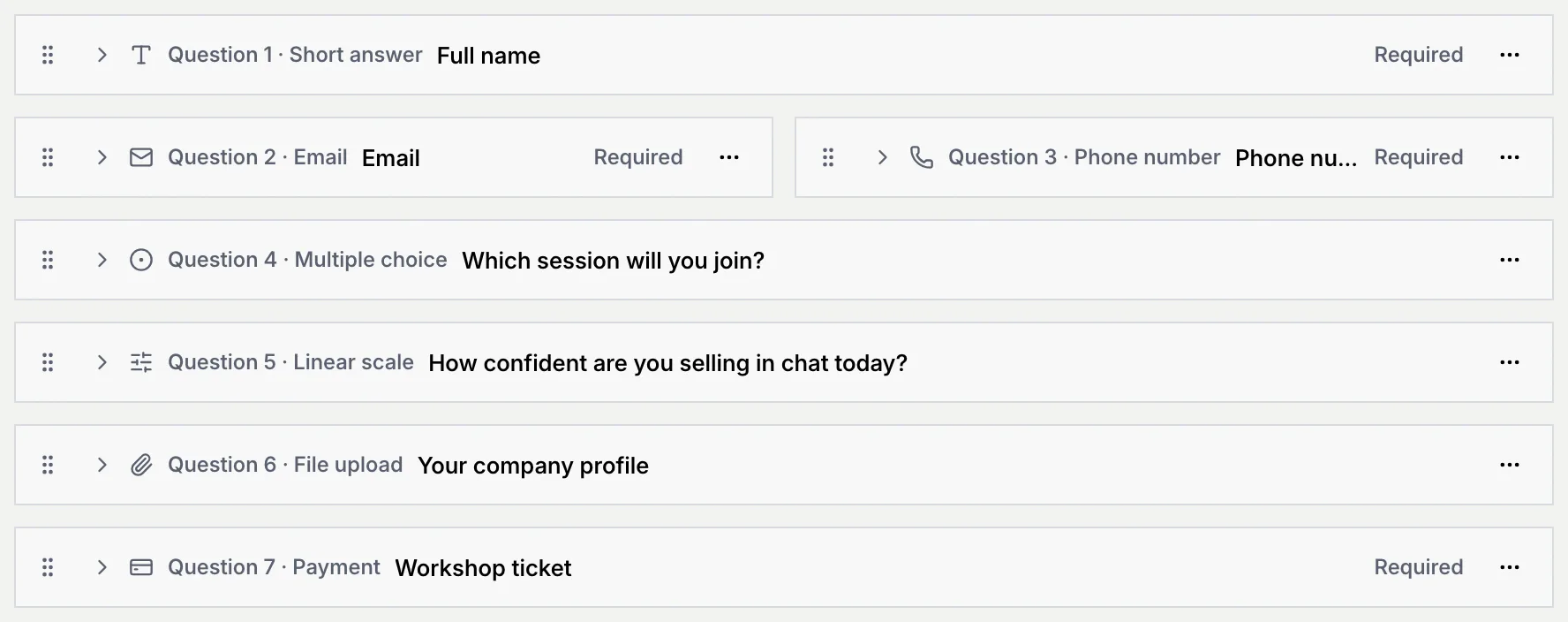
Click **Collapse all** above the questions to fold every card to one line: its number, kind, wording and **Required** (or how many things it has to fix). Click **Expand all**, or one card's heading, to open them again.
## Fix problems before publishing [#fix-problems-before-publishing]
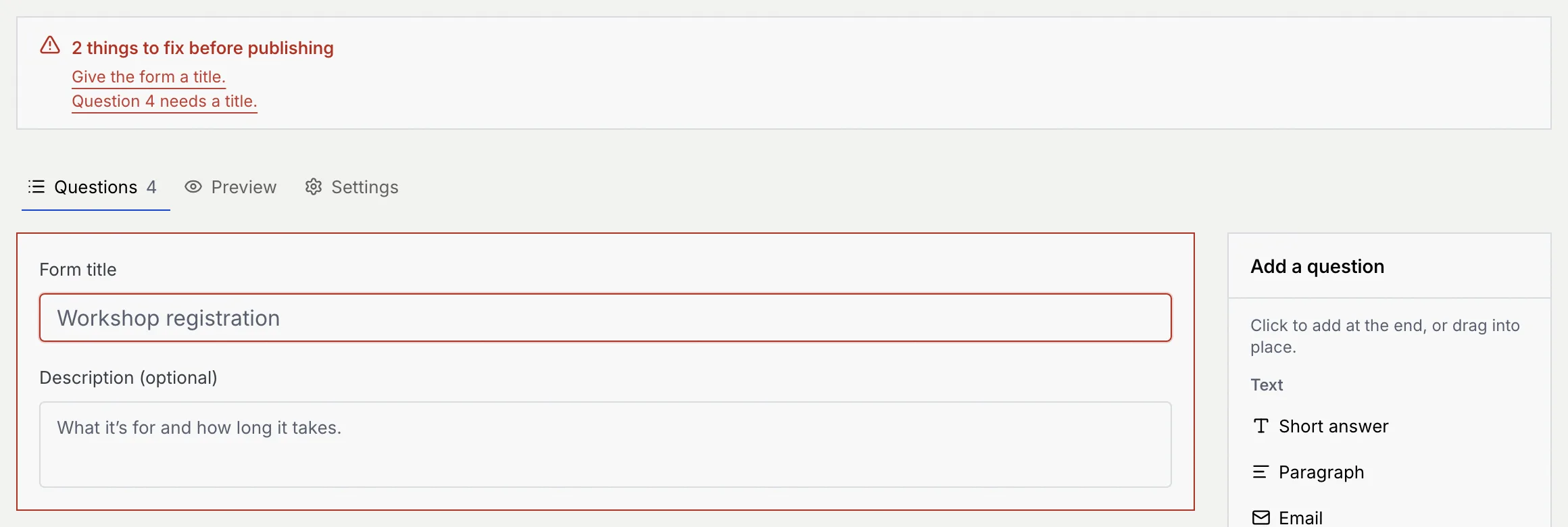
When you click **Publish** (or **Save changes** on a live form) and something would stop a respondent from finishing, the builder shows a red alert listing each problem instead. Click a problem to jump to the field that fixes it; the card or field with the problem is outlined in red.
| Problem | Fix |
|---|---|
| **Give the form a title.** | Fill in **Form title**. |
| **Question N needs a title.** | Write the question's wording. |
| **Question N needs at least one option.** | Add an option to the choice question. |
| **Question N has an empty option. Name it or remove it.** | Fill in or remove the blank option. |
| **Question N needs an amount above zero.** | Enter the payment's **Amount**. |
| **Choose the WhatsApp number respondents message, or enter one with its country code.** | Set the number on the **Settings** tab ([Continue in WhatsApp](/docs/forms/share-a-form#continue-the-conversation-in-whatsapp)). |
| **Fix the custom link:** … | Change the custom link on the **Settings** tab ([Give the form a readable link](/docs/forms/share-a-form#give-the-form-a-readable-link)). |
A draft can be saved with unfinished questions, but not with an invalid custom link.
## Preview the form [#preview-the-form]
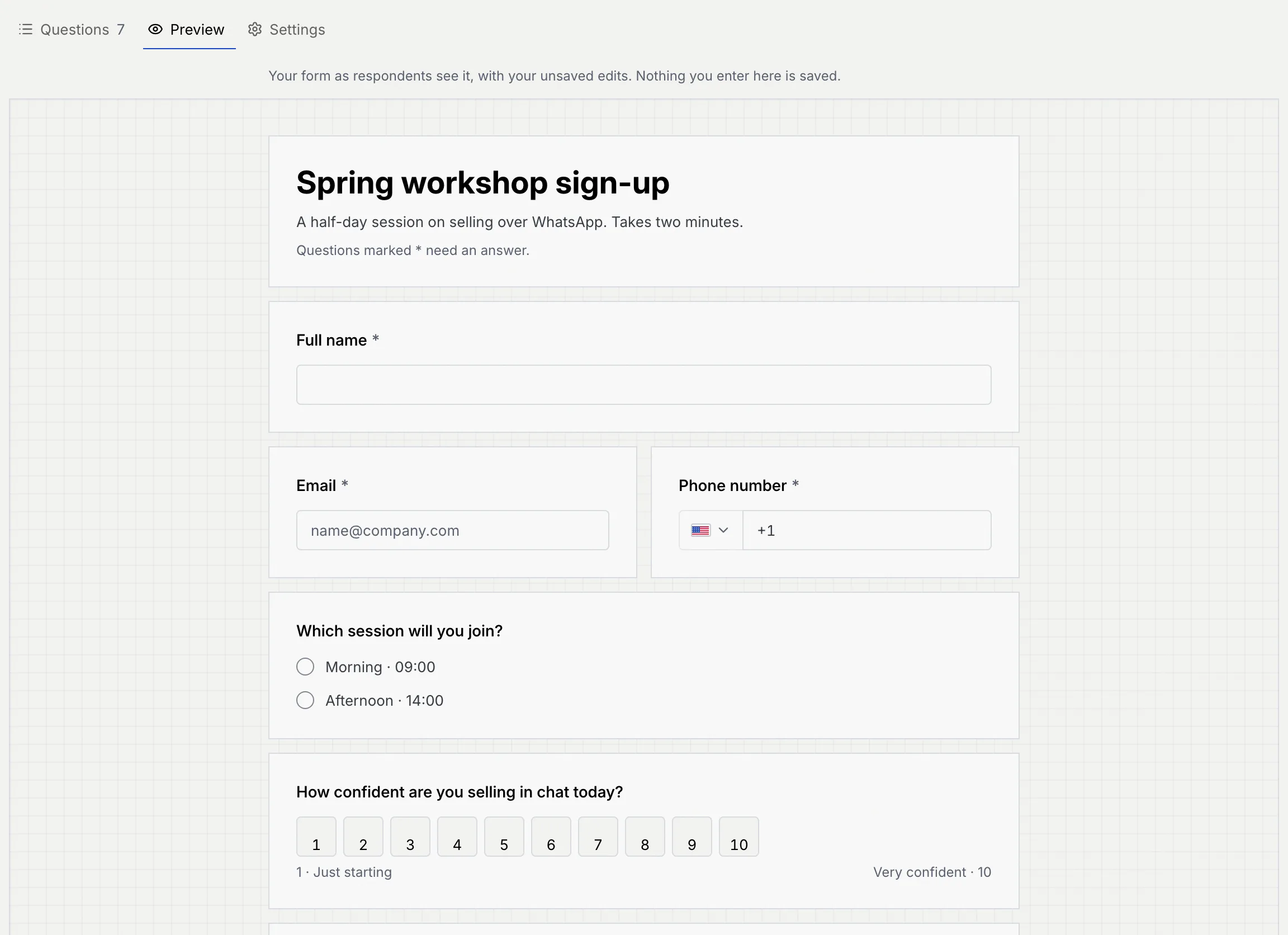
Click the **Preview** tab to see the form as respondents will, with your unsaved edits. You can fill it in: nothing you enter in the preview is saved, and finishing it shows the confirmation with **This was a preview, so nothing was saved.**
## Save your work [#save-your-work]
- **Publish** saves a new form or a draft and starts taking responses. The form then opens on **Settings** with its link: see [Publish and share a form](/docs/forms/share-a-form).
- **Save draft**, in the **⋯** menu, saves a new form or draft without publishing it. It's greyed out when nothing has changed.
- On a live form the main button is **Save changes**. Until you save, the header says **Unsaved changes · respondents see the saved version until you save**.
If you leave the builder with unsaved edits, Mokanata asks **Discard unsaved changes?** Click **Keep editing** to go back, or **Discard changes** to leave without saving. Switching between the builder's tabs never asks.
## Troubleshooting [#troubleshooting]
Payment questions are coming soon, so the palette can't add one yet.
It's one of the contact questions (name, email, phone) every form asks. You can still reword it.
Your role can read forms but not change them. The **View only** notice under the header says why. Ask an owner or admin for the **Edit forms** permission.
## Next steps [#next-steps]