# Ads & conversions (/docs/ads/ads-overview)
**Ads & conversions** sends CRM outcomes (leads, qualified deals, payments) back to Meta and TikTok as conversions, so the ad platforms can optimise for real customers instead of chats. It's also built to tie your Meta Click-to-WhatsApp ads to what happens next in Mokanata: the conversations they start, the leads that qualify, the deals you win and the revenue those deals bring.
Mokanata doesn't read Click-to-WhatsApp ads or spend from Meta yet, and signing in to a Meta ad account is coming soon, so the results on this page only fill in for the sample workspace; the screenshots come from it. Sending conversions to Meta and TikTok works now, and Google Ads conversions are coming soon.
- **Who can use it:** Everyone in the workspace can see results, conversion destinations and the event log. Connecting ad accounts and destinations and sending test events needs **Connect ad platforms**, and changing which events are sent needs **Edit conversion events**. Owners and admins have both by default; members and viewers don't. See [Roles and permissions](/docs/settings/roles).
- **Before you start:** A Meta ad account connected in **Setup → Ad platforms**, once signing in to ad accounts is available (see [Connect ad platforms](/docs/ads/ad-platforms)). Only Meta ad accounts feed this page, because Click-to-WhatsApp ads run on Meta.
## Open Ads & conversions [#open-ads--conversions]
In the sidebar, under **Growth**, click **Ads & conversions** (or press G then D). The line under the title sums up what's connected, for example "2 Meta ad accounts · 5 Click-to-WhatsApp ads · sending to Meta".
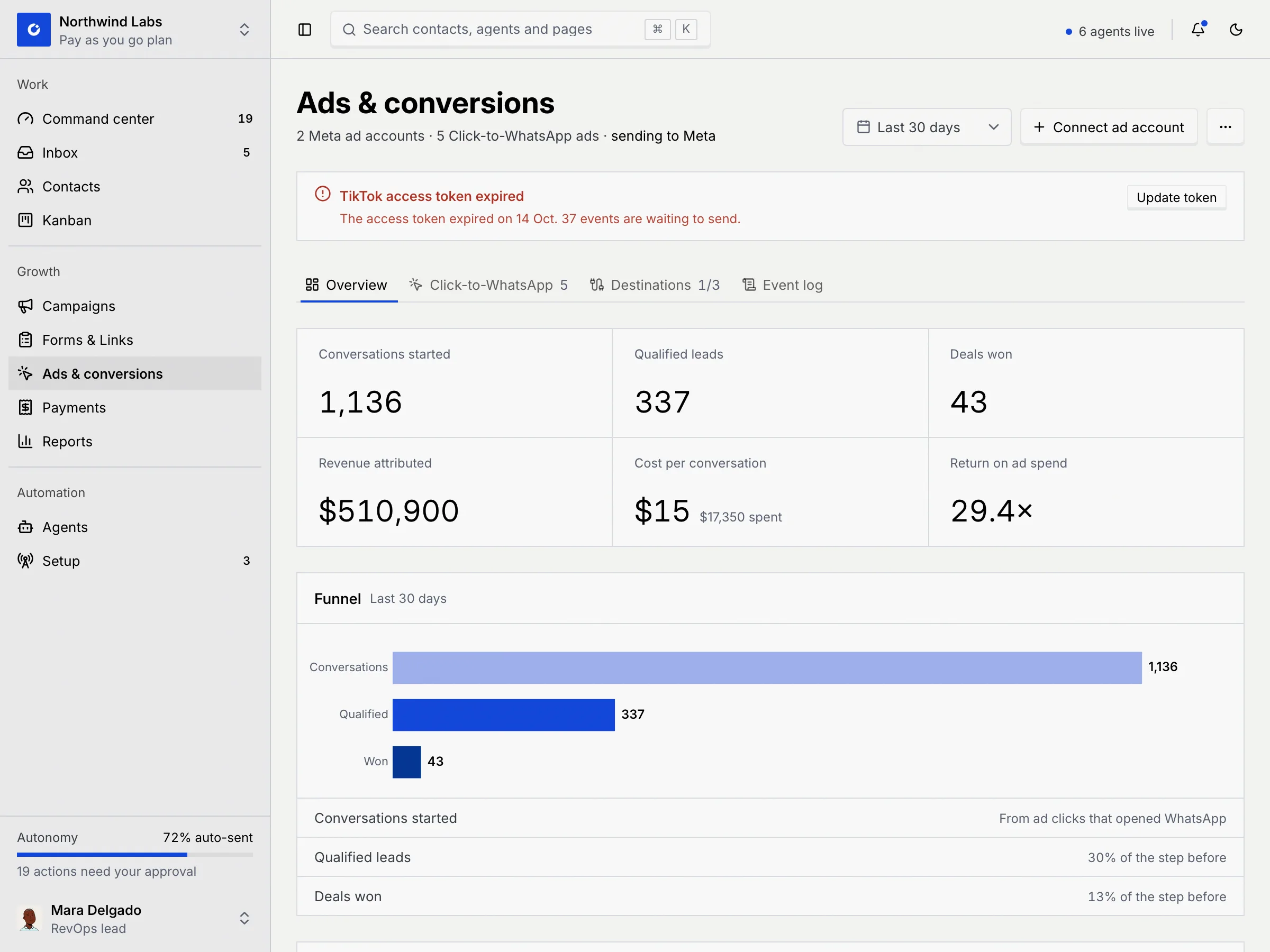
The page has four tabs:
| Tab | What it shows |
|---|---|
| **Overview** | Headline results, the funnel and trend, your top ads and the state of each conversion destination. |
| **Click-to-WhatsApp** | Every ad with its numbers, and the ad detail sheet. The count is the number of ads. See [Click-to-WhatsApp ads](/docs/ads/click-to-whatsapp). |
| **Destinations** | The Meta and TikTok conversion destinations (Google Ads is coming soon) and the event mapping. The count reads like "1/3": destinations sending out of three. See [Send conversions to Meta and TikTok](/docs/ads/conversion-destinations). |
| **Event log** | Match quality and every event Mokanata sent. See [Test events and the event log](/docs/ads/event-log). |
**Connect ad account** in the header opens **Setup → Ad platforms** on the Meta sign-in, where ad accounts are connected.
## Read the results [#read-the-results]
### Pick a date range [#pick-a-date-range]
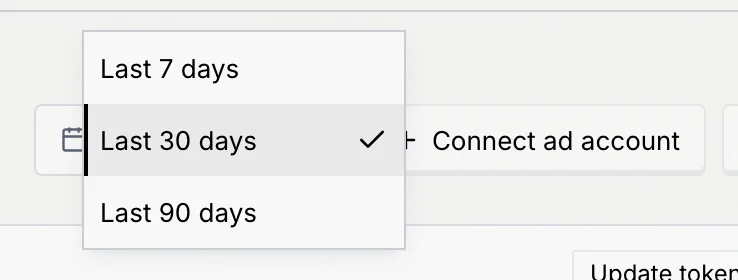
Use the date menu in the header to choose **Last 7 days**, **Last 30 days** (the default) or **Last 90 days**. The range applies to the **Overview** and **Click-to-WhatsApp** tabs; destinations and the event log always cover the last 24 hours, so the menu is hidden there.
### Read the six tiles [#read-the-six-tiles]
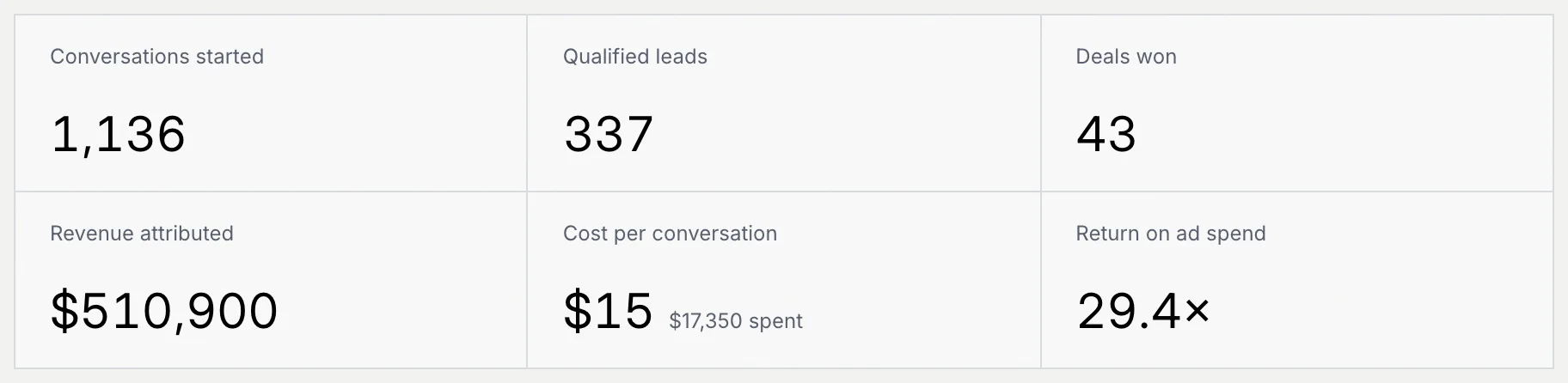
The tiles add up every Click-to-WhatsApp ad in your connected Meta ad accounts for the range. Hover a shortened figure to see it in full.
| Tile | What it counts |
|---|---|
| **Conversations started** | Conversations where a customer messaged you from an ad. |
| **Qualified leads** | Those conversations marked qualified, by an agent or a person. |
| **Deals won** | Deals won from those conversations. |
| **Revenue attributed** | The value of those deals won, credited to the last ad clicked within 28 days. |
| **Cost per conversation** | Ad spend divided by conversations started. The total spend shows next to it. |
| **Return on ad spend** | Revenue attributed divided by spend, shown as a multiple like 29.4×. |
Spend is read from Meta and shown, like revenue, in your workspace currency (set in [Language and region](/docs/settings/language-region)).
### Follow the funnel and the trend [#follow-the-funnel-and-the-trend]
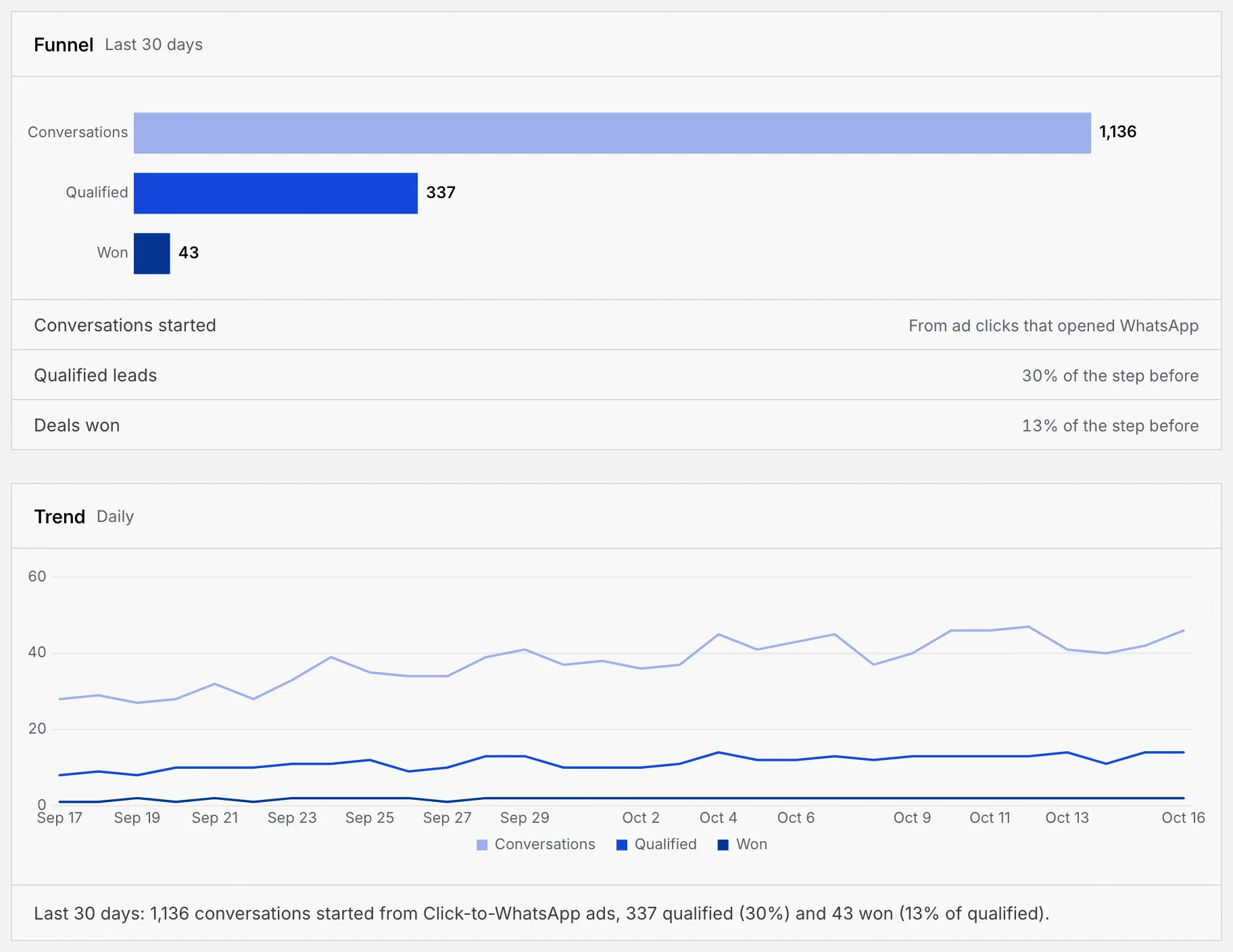
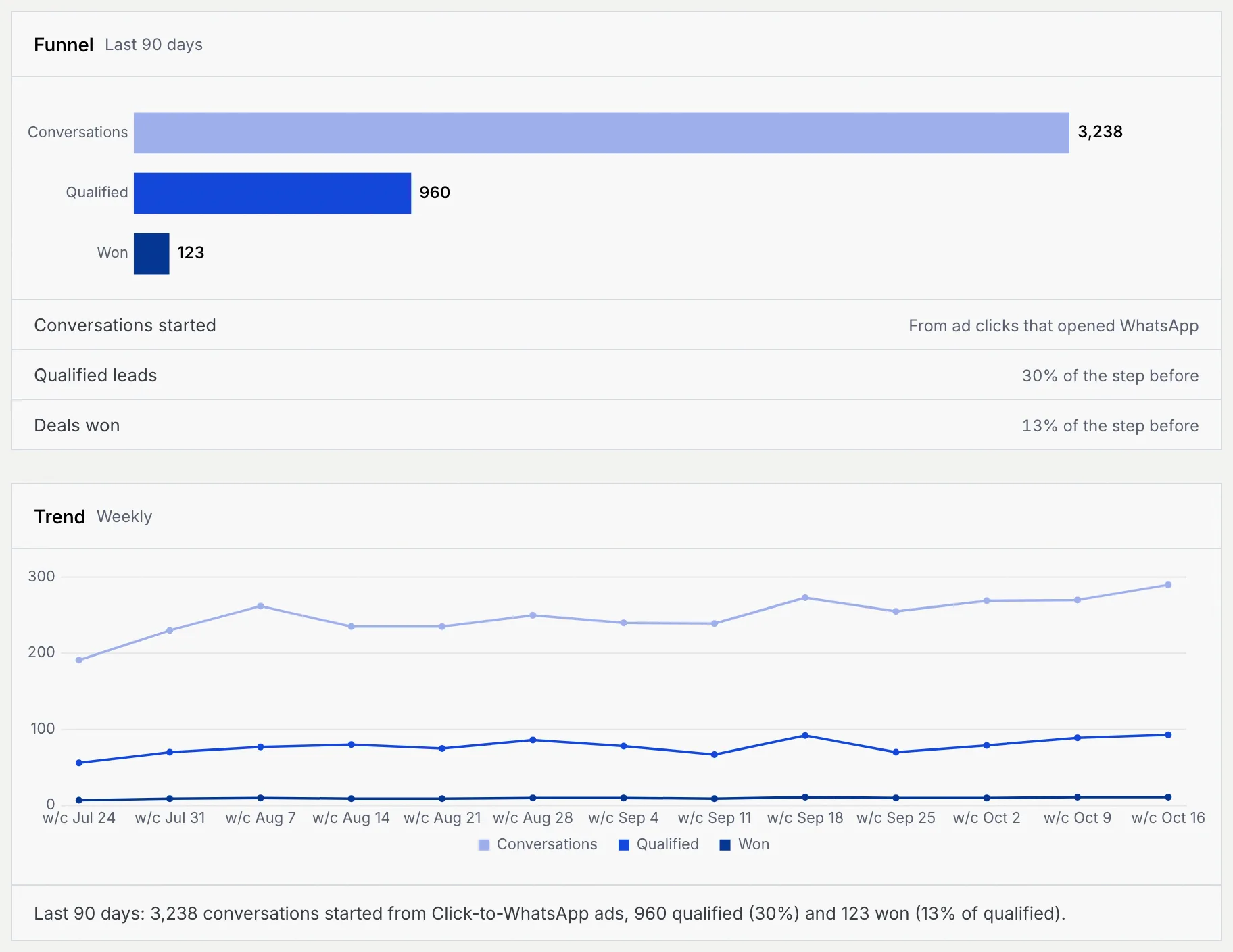
**Funnel** shows conversations, qualified leads and deals won as bars, with each step's share of the step before. **Trend** plots the same three lines over the range, by day, or by week for **Last 90 days**, with a one-line summary underneath.
With **Last 90 days** the trend switches to weekly points:
### Check your top ads and destinations [#check-your-top-ads-and-destinations]
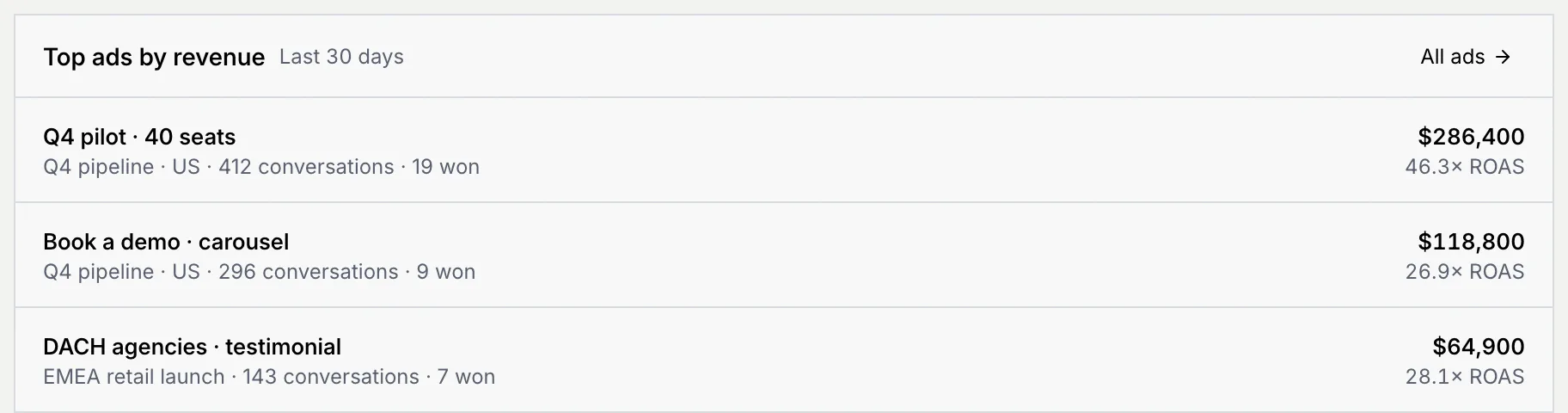
**Top ads by revenue** lists your three best ads with their campaign, conversations, deals won, revenue and return on ad spend. Click an ad to open its detail sheet, or **All ads** to go to the Click-to-WhatsApp tab.
**Conversion destinations** shows Meta, TikTok and Google Ads (coming soon) with their state and, for a connected one, the events sent in the last 24 hours and its match quality. Click **Manage** to go to the Destinations tab.
## When a token expires [#when-a-token-expires]
If a conversion destination's access token expires, a red notice shows at the top of every tab, for example **TikTok access token expired**, with how many events are waiting. Click **Update token** on the notice to paste a new one. Waiting events are kept and sent once it's fixed. See [Fix an expired token](/docs/ads/conversion-destinations#fix-an-expired-token).
## Before you connect a Meta ad account [#before-you-connect-a-meta-ad-account]
Without a Meta ad account, the **Overview** and **Click-to-WhatsApp** tabs show **Connect a Meta ad account** instead of results, saying that reading your Click-to-WhatsApp ads and spend is coming soon. **Connect Meta ad account** opens **Setup → Ad platforms**. The **Destinations** and **Event log** tabs work as usual, so you can set up conversion destinations first.
Once it reads them, Mokanata will read ads and spend from Meta only. It won't edit campaigns, budgets or bids.
## What members and viewers see [#what-members-and-viewers-see]
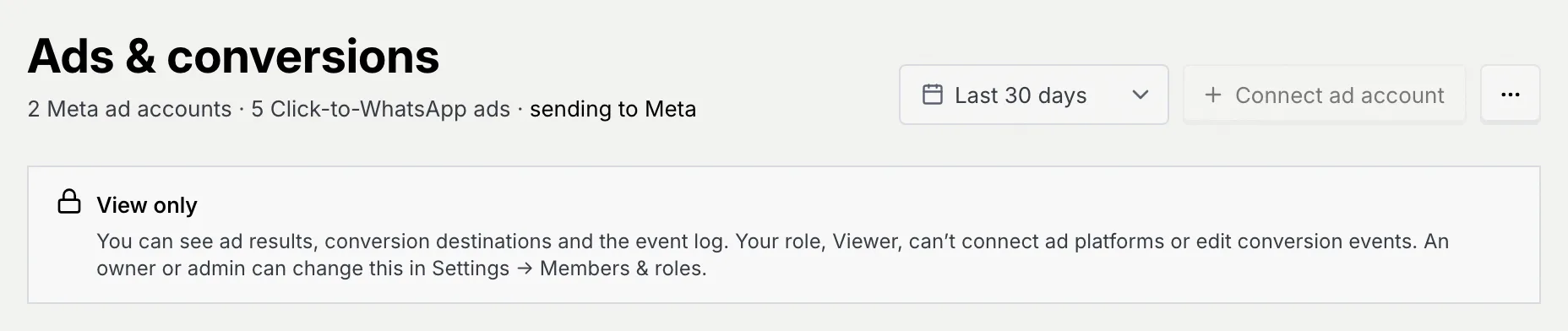
Anyone without **Connect ad platforms** or **Edit conversion events** sees a **View only** notice under the title. They can read every tab; **Connect ad account**, **Update token** and the other buttons that change something stay visible but disabled, and say why when you point at them.
## Troubleshooting [#troubleshooting]
Your Meta ad accounts are connected, but none of them ran ads that open WhatsApp in the selected range. A newly connected account fills in over a few minutes. Try a longer range, or connect the ad account that runs your Click-to-WhatsApp ads with **Connect Meta ad account**.
This page shows Click-to-WhatsApp ads, which run only on Meta. Google, TikTok and other platforms connected in **Setup → Ad platforms** are read for campaigns and spend there. You can still send conversions back to TikTok and Google from the **Destinations** tab.
Your role doesn't include **Connect ad platforms**. Point at the button to see why, and ask an owner or admin to connect the account or change your role in **Settings → Members & roles**.
If you open a link to an ad whose ad account was disconnected, a notice says the ad is in an account that isn't connected. Its results show again once that ad account is reconnected in **Setup → Ad platforms**. A link that matches no ad says "That ad link doesn't match an ad in your connected ad accounts".
## Next steps [#next-steps]